How to Create Patient Communication Protocols
Framework to map patient touchpoints, set response-time standards, ensure HIPAA consent, automate reminders, and reduce no-shows in aesthetic practices.

Effective patient communication protocols are key to running a successful aesthetic practice. They ensure compliance with privacy laws, improve patient satisfaction, and help reduce no-shows. Here’s a quick breakdown of how to build and refine these protocols:
- Review Current Processes: Map all patient interactions (search, booking, visits, follow-ups) and identify delays or gaps.
- Set Standards: Define response times (e.g., reply to non-urgent messages within 3 business days) and create consistent tone/messaging rules.
- Appointment Communication: Use multi-channel reminders (email, SMS, phone) to confirm bookings and reduce cancellations.
- Follow-Up Plans: Send aftercare instructions immediately, check in within 24–48 hours, and request reviews to boost retention.
- Privacy Compliance: Use HIPAA-compliant tools, encrypt sensitive data, and obtain written patient consent for communications.
- Leverage Technology: Automate reminders, centralize communication, and track performance metrics to save time and improve efficiency.
These steps create a smooth process for your staff and patients, ensuring timely communication, trust, and legal compliance.
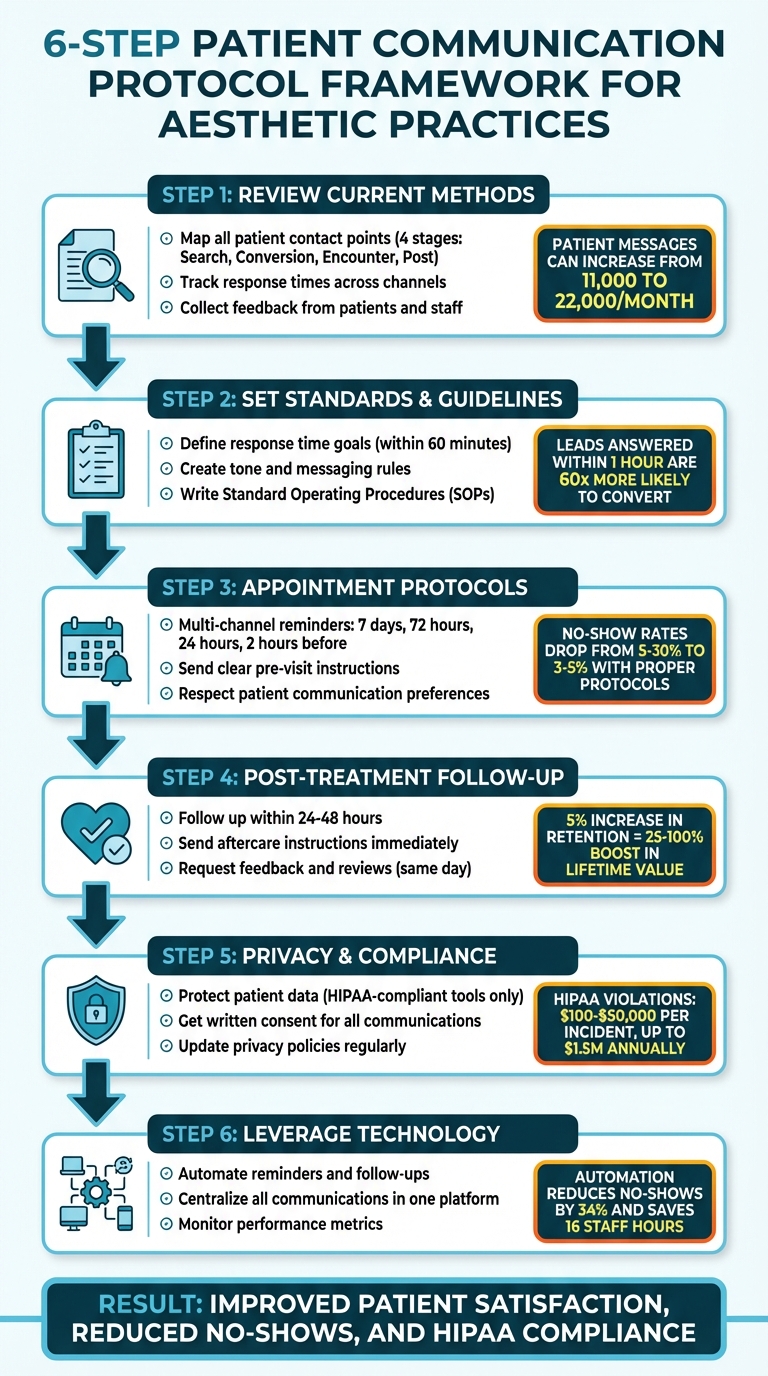
6-Step Patient Communication Protocol Framework for Aesthetic Practices
Step 1: Review Your Current Communication Methods
Take a close look at your current communication processes to uncover any delays, confusion, or challenges your team might be facing. This step lays the groundwork for creating clear and effective communication protocols later on.
Map All Patient Contact Points
Start by documenting every interaction your practice has with patients throughout their journey. This includes four key stages: Search & Evaluation, Conversion & Pre-appointment, Encounter, and Post-appointment.
List all the channels you use to communicate, such as online scheduling tools, digital intake forms, patient portals, phone calls, text messages, email, and live chat. Be sure to note whether each channel is used for clinical or administrative purposes . It’s also crucial to confirm that every tool complies with HIPAA regulations and that you have signed Business Associate Agreements where needed.
"The opportunity to make a lasting impression begins with a patient's internet search and continues through scheduling, the appointment itself, and post-visit communications." - Karmin Gentili, Tebra
Check Response Times and Consistency
Once you’ve mapped out all contact points, evaluate how quickly and consistently your team responds across each channel. Use your practice management software or EHR system to track response times for different types of messages . For example, you might set a standard like responding to non-urgent messages within three business days.
One healthcare system saw patient-initiated messages skyrocket from 11,000 to 22,000 per month within a 70,000-patient base. This highlights the importance of managing response times effectively.
Also, examine how messages are routed within your team. Problems often arise when all messages are sent directly to physicians instead of being triaged by support staff. Standardized text templates can help keep the tone consistent across communications, and automated systems should always correctly populate patient information like names and appointment times.
Collect Input from Patients and Staff
Gather feedback from both patients and staff to identify common communication issues. Surveys and direct input can reveal valuable insights. Ask patients about their preferred communication methods, how clear your instructions are, and whether they feel their private information is handled securely.
Your staff can shed light on operational challenges, such as which patient inquiries they deal with most often (a great starting point for creating templates) and whether the volume of electronic messages is overwhelming. In one healthcare system, while patients were "extremely satisfied" with electronic messaging, physicians and staff reported being only "generally satisfied" due to the increased workload.
Tracking metrics like Average Speed to Answer and First-Call Resolution can also help pinpoint technical or staffing issues that need attention.
sbb-itb-02f5876
Step 2: Set Communication Standards and Guidelines
After reviewing your contact points, the next step is to establish clear rules that keep your team aligned and professional in every interaction. These standards ensure patients experience consistent communication, whether they reach out by phone, text, or email.
Define Response Time Goals
Quick responses make a huge difference when patients contact your practice. Studies show that leads answered within an hour are 60 times more likely to convert than those addressed after 24 hours. Shockingly, 23% of companies never respond to online leads, with the average response time being 42 hours. To avoid this, set up automated responses that immediately acknowledge inquiries via SMS or email. These should confirm receipt and provide a timeline for follow-up. For human responses, aim to reply within 60 minutes - this increases the chance of a productive interaction by seven times.
Adjust response time goals based on the communication channel. For example:
- SMS: Often opened within 90 seconds, making it ideal for urgent updates or reminders.
- Email: Better suited for detailed or less time-sensitive matters.
Prioritize high-value inquiries, such as consultation forms, over general questions about pricing. However, speed should never come at the expense of security. Always verify patient identity and use encrypted platforms to handle sensitive information like PHI. When leaving voicemails, include only the patient's name, the doctor’s name, and a callback number.
Once response time goals are in place, the next step is to refine your messaging tone to improve patient engagement.
Create Tone and Messaging Rules
Consistency in your practice's voice is essential across all platforms - whether it’s an email, text, or your website. With 77% of patients searching online for doctors, a strong, cohesive digital presence helps build trust.
Strive for a tone that combines professionalism with warmth. As Harry Singh from Botulinum Toxin Club puts it:
"Rapport is a close harmonious relationship where people are 'in sync' with each other, understand each other, and communicate smoothly".
Focus on active listening and address the emotions or concerns behind each patient’s question. To streamline communication, use templates with "snippets" or variables that automatically insert details like the patient’s name, provider information, or appointment specifics. This ensures your messages feel personal while maintaining a consistent brand voice.
While automation is efficient, some situations - like follow-ups for new patients or complex procedures - demand a personal touch. For these, set a policy to respond within 24 to 48 hours when a human follow-up is required.
With tone and messaging rules in place, formalize these practices by creating clear SOPs.
Write Standard Operating Procedures
Standard Operating Procedures (SOPs) provide a structured approach for handling common communication scenarios. These might include:
- Clerical tasks like scheduling or billing inquiries
- Medication refill requests
- Medical advice
- Test results or consultation follow-ups
- Documentation requests
Define who handles each type of inquiry. For example, schedulers can manage appointments, while medical assistants or clinical staff can triage medical or refill requests before involving a physician . Clear SOPs not only reduce staff workload but also ensure a consistent patient experience.
Keep responses concise - 1 to 3 sentences is ideal. Use tools like "dot phrases" or auto-text templates to maintain efficiency, while still personalizing messages with tailored variables. Also, outline issues that cannot be addressed through certain channels, such as starting new medications or initiating clinical workups.
Ensure every SOP includes compliance measures. Use HIPAA-compliant platforms, secure Business Associate Agreements (BAAs) with vendors, and obtain written patient consent for communication channels like email or text.
To streamline implementation, consider tools like Prospyr. Integrated communication systems like this help enforce standardized protocols while maintaining secure and consistent patient interactions across all platforms.
Reading about the problem? See how Prospyr solves it in one platform.
Book a DemoStep 3: Create Appointment Communication Protocols
After setting up standardized communication guidelines in Step 2, it's time to focus on protocols specifically for appointments. These include confirmations, reminders, and pre-visit instructions - key touchpoints that directly influence your schedule. Healthcare no-show rates, which range from 5% to 30%, can drop to just 3% to 5% in aesthetic practices with well-designed communication strategies. Late cancellations can also be reduced to around 5% to 7%. The secret? A multi-channel, structured approach that keeps patients well-informed.
Set Up Confirmation and Reminder Systems
Sending multiple reminders is far more effective than relying on a single message. Studies show that a sequence of two or three reminders significantly improves confirmation rates. Here's an example of a staggered schedule:
- 7 days prior: Email with pre-care instructions and a reschedule link
- 72 hours prior: SMS and email with a one-tap option to "Confirm" or "Reschedule"
- 24 hours prior: SMS with practical details, like parking information
- 2 hours prior: Final short reminder
"Clarity plus consistency beats last-minute apologies." – Consentz
Personalization is key. Address patients by name and include specifics like, "Botox treatment with Dr. Smith". Use software to auto-fill details such as appointment times and clinic locations. If a patient hasn’t confirmed by 24 hours before their visit, have your front desk staff make a live call. As Consentz points out:
"A voice builds accountability that texts can't match."
Aim for a 92% or higher confirmation rate. Every reminder should clearly outline your cancellation policy (typically 24–48 hours) and any fees involved. For high-value treatments like injectables or lasers, consider requiring deposits between $100 and $250.
Additionally, ensure patients receive detailed pre-visit instructions to help them prepare for their appointments.
Send Clear Pre-Visit Instructions
Providing detailed instructions in advance reduces confusion and ensures patients arrive prepared. Send these instructions automatically via email immediately after booking to give patients enough time to plan. Email works well for this because it supports attachments, formatting, and branding.
Customize instructions based on the treatment. For example, if someone is scheduled for a chemical peel, you might include guidelines like, "Avoid retinol products for 48 hours before your appointment" or "Arrive with a clean face, no makeup." Be sure to include logistics such as the provider's name, appointment date and time, location details (including parking), and GPS map links. Let patients know if they need to arrive early (e.g., 15 minutes to complete paperwork) and what to bring, like photo IDs or insurance cards.
Add "Add to Calendar" buttons and links to digital intake forms to streamline the experience. For telehealth visits, clearly display the virtual meeting link in both email and SMS reminders. Use a friendly, conversational tone to build trust.
For last-minute reminders, SMS is ideal. For example, a text sent 24 hours before might say:
"Hi Sarah, reminder: Botox with Dr. Smith tomorrow at 2:00 PM. Park in Garage A, Level 2. Reply YES to confirm."
This combination of detailed emails and brief SMS messages ensures patients have all the information they need.
Finally, tailor communication methods to match each patient’s preferences while adhering to privacy standards.
Respect Patient Communication Preferences
Patients have their own preferences for communication - some prefer email, others prefer phone calls. Always collect these preferences during registration and document them in patient files. Written consent is required for email and SMS communications.
When handling appointment-related communications, make sure your tools are HIPAA-compliant and backed by signed Business Associate Agreements (BAAs). Standard SMS, iMessage, and WhatsApp are not HIPAA-compliant. Avoid including sensitive health details in unencrypted messages.
| Communication Method | Best Use Case | Key Limitation |
|---|---|---|
| SMS (Text) | Quick confirmations, 24-hour reminders, urgent updates | Limited characters; requires HIPAA-compliant software |
| Detailed pre-visit instructions, forms, maps | Lower immediate open rates; encryption needed for PHI | |
| Phone Call | Personal touch for older patients or complex follow-ups | Time-intensive for staff; privacy risks with voicemail |
Timing matters, too. Send reminders between 9:00 AM and 8:00 PM local time to respect patients’ schedules. Avoid overwhelming them with too many messages, as this can feel spammy. As Ben O'Brien from Faces Consent explains:
"The goal is to inform and remind, not annoy or overwhelm."
Platforms like Prospyr can simplify this process by automatically managing patient communication preferences. By consolidating reminders into a HIPAA-compliant system, you can ensure consistency while respecting each patient’s preferred method of contact.
Step 4: Create Post-Treatment Follow-Up Protocols
Once you've streamlined appointment communications, the next step is to focus on post-treatment follow-ups. This phase is crucial for completing the patient journey. Why? Because even a small 5% increase in patient retention can boost their lifetime value by 25–100%. Thoughtful follow-up care not only strengthens patient relationships but also ensures ongoing engagement.
Plan Follow-Up Communication Timing
Timing is everything when it comes to follow-up communication. Reaching out within 24–48 hours allows you to address any concerns while the treatment experience is still fresh.
For example, after a Botox session, you could send a quick SMS at the 24-hour mark:
"Hi Sarah, this is a follow-up from your Botox treatment with Dr. Smith. Let us know if you have any questions or concerns!"
For treatments like chemical peels or laser sessions, schedule rebooking reminders that align with the recommended treatment cycle. Since 47% of patients prefer receiving appointment reminders via text, SMS can be an effective way to nudge them toward their next visit.
"Patient recall not only helps individuals stay on top of their care but also ensures a steady flow of patients - and revenue." – Tebra
In addition to timely communication, providing clear and easy-to-follow guidance is essential.
Send Aftercare Instructions
Aftercare instructions should be sent immediately after the treatment, ideally in a format that's easy to understand and accessible. Email works well for this purpose, as it allows for clear formatting, links, and attachments. For instance, after a microneedling session, you might send an email with the subject line: "Here are your aftercare instructions." Include bullet points like:
- Avoid direct sunlight for 48 hours.
- Apply the healing serum provided twice daily.
- Refrain from wearing makeup for 24 hours.
- Stay hydrated and avoid strenuous exercise for 48 hours.
Personalize these instructions by including the patient’s name, the provider’s name, and treatment details. Studies show patients forget 40–80% of verbal care instructions, so written follow-ups are critical. Make sure all communication complies with HIPAA regulations.
"Your role as a medical professional doesn't end after the treatment is complete - clients also count on you for clear aftercare guidance." – Pabau
For more complex procedures, consider adding video tutorials. A short video demonstrating how to apply post-laser skincare products, for example, can make instructions easier to follow. Store these resources in a secure patient portal where patients can access them for up to six months.
Tools like Prospyr can simplify the process by automatically sending aftercare instructions via email or SMS immediately after checkout, tailored to the specific treatment.
Request Feedback and Reviews
Post-treatment follow-up isn't just about care - it’s also an opportunity to gather feedback. Timing is critical here too. Request reviews on the same day as the appointment, while the experience is still fresh in the patient’s mind.
For example, you can ask for a review in person before they leave, and then follow up with a short SMS or email:
"Hi Sarah, thanks for visiting us today! If you enjoyed your experience, we’d love it if you could leave us a quick review. [Link to Google Reviews]"
Keep it brief - three or four sentences max - and include direct links to platforms like Google or Facebook to make it simple for patients to respond. SMS messages are particularly effective, with an open rate of 98%, compared to 15–20% for emails. Just make sure to get written consent for text-based review requests during the intake process and retain these records for at least four years.
| Follow-Up Type | Recommended Timing | Primary Goal |
|---|---|---|
| Aftercare Instructions | Immediately post-treatment | Adherence & Safety |
| Clinical Check-in | 24–48 hours post-treatment | Symptom monitoring |
| Feedback/Review Request | 1–3 days post-treatment | Reputation building |
| Rebook/Recall Reminder | Based on treatment cycle | Retention & Revenue |
Prospyr's review management tools can also take the heavy lifting out of this process by automating personalized review requests after every appointment, helping you maintain a steady stream of patient feedback without adding extra work for your team.
Step 5: Maintain Privacy and Consent Compliance
Once your follow-up protocols are in place, the next priority is ensuring that all communication channels safeguard patient privacy. Protecting this privacy isn’t just about ethics - it’s also about avoiding costly HIPAA violations, which can range from $100 to $50,000 per violation, with an annual maximum penalty of $1.5 million. A single breach could severely damage the trust you’ve built with your patients.
Protect Patient Data in All Communications
Every communication channel you use should include safeguards to protect patient information. For example, emails must be encrypted and backed by a signed Business Associate Agreement (BAA). When it comes to messaging apps, only those that are HIPAA-compliant should be used for protected health information (PHI). Popular platforms like standard SMS, iMessage, and WhatsApp don’t meet HIPAA standards because they lack encryption and providers often won’t sign BAAs.
"Standard SMS messages are not encrypted and can be intercepted. Sending PHI over traditional text messages without encryption or patient consent violates HIPAA." – Aditi Gupta, Emitrr
When leaving voicemails, stick to basic information: your name, your practice name, and a callback number. Avoid including treatment details. For physical mail, use opaque envelopes to ensure PHI isn’t visible, and consider certified mail for highly sensitive documents. Additionally, position computer screens away from public areas and conduct phone calls in private spaces.
| Communication Channel | HIPAA Compliance Status | Requirements for Compliance |
|---|---|---|
| Standard SMS | Non-Compliant | Cannot be used for PHI; lacks encryption and audit trails. |
| Secure Messaging App | Compliant | Requires end-to-end encryption, user access controls, and a signed BAA. |
| Conditional | Requires encryption service, patient consent, and a HIPAA-compliant provider. | |
| Voicemail | Conditional | Compliant only if PHI is excluded or if the patient has given explicit consent. |
Tools like Prospyr can simplify compliance by automatically encrypting patient communications and managing BAAs, helping you maintain secure practices.
Get Patient Consent for Communications
Written consent is a must for appointment reminders, marketing emails, or text messages. Consent forms should clearly outline the types of communication allowed, how consent can be revoked, and include the patient’s signature and date. For multi-page forms, you might also ask patients to initial each page for added clarity.
Store these signed consent forms securely in the patient’s chart or electronic health record (EHR). HIPAA requires keeping such documentation for at least six years from the date of creation or the last effective date. If a patient agrees to receive unencrypted emails, you’re obligated to inform them about the potential cybersecurity risks.
Regularly verify contact details to avoid compliance issues. For instance, if a patient’s phone number changes and the old number is reassigned, contacting that number could violate the Telephone Consumer Protection Act (TCPA). This law allows individuals to sue for up to $1,500 per violation. Your staff should know to immediately stop communications if a patient revokes consent.
Update Privacy Policies Regularly
Privacy policies should be reviewed and updated frequently. Conduct risk assessments and apply role-based access controls to ensure staff can only access the patient information they need.
"The Security Rule is designed to be flexible, scalable, and technology neutral, enabling a regulated entity to implement policies, procedures, and technologies that are appropriate for the entity's particular size, organizational structure, and risks to ePHI." – Office for Civil Rights (OCR), HHS
All staff members should receive ongoing HIPAA training covering key topics such as verifying identities before discussing health information, adhering to the minimum necessary standard for sharing data, and properly handling physical records. Miscommunication accounts for roughly 80% of serious medical errors, so having clear protocols and consistent training isn’t just about compliance - it’s also about ensuring patient safety.
Step 6: Use Technology to Improve Communication
With privacy and consent safeguards in place, technology can now take patient communication to the next level. Relying on manual processes often wastes staff time and increases the risk of errors due to disconnected tools. Platforms like Prospyr solve these problems by automating time-consuming tasks, allowing your team to focus on what matters most - delivering quality care.
Automate Reminders and Follow-Ups
Automated tools for appointment reminders and post-treatment follow-ups take the hassle out of manual outreach. Prospyr’s email and SMS automation handles confirmation messages, pre-visit instructions, and aftercare reminders based on customized triggers set by your practice. This not only saves time but also reduces no-show rates by 34%.
Dr. Saami Khalifian, Founder and CEO of SOM Aesthetics, leveraged Prospyr’s automation features to launch his practice with remarkable success. He hit his sales targets 21 times faster than expected, generating $40,000 in revenue within two days and surpassing $100,000 in monthly revenue within just two months. The platform’s 2-way SMS module also allows for real-time, personalized communication with patients, all while keeping interactions documented within the system.
Manage All Communications in One Place
Centralizing communication is another game-changer for efficiency. Using separate systems for scheduling, messaging, charting, and patient records often leads to lost or duplicated information. Prospyr’s integrated CRM and EMR bring everything together in one HIPAA-compliant platform, covering every interaction from lead capture to post-treatment follow-up. Features like digital intake forms save up to 16 staff hours and increase patient completion rates by 60%.
Dr. Daniel Lee of New Life Cosmetic Surgery experienced a 50% increase in revenue and a 40% rise in appointments after switching from multiple software tools to Prospyr’s unified platform.
"We've seen a 50% increase in revenue and a 40% increase in appointments booked since switching away from using several different point solutions to running our practice on Prospyr." - Dr. Daniel Lee
Additionally, the streamlined system contributed to a 30% boost in new patient bookings.
Monitor Communication Performance
Prospyr’s analytics dashboards provide real-time insights into communication performance. Metrics like response times and lead-to-appointment conversion rates - averaging 69% when optimized - help identify and address bottlenecks such as delayed replies or missed follow-ups. The Smart Note system also speeds up charting by 80%, freeing staff to dedicate more time to patient care.
Conclusion
Creating effective patient communication protocols requires a well-organized approach that addresses every step of the patient journey. By identifying your current touchpoints, establishing clear response guidelines, and automating routine interactions, you can develop a system that helps patients feel valued and stay engaged with their care plans.
The advantages go beyond patient satisfaction. Automated reminders significantly reduce no-shows. Post-treatment follow-ups not only allow for early detection of potential complications but also reassure patients, while two-way messaging offers a private, real-time channel for addressing sensitive concerns and managing appointments.
"Being able to send out appointment reminders has really reduced the number of no shows in my clinic!" – Rebecca Hopkinson, Hopkinson Aesthetics
Keeping existing patients is far more cost-effective than acquiring new ones. Automated rebooking reminders play a critical role in maintaining revenue over time. These systems also align with essential privacy and legal requirements. Ensuring HIPAA compliance and obtaining written consent safeguards patient data, fosters trust, and minimizes legal risks. For added privacy, voicemail messages should include only essential identifiers.
Integrating these protocols with advanced tools can streamline the patient experience from start to finish. Platforms like Prospyr consolidate scheduling, charting, and communication into a single HIPAA-compliant system. Features like digital intake forms save an average of 16 hours of staff time, while automated follow-ups strengthen patient loyalty. The outcome? A more efficient practice that converts more leads and provides a seamless experience from the first interaction to post-treatment care.
FAQs
What should a patient communication SOP include?
A patient communication SOP should establish clear protocols to ensure interactions are secure, compliant, and patient-centered. Here are some key elements to include:
- Guidelines for communication: Define proper use of email, SMS, and social media for tasks like reminders and follow-ups.
- HIPAA compliance measures: Incorporate encrypted messaging systems and mandatory staff training to protect patient information.
- Consent procedures: Outline steps for obtaining and managing consent for digital communication.
- Automation tools: Leverage tools to streamline reminders and marketing efforts efficiently.
- Staff training and escalation protocols: Equip staff to handle inquiries professionally and address issues promptly.
How do I set response-time goals for each channel?
To establish effective response-time goals, start by setting specific time frames for each communication channel - whether it's email, SMS, or social media. These time frames should reflect both your patients' needs and what your practice can realistically handle.
Leverage tools like automated reminders, follow-up messages, and AI-powered chat systems to keep response times on track. Automation minimizes delays, ensures consistent communication, and helps meet patient expectations. This not only keeps engagement steady but also boosts overall satisfaction with your practice.
What’s the safest way to use texts and emails under HIPAA?
To use texts and emails safely under HIPAA, it’s essential to implement protective measures. Start by using encrypted platforms with features like access controls and audit trails to secure communication. Avoid sending detailed medical information through unsecured messages, and always obtain written patient consent for the chosen communication methods.
Double-check email addresses before sending any information to prevent accidental disclosures. Share only the minimum necessary details and ensure all staff members are well-trained in HIPAA regulations and breach response protocols. The HIPAA Privacy Rule allows these communication methods as long as reasonable safeguards are in place.
Related articles
Article
The Importance of Follow-Up: Techniques for Reaching Out to Inactive Patients
By Prospyr Team
Article
How Automated Reminders Reduce No-Shows
By Prospyr Team
Article
Adverse Event Claims: Communication Strategies for Med Spas
By Prospyr Team
Article
5 Follow-Up Templates for Aesthetic Clinics
By Prospyr Team