How to Optimize Google Business Profile for Med Spas
A practical, step-by-step guide to claim, verify, and optimize your Google Business Profile for med spas to boost local visibility, bookings, and reviews.

A Google Business Profile (GBP) is essential for med spas aiming to attract local clients. It helps your business appear in Google Search and Maps when people look for services like "Botox near me." Optimizing your GBP can increase visibility, build trust, and drive bookings directly from search results. Here’s a quick guide to get started:
- Claim and Verify Your Profile: Search for your business on Google, claim it, and verify using methods like video, phone, or postcard.
- Update Business Information: Ensure your Name, Address, and Phone Number (NAP) are accurate and consistent across platforms.
- Choose Categories and Attributes: Select "Medical Spa" as your primary category and add secondary categories for specific services.
- Add Photos and Videos: Use high-quality visuals to showcase your location, treatments, and staff.
- Enable Booking Features: Activate "Reserve with Google" to let clients schedule appointments directly. Pair this with digital intake to streamline the patient onboarding process.
- Manage Reviews: Request client reviews and respond promptly to build trust and improve rankings.
- Track Performance: Use GBP insights to monitor search queries, interactions, and profile views.
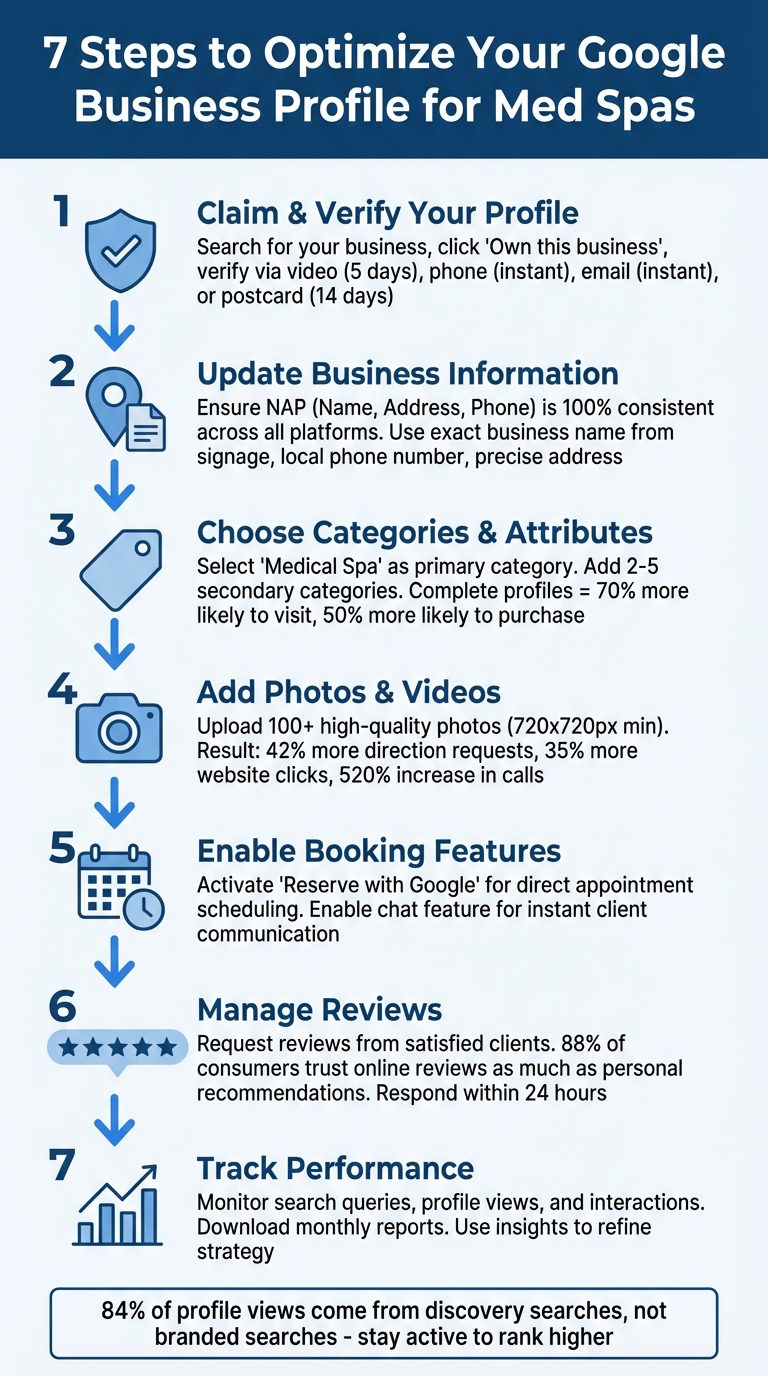
7-Step Google Business Profile Optimization Guide for Med Spas
How to Claim and Verify Your Google Business Profile
Claiming Your Profile
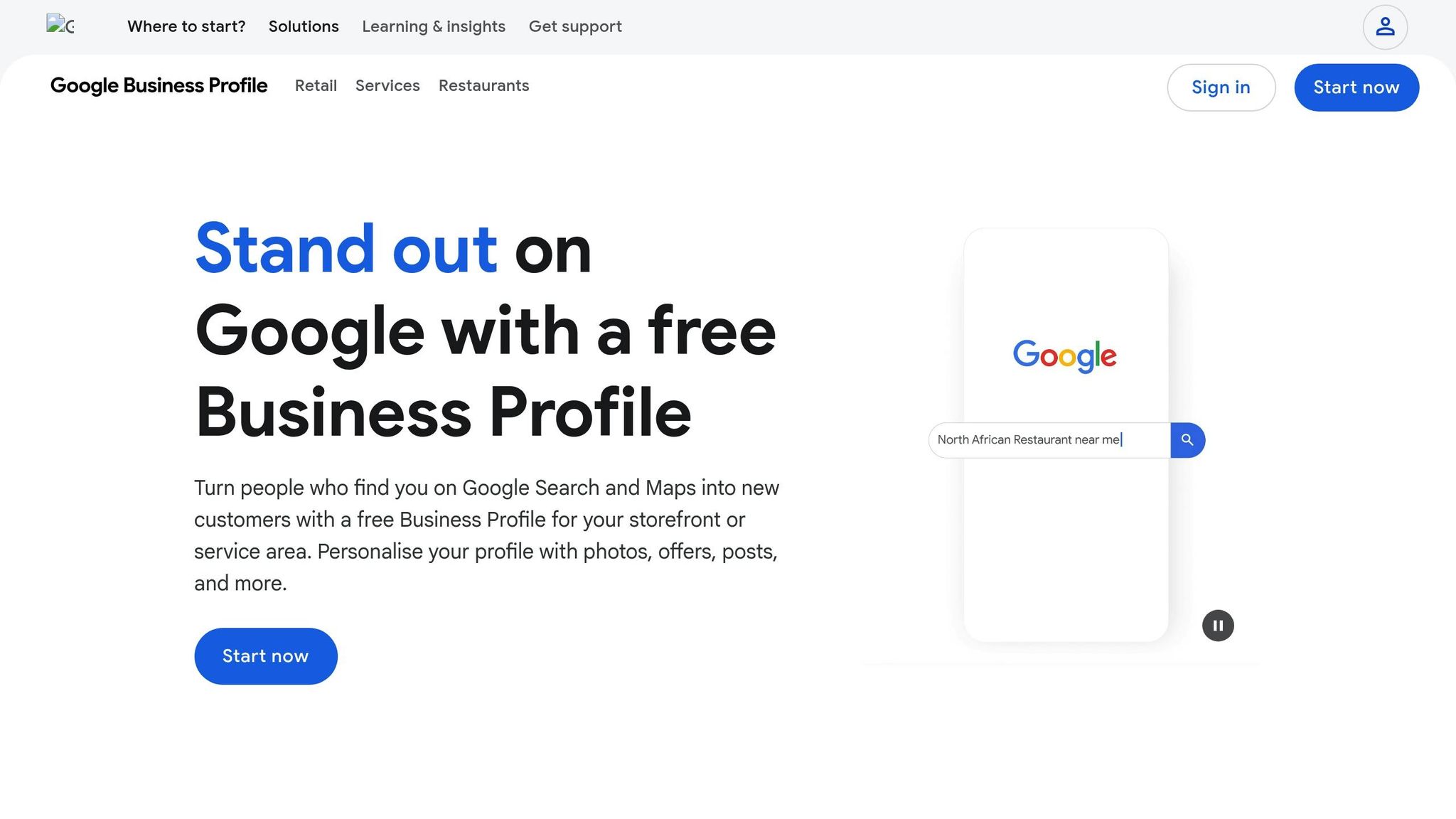
Start by searching for your med spa's name and city on Google or Google Maps. If a profile appears and is unverified, click on "Own this business" and then select "Manage now." If someone else has already verified the profile, you’ll need to click "Request Access" to take over management. If no profile exists, head over to google.com/business, choose "Add your business to Google," and input your med spa's official name, category, and location. Be sure to use a dedicated business Google account and ensure your business name exactly matches your storefront signage. Avoid adding extra keywords, as this could lead to a suspension of your profile.
Completing Verification
Once you’ve claimed your profile, it’s time to verify it. Google offers several verification methods, and the one you choose will depend on your business setup and the options available. Here’s a quick breakdown of the methods:
| Verification Method | Speed | What You’ll Need |
|---|---|---|
| Phone / SMS | Instant | Access to your business phone line |
| Video Recording | About 5 business days | Mobile device, visible signage, keys, and an interior tour |
| Near-instant | A business email tied to your domain | |
| Postcard | Up to 14 days | A physical mailbox at your location |
Video verification is now the preferred method for storefront med spas. To complete it, you’ll need to record a continuous video that shows your exterior signage, you unlocking the door with your keys, and proof of operations, such as your reception area or equipment.
After submitting your verification details, Google typically reviews them within five business days. During this time, avoid making any changes to your business name, address, or category, as this will reset the verification process. If you opt for postcard verification and it doesn’t arrive within 14 days, use the "Postcard didn't arrive" option in Google’s Help Center to request a new one.
sbb-itb-02f5876
How to Fill Out Your Business Information
Adding Your Name, Address, and Phone Number
Your Name, Address, and Phone Number (NAP) are the backbone of your Google Business Profile. Keeping these details accurate and consistent across all platforms is crucial - it directly affects how Google ranks your med spa in local search results. A complete NAP not only builds trust but can also improve your local visibility.
When entering your business name, use the exact name as it appears on your storefront. Avoid adding extra keywords like "Best Botox" or including your city name - it’s against Google’s guidelines.
For your address, input your street information in "Address Line 1" and use "Address Line 2" for suite or floor numbers. This ensures Google’s mapping system can pinpoint your exact location. Also, opt for a local phone number with your area code instead of a toll-free 1-800 number. A local number signals to Google that your business is genuinely tied to the area. Eldar Cohen, Founder of Local Dominator, emphasizes:
"The non-negotiable rule for NAP is 100% consistency across your website, GBP, and all other online directories."
| Detail | Requirement | Prohibited Elements |
|---|---|---|
| Business Name | Real-world name from signage | Marketing taglines, store codes, URLs, or phone numbers |
| Address | Precise physical location | P.O. boxes, remote mailboxes, or virtual offices |
| Phone | Local number under direct control | Premium-rate numbers or redirecting "referral" numbers |
Once your NAP details are set, the next step is to choose categories and attributes that best describe your med spa.
Choosing the Right Categories and Attributes
Your primary category plays a major role in determining how your business shows up in local searches and which features are available. Pick a category that defines what your business is, not what it offers. For example, "Medical Spa" should be your primary category instead of listing individual services. Google’s guidance is clear:
"Select categories that complete the statement: 'This business IS a' rather than 'this business HAS a.'"
Add 2–5 secondary categories to represent the additional services you provide, such as "Weight Loss Service" or "Skin Care Clinic". To get an edge, research top-ranking competitors in your area using Google’s Map Pack to see which categories they’ve selected. Fully completed profiles can make customers 70% more likely to visit and 50% more likely to consider purchasing from your business.
Don’t forget about attributes - these small details can help your business appear in highly specific searches, like "wheelchair accessible med spa". Google divides attributes into practical tags (e.g., Wi-Fi, wheelchair access) and identity markers (e.g., Women-led, LGBTQ+ friendly). Check your profile regularly for new options, as Google often adds attributes like "Appointment required" or "Online estimates".
After setting up your categories and attributes, it’s time to focus on crafting an engaging business description.
Writing Your Business Description
Once your NAP and categories are finalized, your business description is where you can showcase what makes your med spa special.
Google allows up to 750 characters for your business description. Use this space to clearly explain your services, mission, and what sets your med spa apart. Incorporate specific terms like "laser skin resurfacing" or "non-surgical fat reduction" to naturally include relevant keywords. As Margott Agency suggests:
"Instead of vague terms like 'beauty treatments,' use phrases like 'laser skin resurfacing' or 'non-surgical fat reduction.' Incorporating long-tail keywords naturally in your business description enhances searchability."
Avoid breaking Google’s rules by including URLs, links, special promotions, or pricing information. Google advises:
"Use the business description field to provide useful information on services and products offered, as well as the mission and history of your business."
Focus on what sets you apart, such as unique treatments or a highly skilled team. Keep your tone aligned with your brand’s personality, and revisit your description periodically to ensure it reflects your current offerings.
Reading about the problem? See how Prospyr solves it in one platform.
Book a DemoAdding Photos, Videos, and Interactive Features
Uploading Photos and Videos
Adding high-quality visuals and interactive media to your profile can significantly boost client engagement and improve your visibility in local searches. According to data, profiles with great images see 42% more requests for driving directions and 35% more website clicks. Even more impressive, profiles featuring over 100 photos experience a staggering 520% increase in calls and 2,700% more direction requests.
To make your profile stand out, include clear exterior shots of your signage and entrance to help clients find you easily. Showcase your interior spaces, such as reception areas and treatment rooms, and add professional photos of your staff and treatments. With proper client consent, before-and-after images can be a powerful way to highlight your results.
Short, high-quality videos (up to 30 seconds) can also make a big impact. Consider creating video tours of your clinic, introductions to treatments, or behind-the-scenes glimpses of your team. Always update your visuals after any major changes, like renovations, new equipment, or staff updates. And remember: use original photos instead of stock images to build trust and credibility. Keeping your images current ensures your profile reflects the latest look and services of your med spa.
| Media Type | Google Requirement |
|---|---|
| Photo Format | JPG or PNG |
| Photo Size | 10 KB to 5 MB |
| Photo Resolution | 720 x 720 px (Min: 250 x 250 px) |
| Video Duration | Up to 30 seconds |
| Video Resolution | 720p or higher |
| Video File Size | Up to 75 MB |
By incorporating compelling visuals, your profile becomes a dynamic showcase that attracts more bookings and inquiries.
Listing Services and Adding Booking Links
A well-organized service menu helps potential clients quickly determine if your med spa offers what they’re looking for. Use the Service Editor to clearly list your treatments - whether it’s injectables, facials, or laser therapies - and ensure pricing is accurate [10, 19].
Take it a step further by integrating a booking button through Reserve with Google. This feature allows clients to schedule appointments directly from your profile, making the process quick and seamless. As the Booksy Team explains:
"Reserve with Google (RwG) allows customers to book appointments directly through a Google Business Profile listing with a 'Schedule' or 'Book Online' button."
This functionality reduces barriers, turning search interest into immediate bookings. Additionally, enable the chat feature so clients can reach out with questions via text or WhatsApp. Just make sure to respond within 24 hours to keep the feature active [10, 27]. To further enhance your profile, pre-populate the Q&A section with answers to common questions, such as parking availability or whether walk-ins are accepted.
Stephanie Heitman, Associate Director of Content at LocaliQ, emphasizes:
"Providing answers to FAQs and addressing existing questions on your listing can help you win over customers before they even click to your website."
These tools and details make it easier for clients to connect with your business and book services effortlessly.
Creating Posts for Updates and Offers
Google Posts are a great way to keep your profile fresh and engaging. Use them to share updates, limited-time promotions, new treatments, or upcoming events. Unlike your business description, which limits promotional language, Google Posts let you highlight sales, prices, and special offers.
Posting regularly signals active management, which can positively impact your search rankings. Be sure to put the most important information in the first 250 characters, as that’s what users see before clicking "See More." Pair your posts with high-quality images or short videos to grab attention [9, 27].
Here are some effective post types to consider:
- Offer posts: Promote seasonal deals, like "Save 20% on All Facial Treatments This Month!"
- Update posts: Announce changes, such as new equipment or staff additions.
- Event posts: Share details about open houses or live treatment demonstrations.
Always include a clear call-to-action button, such as "Book", "Learn more", or "Buy", to encourage immediate action. To track performance, use unique coupon codes to measure leads generated from your profile.
Managing Client Reviews
How to Get More Client Reviews
Client reviews not only influence local rankings but also play a crucial role in building trust with potential patients. Here's a compelling statistic: 88% of consumers trust online reviews as much as personal recommendations.
The best way to gather more reviews? Simply ask! Start by requesting feedback from satisfied patients. Use the short URL provided in your Google Business Profile dashboard. Just click on "Get more reviews" to generate the link. You can also download a QR code from the same section (right-click and save it) and display it at your front desk or in treatment rooms for added convenience.
Make it easy for clients to leave reviews by including these links in emails, chat messages, or even printed receipts.
A critical reminder: Never offer incentives like discounts, free services, or gifts in exchange for reviews. Google is very clear on this:
"Reviews and other user contributions to Google Maps must reflect a genuine experience. Offering incentives, such as discounts on goods or services, in exchange for a review... is strictly prohibited".
Always ensure that reviews are authentic and based on real experiences. Once you've collected reviews, how you respond to them becomes just as important as getting them in the first place.
Responding to Reviews
Responding to reviews - whether they're glowing or critical - demonstrates that you value client feedback and care about maintaining a strong online reputation. When you reply, your business name will appear publicly under each response (instead of your personal name).
For positive reviews, take a moment to thank the client and reference specific details from their feedback. This shows you're paying attention. Keep your response short and avoid turning it into a sales pitch. Adding a personal touch, like signing off with your name or initials, can make your reply feel more genuine.
For negative reviews, stay professional and aim to resolve the issue offline. Share a phone number or email address and invite the reviewer to contact you directly. Before responding, review your internal records to fully understand the situation. A thoughtful, empathetic response can actually boost your credibility with potential clients who are reading through your reviews.
Timely responses matter. Google notifies reviewers when you reply, and a well-handled response might even encourage them to update their original review.
Using Prospyr for Review Management
Want to take your review management to the next level? Consider using automated tools like Prospyr to simplify the process.
Prospyr’s platform helps med spas monitor reviews and respond quickly - all from a centralized dashboard. Instant notifications alert you to new reviews, giving you the chance to address concerns before they escalate into bigger issues.
The tool integrates with your EMR system, automating review requests after appointments. This ensures a steady stream of feedback without adding more tasks to your plate. Plus, Prospyr’s sentiment analysis feature tracks trends in patient satisfaction, helping you identify what’s working and where you might need to improve. For med spas with multiple locations, the centralized dashboard makes it easy to manage and respond to reviews across all profiles, saving time while maintaining a consistent tone of communication.
Incorporating tools like Prospyr not only streamlines the review process but also supports broader efforts to optimize your online presence. It’s an efficient way to maintain a strong reputation while staying focused on delivering excellent patient care.
Tracking Your Profile Performance
Reading Google Business Profile Insights
Client reviews are great for building trust, but it’s just as important to track how people are interacting with your Google Business Profile. This data helps you fine-tune your local SEO strategy. You can access performance metrics through the Performance section in Google Maps or by using the New Merchant Experience (NMX) view directly on Google search results . Google allows you to view up to six months of performance data, so downloading monthly reports in spreadsheet format is a smart way to monitor trends over time.
Focus on three key metrics to measure your profile’s effectiveness:
- Search queries: These show the exact terms people use to find your med spa.
- Views: Track the number of unique daily visitors to your profile.
- Interactions: This includes actions like calls, messages, bookings, and website clicks .
For example, if you notice a high search volume for terms like "Botox near me" but relatively few website clicks, it may be time to update your profile description or add more photos to boost engagement . The "Popular Times" feature can also help you identify peak hours, ensuring your team is prepared to handle in-person visits or phone inquiries.
However, keep in mind that Google removed detailed call tracking in July 2024, so you’ll need to rely on external tools to analyze call duration and quality. To track traffic from your profile more accurately, use UTM parameters (like utm_source=gbp&utm_medium=organic) when linking to your website. This will allow you to measure Google Business Profile traffic directly in Google Analytics.
By combining these insights with advanced analytics tools, you’ll get a clearer picture of how users are engaging with your profile and where there’s room for improvement.
Using Prospyr for Practice Analytics
To go beyond basic profile metrics, advanced analytics tools like Prospyr can help you understand the full client journey - from their first inquiry to completed treatments and repeat visits. Prospyr lets you pinpoint which search terms bring in high-value clients and which services generate the most revenue. This information allows you to fine-tune your profile and target patients who are most likely to boost your bottom line.
Prospyr also offers a centralized dashboard that tracks review metrics and other key performance indicators, which can enhance your profile's "Prominence" - a critical factor in local search rankings . With 84% of Google Business Profile views coming from discovery searches rather than direct brand searches, maintaining strong visibility is crucial.
If your med spa operates in multiple locations, Prospyr’s dashboard makes it easy to compare performance across profiles. Real-time data on client retention, referral patterns, and membership renewals gives you a better understanding of long-term patient loyalty. When you combine Prospyr’s insights with UTM tracking, you can accurately measure the return on investment from your Google Business Profile optimization efforts. This alignment ensures that your local engagement strategies directly translate into revenue growth.
Next Steps for Your Google Business Profile
Key Optimization Steps to Remember
Keeping your Google Business Profile (GBP) in top shape isn’t a “set it and forget it” task. It demands regular updates to ensure your business stays visible and continues to attract new patients. Start by maintaining consistent NAP (Name, Address, Phone Number) details across your website, GBP, and all online directories. This simple step strengthens your local SEO and builds trust with search engines.
Make it a habit to upload high-quality photos (at least 720px resolution) every month. Why? Businesses that do this see a 42% increase in direction requests. Pair that with weekly Google Posts to share promotions or educational tips, keeping your profile fresh and engaging.
Don’t overlook the Q&A section. Populate it with answers to common questions about consultation policies, recovery times, or popular treatments. This not only helps potential clients but also signals to Google that your profile is relevant. With 84% of business profile views coming from discovery searches rather than branded ones, staying active boosts your chances of ranking higher.
"Consistent activity on your Google Business Profile signals to Google to rank your business higher and show you in search results." – Booksy Team
Managing reviews is another critical piece. Promptly request feedback and aim to respond to reviews within 24 hours. This shows both Google and your clients that you’re engaged and attentive. To streamline bookings, enable the "Reserve with Google" feature, turning profile visits into confirmed appointments.
How Prospyr Supports Your Online Presence
Handling all these tasks can feel overwhelming, but that’s where Prospyr comes in. Their platform automates review collection through email and SMS, ensuring a steady stream of client feedback to keep your profile thriving. A centralized dashboard lets you track metrics like review volume and other key performance indicators, giving you a clear picture of how your online efforts translate into patient appointments.
Prospyr also offers practice analytics to help you identify which services bring in the most revenue and which search terms attract high-value clients. Armed with this data, you can fine-tune your business description and Google Posts with targeted keywords like "laser skin resurfacing" or "body contouring".
Beyond GBP optimization, Prospyr provides tools for social media management, task tracking, and even membership management. These features ensure your digital marketing stays on track, freeing you up to focus on patient care while your online presence continues to draw in new clients.
FAQs
How can I keep my Google Business Profile details consistent across all platforms?
Consistency in your Google Business Profile (GBP) details plays a huge role in earning trust from Google and improving your med spa’s local search visibility. Here’s how to keep everything accurate:
- Create a master record: Include your business name, address, phone number, website, and hours in a standardized format. For example, use "123 Main St, Suite 200, Anytown, CA 90210" and "(555) 123-4567" consistently across all platforms.
- Match all listings: Ensure platforms like Google, Yelp, and Facebook align perfectly with your master record. This includes categories, service descriptions, and any other key details.
- Perform regular audits: Search for your med spa online periodically to spot and fix any mismatched or outdated information.
Using tools like Prospyr can make this process easier by syncing updates across multiple platforms automatically. Accurate and consistent information not only helps patients find you easily but also enhances your credibility and strengthens your local SEO efforts.
Why should I use high-quality photos and videos on my Google Business Profile?
Using top-notch photos and videos on your Google Business Profile can elevate your med spa's image, making it feel more polished and welcoming. Visual content plays a key role in building trust by giving potential clients a genuine glimpse of your services, facilities, and the results you deliver.
Beyond that, high-quality visuals can boost your local SEO, helping clients discover your business more easily online. Engaging images and videos also leave a lasting first impression, making your med spa stand out and attracting more clients compared to the competition.
How does using 'Reserve with Google' help increase bookings at my med spa?
Enabling Reserve with Google lets clients book appointments directly through Google Search or Maps, offering a smooth and hassle-free experience. This feature simplifies scheduling and even sends automatic reminders to clients, removing common obstacles in the booking process.
With this streamlined system, med spas often notice a boost in client appointments, as it meets the demand for fast and convenient online scheduling. It's also an excellent way to improve your Google Business Profile and draw in more local customers.