Common Technical SEO Issues in Healthcare
Fix common technical SEO issues for healthcare sites—mobile-first problems, HTTPS, page speed, Core Web Vitals, schema, and site structure to improve visibility.


Did you know? About 7% of Google’s daily searches - roughly 70,000 - are health-related. Yet, many healthcare websites fail to reach patients due to technical SEO issues. These problems can make your site hard to find, slow to load, or even non-compliant with regulations. This means fewer visitors, fewer appointments, and lost revenue.
Here’s what you need to know:
- Google prioritizes mobile-friendly, secure, and fast-loading websites. If your site doesn’t meet these standards, it will rank lower.
- Page speed matters. Over 50% of mobile users leave if a page takes more than 3 seconds to load.
- Site structure and schema are key. Poor navigation and missing structured data can make it harder for search engines to understand your content.
- HTTPS is mandatory for healthcare. It protects patient data and boosts rankings.
Fixing these issues can improve your search visibility, patient trust, and overall site performance. Let’s dive into the most common problems and how to solve them.
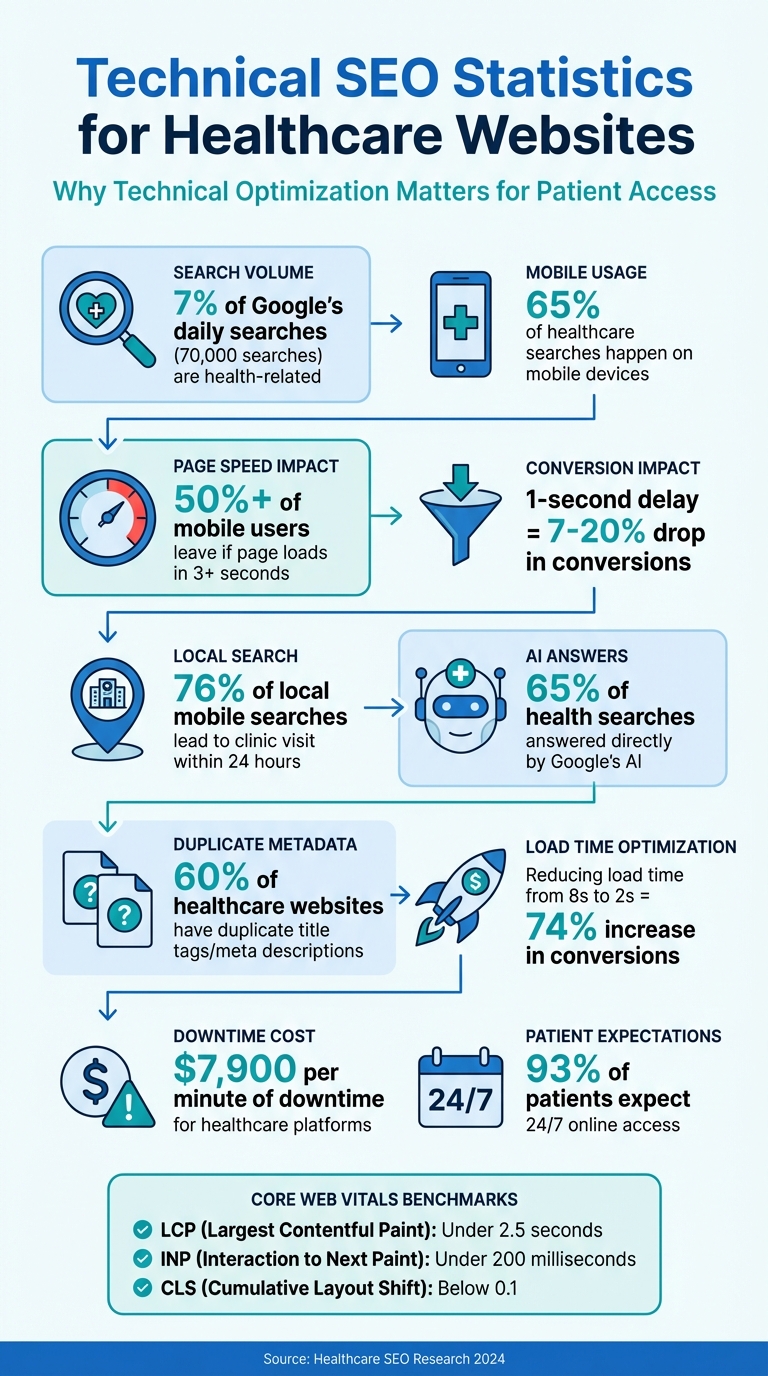
Technical SEO Statistics for Healthcare Websites
Common Technical SEO Problems in Healthcare
Healthcare websites often struggle with technical issues that directly impact search rankings and make it harder for patients to access critical health information. For example, poor site architecture can prevent search engines from properly crawling and indexing new pages. When important content - like service pages, doctor profiles, or location details - is buried more than two clicks away from the homepage, search engines may fail to find it. This makes it harder for patients to discover essential information.
Another issue is insufficient or missing content, which can harm both credibility and search visibility. Many healthcare websites lack detailed service descriptions or complete provider profiles. This kind of shallow content not only provides little value to users but also signals to search engines that the site lacks authority. Missing key landing pages - like those for specific treatments or location-specific services - or integrated online scheduling tools - can further limit a practice’s growth and lower its rankings.
Page speed is another critical factor. Google considers loading time a direct ranking signal, and slow-loading pages often lead to higher bounce rates as visitors leave within seconds. Additionally, poorly structured URLs that fail to reflect the site’s hierarchy can confuse search engines, making it harder for them to understand your site’s organization.
Security and structured data also play a big role in healthcare SEO. Missing schema markup - such as Physician, MedicalCondition, or MedicalOrganization - can prevent search engines from fully understanding your site’s content. This structured data is essential for achieving rich snippets, knowledge panels, and better visibility in search results. It’s especially important now, as Google’s AI provides direct answers for about 65% of health-related searches.
"From Google's perspective, your key information should never be more than 2 clicks away from your homepage. This practice helps Google find, understand, and index your content quickly." - Crawford Ifland, Host of the Medical Marketing Podcast
Lastly, security and compliance are non-negotiable for healthcare sites. Falling under Google’s "Your Money or Your Life" (YMYL) category, these websites must prioritize HTTPS and robust data security to build both search rankings and patient trust. Without these measures, even the best content might fail to reach its intended audience.
sbb-itb-02f5876
Reading about the problem? See how Prospyr solves it in one platform.
Book a DemoBasic Technical SEO Fixes for Healthcare Websites
Mobile Optimization and Responsive Design
Google now relies entirely on mobile-first indexing, meaning the mobile version of your site is what gets crawled and ranked. For healthcare providers, this is especially important - 65% of healthcare-related searches happen on mobile devices, and 76% of local mobile searches lead to a clinic visit within 24 hours. If your mobile site lacks content that exists on the desktop version, that missing content won’t be indexed.
To address this, implement responsive design with a single URL for both desktop and mobile. Add the viewport meta tag (<meta name="viewport" content="width=device-width, initial-scale=1">) to ensure proper scaling. Make sure interactive elements are at least 48×48 pixels with adequate spacing, and use a minimum font size of 16px with a line height between 1.5 and 1.7 for readability.
Core Web Vitals play a big role in mobile rankings. Aim for these benchmarks:
- Largest Contentful Paint (LCP): Under 2.5 seconds
- Interaction to Next Paint (INP): Under 200 milliseconds
- Cumulative Layout Shift (CLS): Below 0.1
These metrics matter - a site that takes more than three seconds to load will lose over half of its mobile visitors. Even a one-second delay can drop conversion rates by 7% to 20%.
To improve performance, use modern image formats like WebP and the srcset attribute to serve device-optimized images. Avoid intrusive popups that block content on mobile, as Google penalizes such pages. Ensure phone numbers are clickable with href="tel:+1..." for easy dialing, and place key elements like appointment buttons above the fold. Finally, secure your mobile site with HTTPS for both safety and SEO benefits.
HTTPS and Data Security
HTTPS is non-negotiable for healthcare websites. It encrypts sensitive patient data, ensuring compliance with HIPAA regulations for sites with patient portals, booking forms, or contact forms. Google favors HTTPS pages for indexing and ranks them higher than HTTP pages. Without HTTPS, browsers display "Not Secure" warnings, which can drive away visitors and erode trust.
"Google strongly recommends using HTTPS for your site to protect your users' security and privacy." - Google Search Console Help
Install an SSL/TLS certificate and enforce HTTPS across all pages, including blog posts and landing pages, to avoid mixed content errors. Use 301 redirects to route all HTTP traffic to HTTPS, preserving link equity. Update your XML sitemaps to include only HTTPS URLs so search engines index the correct versions.
Enhance site security further by adding headers like HSTS and CSP to guard against attacks. Regularly monitor SSL certificates - an expired certificate can block access to your site, which is especially costly for healthcare providers. With 93% of patients expecting 24/7 online access, even a brief outage can cost around $7,900 per minute. Once your site is secure, refine metadata to improve search visibility and indexing.
Metadata Optimization
Every page on your site should have unique and descriptive metadata. Duplicate title tags and meta descriptions - common on healthcare sites - confuse search engines and dilute ranking potential. Around 60% of healthcare websites are affected by this issue. Use metadata that incorporates primary keywords and specific terms related to treatments or conditions. For example, instead of “Services - ABC Clinic,” use something like “Knee Replacement Surgery in Chicago | ABC Orthopedics.”
Incorporate structured data with schemas like MedicalCondition, Physician, Doctor, Hospital, or LocalBusiness. Adding FAQ schema for patient questions can help your site appear in expanded search results, providing answers directly in the SERP.
"Proper schema allows search engines to return more informative results. It also helps populate rich snippets, carousel results, and the knowledge graph." - Naghmeh Jafarzadeh, Senior SEO Specialist, Healthcare Success
Use canonical tags to manage duplicate content, especially for multi-location practices offering similar services. Create clean, keyword-rich URLs like /services/orthopedics/knee-replacement instead of generic ones like /page123. Stick to one H1 tag per page to clarify the primary topic for search engines. For non-essential pages like admin dashboards or thank-you pages, use noindex tags to conserve your crawl budget for high-value pages. These metadata updates, combined with the technical fixes above, address key SEO challenges for healthcare websites.
Tools for Finding and Fixing Technical SEO Issues
Website Crawlers and Performance Tools
Google Search Console is an essential tool for auditing any healthcare website. It’s free and offers insights into how Google views your site. You can uncover indexing errors, mobile usability problems, and Core Web Vitals data. For example, the Pages report highlights URLs labeled as "Crawled - currently not indexed", which may point to duplicate or thin content. Addressing URLs marked as "Poor" in Core Web Vitals should be a top priority since these can greatly affect your rankings.
Screaming Frog SEO Spider is another powerful resource, especially for small- to mid-sized practices. The free version scans up to 500 URLs, while the paid version (around $260 per year) allows unlimited crawling. It identifies technical issues like broken links, redirect chains, duplicate title tags, and orphan pages - those without internal links that are often overlooked by both users and search engines. Glenn Gabe, founder of GSQI, calls it "an invaluable resource in my SEO arsenal... from uncovering serious technical SEO problems to troubleshooting international SEO issues".
Google Lighthouse and PageSpeed Insights are free tools that assess Core Web Vitals and suggest actionable improvements. Additionally, the Rich Results Test helps validate healthcare-specific schema, such as LocalBusiness or MedicalWebPage. This validation can enhance your site’s visibility in rich snippet results, making it stand out to users.
| Tool | Cost | Primary Use |
|---|---|---|
| Google Search Console | Free | Indexing status, mobile usability, Core Web Vitals |
| Screaming Frog SEO Spider | Free (500 URLs); $260/year (unlimited) | Broken links, redirects, duplicate content |
| Lighthouse / PageSpeed Insights | Free | Speed audits, Core Web Vitals recommendations |
| Rich Results Test | Free | Schema markup validation |
While these tools focus on crawling and performance, understanding visitor behavior is equally important. That’s where analytics tools come into play.
Analytics and Reporting
Crawlers and performance tools help identify technical problems, but analytics platforms reveal how users interact with your site. Google Analytics tracks key metrics like page views, session duration, and conversion paths, offering a deeper understanding of post-click behavior. However, healthcare sites must tread carefully. The Department of Health and Human Services cautions that "regulated entities are not permitted to use tracking technologies in a manner that would result in impermissible disclosures of PHI to tracking technology vendors or any other violations of the HIPAA Rules". For sites with patient portals or appointment booking features, consulting legal teams before implementing GA4 is essential. Alternatively, HIPAA-compliant analytics solutions like Freshpaint or Heap can anonymize sensitive data, ensuring both compliance and user trust.
These tools also allow you to measure the success of your technical fixes. For instance, after optimizing your page’s load time to meet LCP recommendations, you can track changes in bounce rates and appointment bookings. Regular automated crawls are equally important for catching new issues, especially after CMS updates. Without consistent monitoring, websites risk losing up to 12% of organic traffic each quarter due to unresolved technical problems.
Conclusion
Technical SEO plays a critical role in ensuring healthcare websites remain accessible and effective for patients. Because medical sites fall under Google's "Your Money or Your Life" category, search engines hold them to higher standards. Factors like security, fast load times, and mobile usability weigh heavily in rankings. With most patients relying on mobile searches to book appointments, a slow or glitchy site can hurt rankings and push potential patients toward competitors.
The good news? Many technical issues are relatively simple to fix. Addressing problems like disorganized site structure, missing schema, or sluggish load times can significantly boost both visibility and user experience. For example, reducing load time from 8 seconds to just 2 seconds has been shown to increase conversions by 74%.
"A technically solid website serves as the cornerstone for all other SEO tactics. No matter how good your content is, your rankings will suffer if the foundation is weak." - Eugene Ugolkov, CEO of Webugol
As healthcare continues its digital transformation, ongoing monitoring becomes essential. With Google's AI now directly answering 65% of health-related searches, maintaining a competitive edge requires consistent optimization. Regular audits - whether weekly, monthly, or quarterly - are key to staying ahead.
To see long-term results, focus on fundamental fixes first. Start with critical updates like implementing HTTPS, ensuring mobile responsiveness, and improving Core Web Vitals. Once the foundation is solid, enhance your site with structured data and a well-organized architecture. These efforts not only improve search rankings but also build patient trust. And considering that just one minute of downtime can cost a healthcare platform around $7,900, proactive maintenance is far more cost-effective than scrambling to fix issues later.
At Prospyr (https://prospyrmed.com), we understand the importance of a technically optimized website in providing an outstanding patient experience and supporting sustainable growth.
FAQs
Which technical SEO fixes should a healthcare site prioritize first?
Healthcare websites should prioritize refining their site architecture to make key landing pages easy to find and navigate. Equally important is optimizing site speed, as faster load times enhance both user experience and search engine rankings. Lastly, focusing on content quality ensures that visitors find valuable, accurate information, which can boost engagement and trust. Tackling these areas first is a smart way to improve both performance and visibility online.
How can we improve Core Web Vitals without rebuilding the whole website?
Improving Core Web Vitals doesn’t always require a complete site overhaul. Instead, you can make targeted adjustments that deliver noticeable results. Start by optimizing server response times - this can be achieved with better hosting, caching, and using a Content Delivery Network (CDN) to speed up content delivery.
For images, resizing them appropriately and converting them to WebP format can make a big difference. Enabling lazy loading ensures images and other media only load when they’re needed, reducing initial load times. Similarly, defer or load JavaScript and CSS asynchronously to prevent these files from blocking the page from rendering.
Other key optimizations include splitting up large scripts, removing unused code, and reserving space for dynamic elements like ads or images. This helps avoid unexpected layout shifts, which directly impact user experience. By tackling these areas step by step, you can see meaningful improvements without rebuilding your entire site.
How can we use analytics without risking HIPAA violations?
To ensure the safe use of analytics in healthcare, it's essential to opt for HIPAA-compliant tools that protect sensitive information. These tools must not share protected health information (PHI) with third parties. For example, platforms like Google Analytics should only be used if they fully meet HIPAA requirements, including implementing the necessary safeguards and signing a Business Associate Agreement (BAA). Always adhere to HHS guidelines to maintain compliance and protect patient data effectively.