SEO for Multi-Location Clinics: Ultimate Guide
Local SEO tactics for multi-location clinics: site structure, Google Business Profiles, schema, location pages, reviews, citations, and tracking to drive patients.
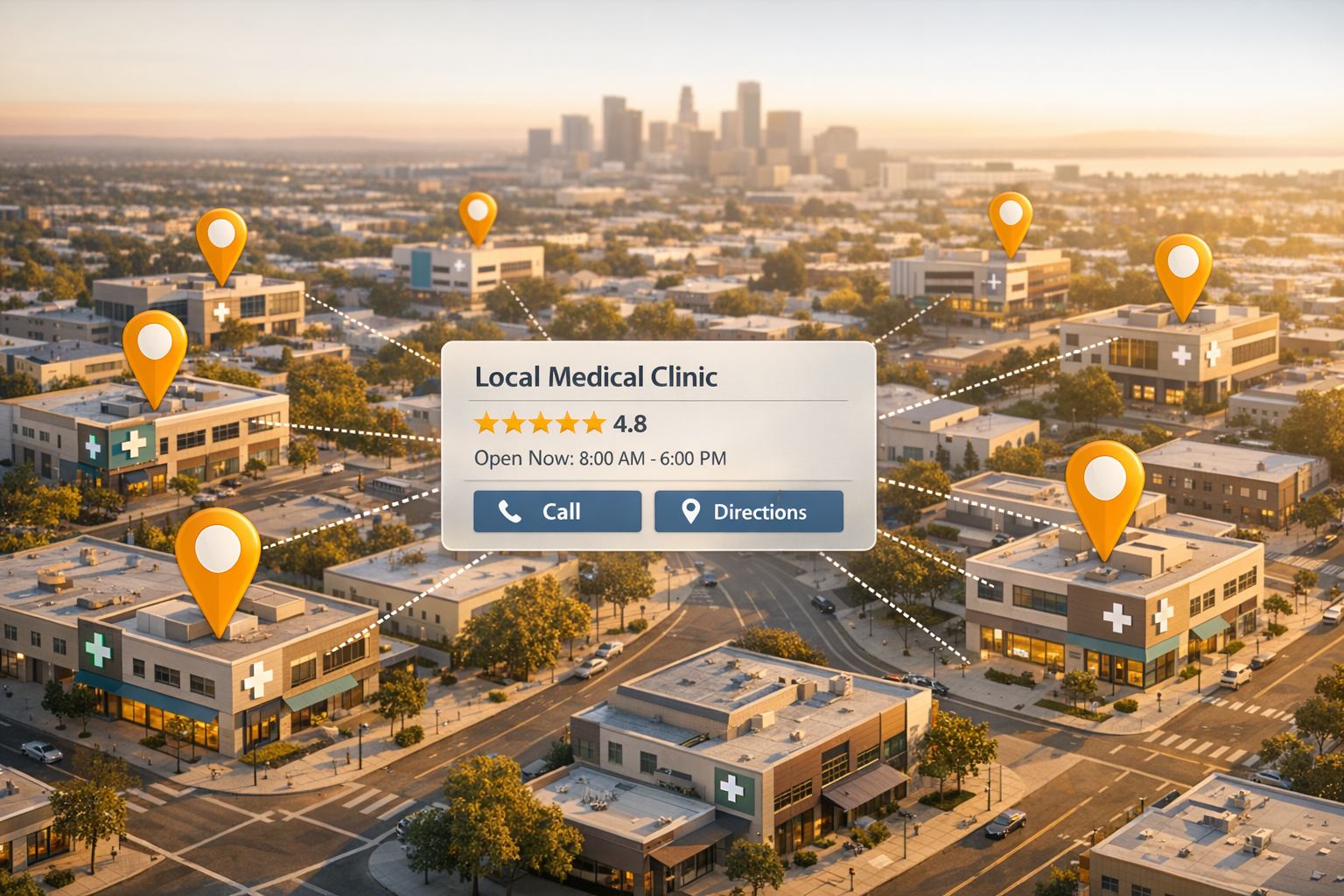

Want more patients at your clinics? Local SEO is the answer. Nearly half of Google searches are local, and clinics in the "Local Pack" (top 3 map results) see a 156% boost in inquiries. But managing SEO for multiple locations isn’t simple - it means creating unique content for each clinic, ensuring consistent contact info, and optimizing Google Business Profiles.
Here’s what matters most:
- Website Structure: Use subfolders like
yourclinic.com/locations/miamito consolidate SEO authority. - Schema Markup: Add structured data for each location to help search engines understand your site.
- Google Business Profiles: Claim, verify, and manage profiles for each location and provider.
- Local Keywords: Target city-specific phrases like "Botox in Austin" or "medspa near Buckhead."
- Reviews and Citations: Consistent NAP info and patient reviews are key for trust and rankings.
- Performance Tracking: Use tools like Google Analytics and CallRail to measure results by location.
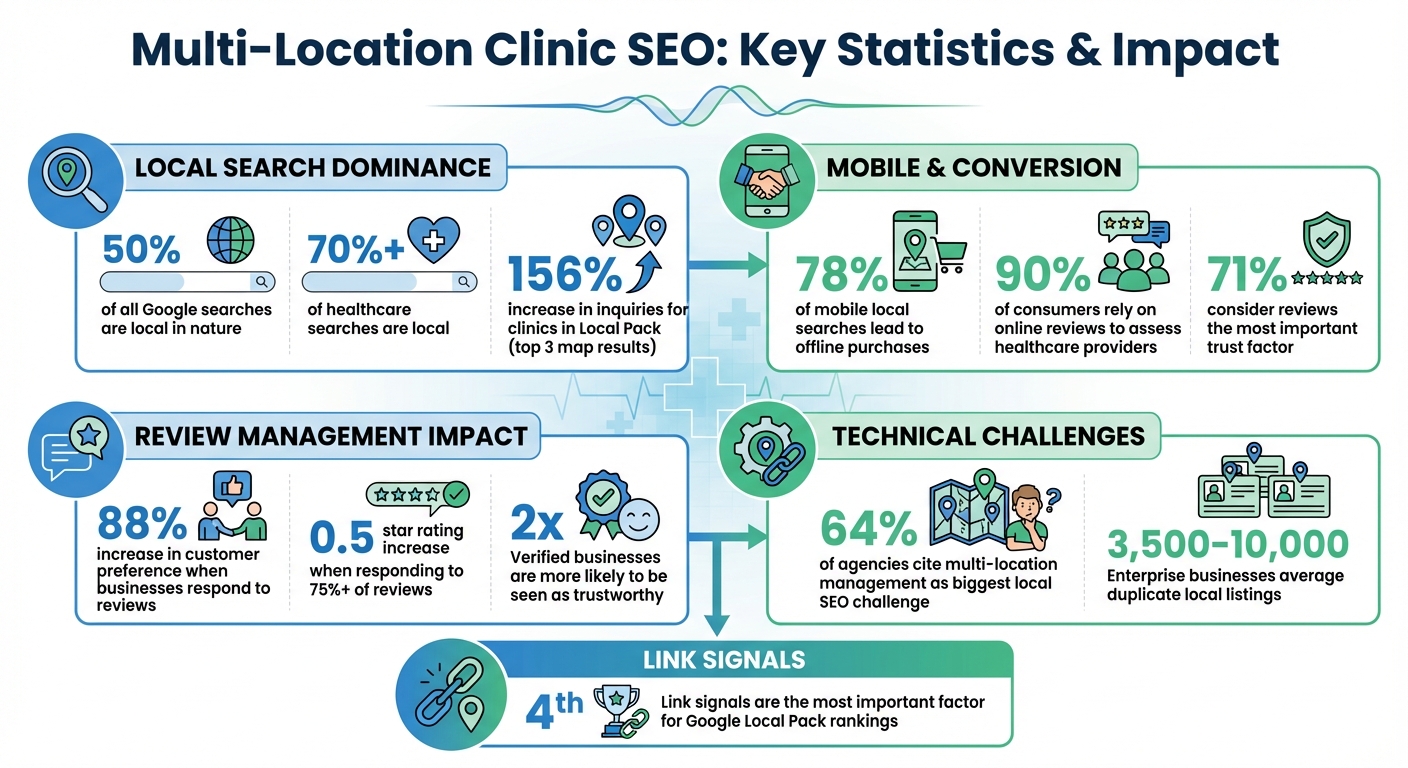
Multi-Location Clinic SEO Statistics and Key Performance Metrics
Technical SEO Basics for Multi-Location Clinics
Getting the technical side of SEO right is crucial for helping search engines discover and rank your clinic locations. For multi-location clinics, there's the added complexity of balancing a unified brand presence with the need to target local audiences effectively. Without a solid framework, even the best content won’t help your clinics appear in local search results. Here’s what you need to focus on.
Building a Scalable Site Structure
How your website is organized plays a bigger role in SEO than many clinic owners realize. A smart move is to use subfolders rather than subdomains. For example, structure your URLs like this: yourclinic.com/locations/miami/ instead of miami.yourclinic.com. This keeps all your SEO authority consolidated under one domain, rather than splitting it across multiple sites.
A hub-and-spoke model works well for multi-location clinics. Think of your main brand as the hub, with each clinic location acting as a spoke. This setup allows new locations to benefit immediately from the authority of your established domain, rather than having to build visibility from scratch.
Create a clear hierarchy that’s easy for both users and search engines to follow. For example: Homepage → State/Region → City → Individual Location. Adding breadcrumb navigation can make it simpler for visitors to understand where they are on your site. Plus, linking to nearby clinics on each location page not only aids navigation but also spreads internal link authority and offers alternatives if a location is fully booked.
Consistency is key when it comes to your clinic’s Name, Address, and Phone number (N.A.P.). Keep a master spreadsheet to ensure all formatting is identical - whether it’s “Street” or “St.” or how phone numbers are displayed. Small inconsistencies like these can hurt your local rankings.
Once your site structure is in place, you can make it even more search-engine-friendly with schema markup.
Adding Schema Markup for Local Businesses
Schema markup helps search engines better understand your website’s content. For multi-location clinics, this means providing structured data that clearly identifies each page as representing a physical medical facility at a specific address.
Choose the most specific schema type for your clinic. For instance, instead of a generic LocalBusiness schema, you can use MedicalClinic, Physician, or Dentist, depending on your practice. On your homepage, implement Organization schema for your parent brand. For individual location pages, use the appropriate medical schema, linking it back to your main organization using the parentOrganization property.
While basic details like the business name and address are essential, going further can make a big difference. Include geo-coordinates (latitude and longitude accurate to at least five decimal places), operating hours, and a local phone number. If you have patient reviews, adding an aggregateRating can give your search results an extra boost.
Use JSON-LD format for schema implementation - it’s Google’s preferred method - and always validate your code with Google’s Rich Results Test before publishing. If you manage multiple locations, tools like a CMS or the Google Business Profile API can help you roll out schema updates across all pages efficiently, saving time and effort.
"By defining objects on your homepage as unique entities using Schema Markup, you effectively connect them to a search engine's knowledge graph." – Martha van Berkel, CEO, Schema App
But technical SEO doesn’t stop at structure and data. You also need to ensure your site performs well on all devices.
Core Web Vitals and Mobile Performance
In the U.S., more than 70% of healthcare searches are local in nature, and many of these come from mobile devices. When someone searches for “urgent care open now” on their phone, your website needs to load immediately, or they’ll likely click on a competitor’s site instead.
Your site must be mobile-friendly, load quickly, and display key details like your phone number, address, and operating hours without requiring users to zoom or scroll excessively. Regular audits using tools like Google Search Console can help you identify issues like outdated plugins or slow-loading images that might hurt your Core Web Vitals.
For multi-location sites, avoid manually creating pages for each clinic. Instead, use dynamic templates or APIs to auto-populate location-specific data and update your sitemap whenever new clinics are added. This not only saves time but also ensures your site remains scalable and easy for search engines to crawl.
To improve mobile user experience, tools like Microsoft Clarity can provide valuable insights. For example, heatmaps can reveal if users struggle to find the “Book Appointment” button or if a contact form doesn’t function well on certain devices. Fixing these friction points can boost both user satisfaction and conversion rates.
sbb-itb-02f5876
Google Business Profile Setup and Management
Your Google Business Profile (GBP) is often the first impression potential patients have of your clinic. When someone searches for "aesthetic clinic near me" or "Botox in Miami", a well-maintained profile can be the deciding factor in attracting new patients. Verified businesses are twice as likely to be seen as trustworthy, and nearly half of all Google searches have a local focus. For clinics with multiple locations, getting your GBP right is especially important.
Claiming and Verifying Each Location
Start by searching for each clinic on Google. If a profile already exists, click "Own this business?" or "Manage now" to claim it. If no profile is listed, go to business.google.com/create to set one up. Be sure to use the exact name, address, and phone number as shown on your website and physical signage.
Medical practices need profiles for both their physical locations and the individual healthcare providers working there. For example, if you operate two clinics with four providers, you’ll need six profiles in total - one for each location and one for each provider. This setup maximizes your visibility.
Verification can be done through several methods, including postcard (7–12 days), phone, text, email, or video recording. Clinics with 10 or more locations can use Bulk Verification, which allows for a spreadsheet upload to speed up the process. Keep in mind that service-area businesses without a physical storefront must verify each location individually.
| Verification Method | Typical Timeline | Best For |
|---|---|---|
| Postcard | 7–12 days | Single locations |
| Phone / Text | Instant | Established businesses |
| Instant | Domain-verified emails | |
| Video Recording | Manual Review | Shared-address clinics |
| Bulk Verification | Several weeks | Chains with 10+ locations |
When setting up profiles, always use a domain email address (e.g., manager@yourclinic.com) rather than a personal Gmail account. This not only signals authority to Google but also simplifies the verification process. Make the domain email the primary owner and add a second domain email as a backup to avoid losing access.
If using video for verification, keep it under 2 minutes and 75MB. Include footage of your clinic’s exterior signage, management activities (like unlocking doors or accessing your point-of-sale system), and supporting documents like utility bills or licenses.
Once verified, create a Business Group in your GBP dashboard. This allows you to manage multiple locations from one place and delegate access to staff or marketing agencies without sharing passwords. Be cautious with frequent edits or assigning managers with restricted Google accounts, as these actions can trigger account suspensions.
With your profiles verified, focus on building a strong online presence through engaging visuals and regular updates.
Managing Photos and Posts
Photos are a powerful tool for drawing patients to your clinic. Share high-quality images of your clinic’s exterior (to make it easy to find), interior (to showcase your facilities), medical team, and treatment results. Update these seasonally to keep your profile fresh and inviting.
Google Posts function like a micro-blog for your clinic. Use them to share updates on new services, promotions, health tips, or upcoming events. For example, a post announcing a limited-time offer or introducing a new provider can catch immediate attention. Regular posting keeps your profile active and engaging.
Be mindful of Google’s AI image filters when uploading photos. Images that don’t meet quality or content standards may have reduced visibility, so always choose clear, professional visuals that accurately represent your clinic.
Handling Patient Reviews
Patient reviews are critical in healthcare. Around 90% of consumers rely on online reviews to assess healthcare providers, and 71% consider reviews the most important factor in building trust with a brand. Additionally, businesses that respond to reviews see an 88% increase in customer preference.
Set up an automated system to request reviews via SMS or email within 24 hours of a patient’s visit, while the experience is still fresh. Train front-desk staff to ask satisfied patients for reviews during checkout.
When responding to reviews, personalize your replies. Mention the patient’s name and clinic location to create a local connection. For example, “Thank you for visiting our Salt Lake City clinic, Jennifer!” This adds a personal touch and reinforces your local presence. Businesses that respond to at least 75% of their reviews often see their average rating increase by 0.5 stars.
"When you reply to customer reviews, it shows that you value their feedback. Positive reviews and helpful replies can help your business stand out." – Google Support
For negative reviews, respond professionally and as soon as possible - ideally within the same day. For sensitive issues, take the conversation offline through phone or email. Keep responses concise: “We’re sorry to hear about your experience. Please call our office manager so we can address your concerns.”
Decide on a review management strategy that suits your clinic chain. A centralized approach ensures a consistent brand voice, while decentralized management allows individual clinics to provide personalized responses. Many clinics find a hybrid model - where corporate sets guidelines and templates, and local managers handle daily interactions - works best.
Finally, enable email alerts for Google Business Profile updates. This helps you catch and correct any unwanted user-suggested changes to your clinic information.
Reading about the problem? See how Prospyr solves it in one platform.
Book a DemoContent Strategy for Each Location
Building a strong local presence requires more than just technical SEO and managing profiles - it’s about creating content that resonates with each specific location. Striking the right balance between maintaining your brand’s voice and tailoring content for local audiences can make all the difference. A common misstep? Treating each location page as if it’s entirely separate from the parent brand, or worse, simply swapping out city names in generic templates. Both approaches can miss the mark when it comes to ranking for local searches.
Creating Location Pages
When building location pages, aim for a mix of 60% core brand content and 40% unique local details. The core portion should reflect your brand’s mission, service standards, and guarantees - elements that stay consistent across all locations. The local details, however, should spotlight what makes each clinic distinct.
Start by structuring your URLs thoughtfully. Subfolders like "yourclinic.com/locations/miami" are preferable to subdomains, as they consolidate domain authority and simplify maintenance. Each page should have a unique H1 tag that combines your primary service keyword with the city name. For example: "Botox and Dermal Fillers in Austin, Texas."
Local content should include personal touches like staff photos and bios tailored to each branch. Add practical details, such as directions referencing nearby landmarks: "We’re just a five-minute walk from Central Station, next to the Riverside Shopping Center." Embed a Google Map for easy navigation and include an FAQ section that addresses specific concerns like parking availability or public transit options.
Authenticity matters. Use real photos of your clinic’s exterior, interior, and team instead of stock images. This builds trust - especially when 89% of people trust customer-generated content over branded messaging. To help search engines understand your pages better, implement MedicalClinic schema markup for each location.
Finally, fine-tune your keyword strategy and lead management to ensure each page attracts and converts the right local traffic.
Finding Location-Based Keywords
A well-thought-out keyword strategy is essential for capturing local search traffic. Start by brainstorming your core services - like Botox, laser hair removal, or dermatology consultations - and pair them with location-specific modifiers. Think beyond city names: include neighborhoods, ZIP codes, and landmarks. For example, target phrases like "aesthetic clinic near Buckhead" or "Botox in 33139" alongside broader terms like "Miami aesthetic clinic."
Google’s autocomplete feature can confirm whether people are actively searching for these combinations. Dig deeper into the "People Also Ask" and "People Also Search For" sections for additional ideas. Tools like Semrush and Ahrefs can help identify the cities or regions where demand for your services is highest. Even keywords with lower search volumes - like 50 to 100 searches a month - can be valuable in healthcare, as they often indicate high intent to book an appointment.
Assign specific keywords to their respective location pages to avoid keyword cannibalization. For instance, ensure your Austin page focuses on "Botox in Austin" while your Dallas page targets "Botox in Dallas."
Writing Service and Educational Content
Beyond location pages, create blog posts and service descriptions tailored to regional needs. For instance, a Miami clinic might publish articles on protecting skin from sun damage year-round, while a Chicago clinic could focus on winter skincare tips or combating dry indoor air.
FAQs are another opportunity to generate unique content. Address common questions like parking availability, accepted insurance plans, or local regulations. You can also streamline the patient experience by offering digital intake forms tailored to each location's specific requirements. This not only enhances user experience but also helps differentiate each branch.
Consider creating dedicated landing pages for well-known practitioners at each clinic. These pages can capture searches for specific names while building credibility. Use a hub-and-spoke model: link a regional hub page to individual branch pages to consolidate SEO authority across locations.
Text-based content remains the cornerstone of Google rankings. Focus on crafting detailed, helpful content that naturally incorporates local keywords and genuinely serves the needs of patients in each area. By doing so, you’ll not only boost visibility but also build trust with your audience.
Building Links and Local Citations
Backlinks and citations might work in different ways, but they share a common goal: signaling to Google that your clinic is trustworthy, relevant, and deserving of a higher rank. Link signals are the fourth most important factor for appearing in the Google Local Pack and remain a key driver for local organic search results. When it comes to links, quality beats quantity every time. A few links from respected local sources - like a city health department or a neighborhood blog - will always outperform dozens of generic, unrelated links [38,39].
These local citations strengthen your technical SEO efforts, helping to reinforce your clinic’s credibility in every market you serve.
Managing Local Directory Listings
When it comes to local SEO, consistent local citations are essential. They validate your clinic's legitimacy online. Ensuring your NAP (Name, Address, Phone) information is consistent across all platforms is key. Even small formatting differences, like "St" versus "Street", can confuse search engines [2,41]. Managing multiple locations can be tricky - 64% of agencies consider it their biggest local SEO challenge. That’s why having a clear, systematic approach is so important.
Start by creating a master spreadsheet for all your clinic locations. This document should include exact formatting for key details like business names, full street addresses (including suite numbers), phone numbers with area codes, and website URLs [2,42]. This will serve as your go-to reference for maintaining consistency.
Begin by focusing on major data aggregators such as Neustar and Data Axle. These platforms distribute information to hundreds of smaller directories, so getting it right at this level prevents errors from spreading. Next, prioritize healthcare-specific directories like Healthgrades, Vitals, and ZocDoc, along with general platforms like Yelp, Facebook, and Bing Places. If your clinic operates in multiple locations, aim to build 50 to 100 citations per location to establish solid trust signals.
Make sure each citation links directly to the relevant location page on your website (e.g., "yourclinic.com/locations/denver") rather than your homepage. This not only improves local relevance but also enhances the user experience. Add UTM tracking codes to these links so you can measure how much traffic each directory generates for your branches.
Duplicate listings can be a major headache for larger businesses. An enterprise-level business might have anywhere from 3,500 to 10,000 duplicate local listings, which can dilute your ranking power by splitting authority between multiple entries. Tools like BrightLocal and Moz Local can help you identify and permanently remove these duplicates - a process that could otherwise take nearly a year to manage manually.
Creating Partnerships and Guest Content
Directory listings are just the beginning. Building relationships within your local community can significantly boost your clinic’s authority. Local backlinks carry more weight than generic industry links, and being active in your community naturally encourages these valuable connections.
Start by partnering with local Chambers of Commerce or sponsoring community events. These partnerships not only provide trusted backlinks but also ensure consistent NAP citations [9,38,39]. You can use search operators like "become a sponsor" AND "[city name]" to find opportunities with youth sports teams, festivals, or other local events that often acknowledge sponsors with backlinks [38,39].
Another idea? Consider offering a scholarship for students interested in healthcare careers. This can earn links from local schools, community colleges, and even neighborhood news sites. Additionally, pitch stories about your clinic’s milestones, charity efforts, or health initiatives to local media outlets. These stories can secure high-authority backlinks from local news organizations [7,9].
You could also contribute expert columns to local newspapers or neighborhood blogs [39,40]. To find opportunities, search for "[city name]" AND "guest post" or use competitor link analysis tools to identify local websites linking to competing clinics - but not yours. Reach out to those sources and build relationships [38,40].
Even "linkless mentions" of your clinic’s NAP in local articles or event listings can help boost your prominence in Google’s eyes, even if there’s no clickable link. The ultimate goal is to foster genuine community connections that encourage local websites to naturally reference your clinic.
Measuring SEO Performance
Keeping tabs on SEO performance is a must, especially for multi-location clinics. It's not just about tracking local visibility; it's about turning visitors into patients and spotting areas for improvement. As Nick Pierno, Director of Custom Projects at Whitespark, puts it:
"If you're spending money or energy on SEO... and you're not measuring how many leads you get from each source, stop what you're doing right now and make setting up a solid tracking plan your next priority".
Granular tracking for each location can uncover both strengths and weaknesses.
Tracking Local Rankings and Traffic
Tools like Google Search Console (GSC) are invaluable for understanding how your clinic’s pages perform in search results. You can track impressions and click-through rates for specific local queries, such as "dermatologist in Denver" or "urgent care near Boulder". By filtering reports for queries that include "near me" or city names, you can assess how well each clinic is capturing local search traffic.
For on-site behavior, Google Analytics 4 (GA4) is a powerhouse. You can create separate views for each location by applying city or region filters. Geographic reports in GA4 can also highlight "unexpected serviceable areas" - places where you're getting traffic but haven’t yet optimized content.
Adding UTM parameters to the URLs in your Google Business Profile (GBP) listings helps track traffic coming specifically from the Map Pack versus organic search results. For instance, the GBP link for your Denver clinic might look like this:
?utm_source=google&utm_medium=organic&utm_campaign=gbp_denver
Specialized tools can take your insights even further. Local Falcon provides a map grid of your rankings within a specific radius, showing where visibility starts to drop off. BrightLocal is great for monitoring local rankings and online reviews, while Moz Local can help maintain NAP (Name, Address, Phone) consistency and track up to 10 keywords across multiple locations.
While rankings and traffic give you a sense of visibility, conversion tracking is where you see the real business impact.
Setting Up Conversion Tracking by Location
At the end of the day, patient appointments are what matter most. To measure ROI, track conversions like appointment bookings, phone calls, and form submissions separately for each clinic. These metrics directly tie to your revenue, making local tracking essential.
Call tracking software like CallRail or CallTrackingMetrics is a game-changer for healthcare SEO. These tools use Dynamic Number Insertion (DNI) to display unique tracking numbers based on traffic sources. By using keyword pools (e.g., one number per four peak visitors, as CallRail suggests), you can track calls effectively.
Don't forget to set up click-to-call conversion tracking in GA4. This feature lets you monitor when mobile users tap your phone number. Finn Rueffert, Technical SEO Specialist at Cardinal Digital Marketing, emphasizes its importance:
"Setting up click-to-call conversion tracking is one of the most important methods of tracking the effectiveness of a local SEO strategy."
Combine this data with metrics like direction requests and website visits to estimate foot traffic and user intent.
To calculate ROI, multiply the number of conversions by your clinic's closing ratio and the lifetime value (LTV) of a patient. For example, if your Austin clinic received 50 appointment requests last month, with a 60% closing ratio and an average LTV of $2,500, that location brought in an estimated $75,000 in revenue from SEO efforts.
Using Google Looker Studio (formerly Data Studio), you can pull data from GA4, GBP, GSC, and your CRM into one dashboard. This side-by-side comparison helps you pinpoint which locations need attention and which strategies can be scaled across your clinics.
For even greater efficiency, integrate these insights with your practice management system - like Prospyr (https://prospyrmed.com) - to align online performance with overall business growth.
Conclusion: Growing with Multi-Location SEO
Multi-location SEO isn’t a quick fix - it’s a long-term investment that gains momentum over time. By consistently creating niche-relevant content, your clinic can build topical authority, making it easier for each location page to climb the search rankings. The secret lies in approaching SEO as a scalable system that connects all your branches, rather than treating each location as a separate project.
Some basics are non-negotiable: maintaining consistent NAP data (name, address, phone number) across directories and keeping your Google Business Profiles active. Even small inconsistencies in NAP data can erode trust with search engines and hurt your local visibility. With over 70% of healthcare searches being locally focused, and 78% of mobile local searches leading to an offline purchase, these foundational steps directly influence your clinic’s success.
The best-performing multi-location clinics take a hybrid approach - balancing centralized brand standards with the flexibility for local content. This allows the authority of the parent brand to elevate rankings for individual locations. However, to fully capitalize on SEO wins, you need strong operational tools that can turn increased visibility into actual patient growth.
Operational systems play a crucial role in amplifying SEO efforts. For example, platforms like Prospyr (https://prospyrmed.com) can simplify the process by unifying patient management and automating review requests, ensuring a consistent experience across all clinic locations. Dr. Daniel Lee from New Life Cosmetic Surgery experienced a 50% jump in revenue and a 40% increase in appointments after streamlining his operations with Prospyr in 2024. When your operational tools align with your SEO strategy - enhancing patient experiences, generating reviews efficiently, and centralizing data - you set the stage for sustainable growth.
FAQs
How can I avoid duplicate content on location pages?
Every location page should provide unique and meaningful content that’s specific to its area. Avoid the temptation to just swap out city names or copy-paste descriptions across pages - search engines might flag this as duplicate content, which can hurt your rankings.
Instead, focus on what makes each location special. Here are a few ways to do that:
- Showcase Local Services: Highlight any services or offerings that are tailored to the specific location.
- Spotlight Your Team: Introduce team members who work in that area, adding a personal touch.
- Feature Community Engagement: Mention local events, partnerships, or contributions to the community.
- Use Unique Visuals: Incorporate images and testimonials that reflect the specific location.
By paying attention to these details, you not only improve your SEO but also create a better experience for users. Each page becomes a genuine resource that reflects the uniqueness of the area it represents.
Should I create Google Business Profiles for each provider too?
Creating Google Business Profiles for each provider is an excellent way to improve local visibility and highlight each location in search results. This ensures that patients can quickly find and connect with the right provider at the correct location, making the process more seamless for everyone involved.
What should I track to prove SEO ROI per location?
Track metrics that matter for local SEO success. Keep an eye on local keyword rankings, Google Business Profile views, and customer actions like calls, direction requests, and website visits. Dive deeper by monitoring conversions such as appointment bookings to measure how effectively your efforts drive business.
Use tools like Google Analytics to analyze traffic patterns and referral sources. Comparing data across different locations can reveal which areas are performing well. At the same time, tracking costs and revenue ensures your SEO strategy stays aligned with your overall business growth goals.