Digital vs. Physical Records: Cost Comparison
Compare annual costs of digital vs. physical records — digital systems cost far less, with hybrid storage as a practical option.


Switching from physical to digital records can save businesses a lot of money. Here’s the bottom line:
- Digital systems cost less over time, with annual expenses ranging from $2,420 to $8,360.
- Physical records are much more expensive, with costs reaching $111,100 to $195,080 annually when factoring in storage, supplies, productivity losses, and compliance risks.
Key Takeaways:
-
Initial Costs:
- Digital: Higher upfront investment ($2,000–$8,000) for software and setup.
- Physical: Lower setup costs ($2,000–$8,000) for cabinets and equipment.
-
Maintenance:
- Digital: Predictable monthly fees for software, storage, and IT support.
- Physical: Ongoing costs for paper, printing, and equipment maintenance.
-
Compliance:
- Digital: Built-in features simplify compliance, costing $500–$2,000 annually.
- Physical: Higher risks and fines, costing $20,000–$75,000 annually.
-
Productivity:
- Digital: Instant access to files saves time.
- Physical: Employees spend 21% of their day retrieving documents, costing businesses thousands in lost productivity.
| Comparison | Digital Records | Physical Records |
|---|---|---|
| Upfront Cost | $2,000–$8,000 | $2,000–$8,000 |
| Annual Cost | $2,420–$8,360 | $111,100–$195,080 |
| Compliance | $500–$2,000 | $20,000–$75,000 |
| Retrieval Time | Instant | 8–12 minutes per document |
| Space Required | Minimal (cloud/server) | High (cabinets, storage rooms) |
Digital systems are more cost-effective, efficient, and secure in the long run. However, a hybrid approach - digital for active files and physical for rarely accessed records - can balance costs and practicality for many businesses.
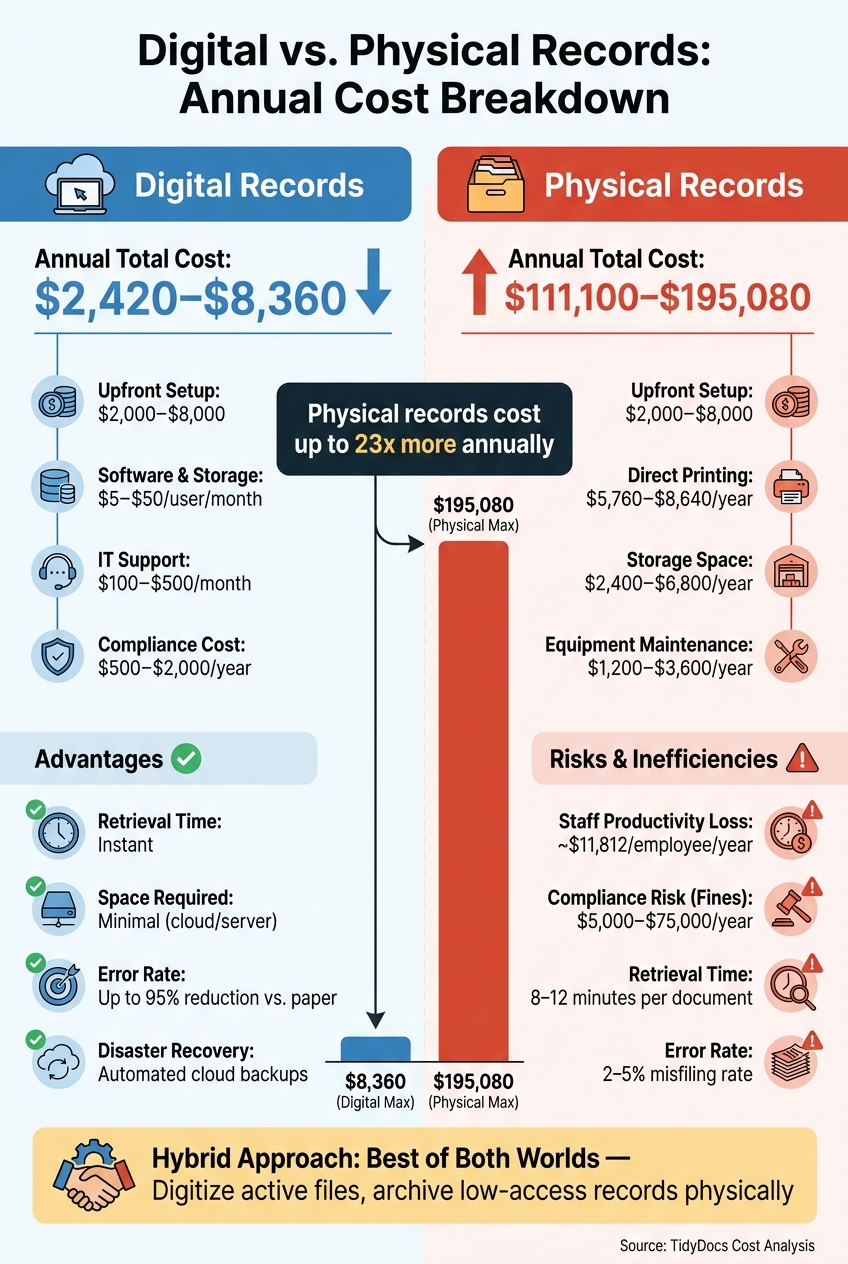
Digital vs. Physical Records: Annual Cost Comparison
1. Digital Records
Switching to digital records involves an initial investment spread over about four months. This includes vendor selection, data migration, and staff training, followed by ongoing monthly costs for subscriptions, storage, and support. Let’s break down the key expenses associated with digital systems.
Setup Costs
The largest upfront cost comes from software implementation and data migration, which typically ranges from $2,000 to $8,000 as a one-time expense. If you need hardware like OCR scanners, that will add to the initial cost. However, this investment can be offset by eliminating traditional hardware expenses, which can run between $1,450 and $7,200.
Maintenance Costs
Ongoing costs for digital systems are predictable and relatively low. Here’s a quick breakdown:
- Document management software: $5–$50 per user per month, depending on the subscription tier.
- Cloud storage: $5–$15 per user per month.
- IT support: $100–$500 per month.
For most small businesses, the yearly maintenance costs fall between $2,420 and $8,360. Beyond these expenses, compliance is another critical consideration, especially for healthcare and wellness practices.
"Digital systems cost 95% less than paper systems when you calculate total cost of ownership. The monthly subscription cost is typically less than what most businesses spend on printer ink." - TidyDocs
Compliance Costs
Compliance is a significant factor for industries like healthcare and wellness, but digital systems simplify much of the process. Features like audit trails, access logs, and retention policies are often built in. For small businesses, annual compliance costs for digital systems range from $500 to $2,000, compared to a staggering $20,000 to $75,000 for paper-based systems.
Failing a compliance audit can lead to fines of $5,000 to $25,000, making the investment in a compliant digital system a smart choice. Platforms such as Prospyr are designed with HIPAA compliance in mind, which helps aesthetics and wellness clinics navigate regulatory requirements with ease.
sbb-itb-02f5876
Reading about the problem? See how Prospyr solves it in one platform.
Book a Demo2. Physical Records
Managing physical records may seem straightforward, but it comes with hidden costs that can quickly add up. From hardware investments to compliance risks, maintaining physical files requires more resources than you might expect.
Setup Costs
Filing cabinets, a staple of physical recordkeeping, cost between $150 and $400 each. Small businesses typically need 3 to 8 cabinets, depending on their size. But that’s just the beginning. Essential equipment like printers, copiers, and scanners brings the total hardware investment to somewhere between $2,000 and $8,000.
Then there’s the cost of storage space. Office space dedicated to storing files runs about $15 to $35 per square foot annually, depending on location. For instance, a regional accounting firm with 12 employees was spending $6,720 annually to store 240 square feet of files, and that figure doesn’t even include the cost of filing cabinets or storage supplies.
Maintenance Costs
The ongoing costs of physical records can be just as steep. Printing and paper supplies cost $0.06 to $0.12 per page, and maintenance contracts for office equipment add another $1,200 to $3,600 annually.
Consider this example: A 7-person medical practice was spending $15,600 annually just on paper and printing for patient records. On top of that, hardware depreciates at a rate of 20% annually, and employees spend about 21% of their day retrieving documents. This downtime translates to a productivity loss of around $11,812 per employee each year.
Compliance Costs
Physical records also carry compliance risks. A single lost or mishandled document can cost anywhere from $15,000 to $50,000, while a small-scale physical data breach can exceed $50,000. Paper-based systems are prone to errors, with a 2–5% error rate that can lead to duplicate payments or missed deadlines. These mistakes often result in fines ranging from $5,000 to $25,000.
| Cost Category | Physical Records (Annual) |
|---|---|
| Direct Printing | $5,760–$8,640 |
| Storage Space | $2,400–$6,800 |
| Staff Productivity Loss | ~$11,812 per employee |
| Equipment Maintenance | $1,200–$3,600 |
| Compliance Risk (Fines) | $5,000–$25,000 |
(Source: TidyDocs Cost Analysis)
All these expenses highlight the long-term financial challenges of sticking with physical records. While they may seem manageable at first glance, the combined costs can become a heavy burden over time.
Pros and Cons
Here’s a closer look at the strengths and weaknesses of digital and physical record systems, based on the cost and efficiency insights discussed earlier.
| Feature | Digital Records | Physical Records |
|---|---|---|
| Upfront Cost | Higher (scanning, software, setup) | Lower (cabinets, basic equipment) |
| Long-Term Cost | Lower; scales efficiently with volume | Higher; grows with space and supplies |
| Retrieval Speed | Instant via search | 8–12 minutes per document |
| Disaster Recovery | Automated cloud backups; redundant storage | Single point of failure; permanent loss risk |
| Security Model | Encryption, 2FA, role-based access | Physical locks; no automated audit trail |
| Compliance | Automated audit logs; complex technical requirements | Satisfies original signature/notary rules; manual tracking |
| Error Rate | Up to 95% reduction in document errors | 2–5% error rate; prone to misfiling |
| Space Required | Minimal (cloud or server) | High (cabinets, offsite warehouses) |
Digital records are clearly more efficient when it comes to speed, scalability, and error reduction. For example, digital systems allow for near-instant document retrieval, which can save a team hours of time compared to the 8–12 minutes it often takes to locate a single paper document. Additionally, automated cloud backups and redundant storage significantly reduce the risk of permanent data loss.
However, physical records still hold their ground in specific scenarios. They remain legally required for certain document types, like notarized papers, property deeds, and files needing original signatures. For records that see minimal use but have long retention periods, offsite physical storage can sometimes be more economical than ongoing cloud subscription fees.
"Digital documentation has a higher security ceiling but a more complex threat landscape. Paper is simpler to secure but offers fewer recovery options when security fails." - NotuDocs
As NotuDocs points out, the security considerations for each system differ greatly. While digital records offer advanced security features like encryption and two-factor authentication, they also face more sophisticated threats. On the other hand, physical records are easier to secure with simple locks but lack robust recovery options if something goes wrong.
For many organizations, a hybrid approach - digitizing frequently accessed files while archiving less-used records physically - strikes the best balance between cost-effectiveness and operational efficiency.
Conclusion
The numbers don't lie: paper-based systems can rack up annual costs ranging from $111,100 to $195,080, while digital solutions cost significantly less - just $2,420 to $8,360. These figures account for often-overlooked expenses like lost productivity, fixing errors, and compliance risks.
For many organizations, digital recordkeeping pays off quickly. Take the example of a 7-person medical practice: after transitioning to a digital system, they reduced chart access time from 8 minutes to nearly instant. The result? Annual savings of $216,280, even after factoring in setup costs. That said, these benefits depend on specific circumstances.
Still, a fully digital system isn’t always the best fit. Files that are rarely accessed but need to be retained for long periods - like closed cases or old tax records - are often more cost-effective to store physically offsite. Scanning, indexing, and maintaining these documents in a cloud system can unnecessarily drive up costs. As Corodata explains:
"Storing rarely accessed files digitally adds cost without adding value; inactive records don't belong in active systems."
For most clinics and practices, a hybrid approach strikes the right balance. Digitize active, frequently used records for faster access and compliance, while securely storing low-access files offsite. This method keeps costs manageable without sacrificing the efficiency digital systems bring to daily operations.
If your practice handles sensitive patient data and needs HIPAA compliance, Prospyr offers a streamlined solution. By integrating EMR, digital intake forms, and automated workflows, it allows your team to focus on what matters most - patient care. This balanced strategy highlights the importance of tailoring recordkeeping methods to fit your operational needs.
FAQs
How fast can digital records pay for themselves?
Switching to digital records can often recoup the initial investment within 2 to 3 years. This timeline depends on factors like the size of the practice and the costs associated with implementation. The shift brings several advantages, such as saving physical space, boosting efficiency, and cutting down on storage expenses, all of which help balance out the upfront costs. Studies suggest that businesses transitioning to digital can save approximately $15,000 annually. On top of that, there are additional savings from reducing hidden costs like lost productivity and the complexities of managing paper records.
What costs are often missed with paper records?
Hidden costs tied to paper records go beyond the obvious printing and storage expenses. They include lost productivity, compliance risks, and security vulnerabilities. For instance, searching through physical documents can be a time-consuming process, significantly affecting workplace efficiency.
On top of that, paper records are highly vulnerable to damage from events like fires or water leaks. Such incidents can lead to costly replacements or even legal troubles if compliance requirements are not met. When you factor in these risks, it's clear that paper-based systems can end up being far more expensive than they initially seem.
When does a hybrid records approach make sense?
A hybrid records approach strikes a balance between the expenses and advantages of digital and physical storage. It works best for records that are accessed often, as these can be digitized for convenience. Meanwhile, documents that are rarely used or need to be kept long-term can be securely stored in physical form. This method helps reduce costs, ensures regulatory compliance, and saves space - particularly when fully converting to digital isn’t practical or when specific records must legally or operationally remain in their physical format.