HIPAA-Compliant Messaging for Aesthetic Practices
Secure patient communication for aesthetic practices: avoid unsecured apps, require BAAs, use encrypted platforms and staff training.

HIPAA compliance is critical for aesthetic practices. Even if your services are elective or don't involve insurance, you're still handling sensitive patient information like names, treatment details, photos, and digital intake records. Missteps, like using unsecured messaging apps or email, can result in fines up to $50,000 per violation, with annual penalties exceeding $2 million in severe cases. Beyond financial risks, a data breach can destroy patient trust.
Here’s how to avoid these pitfalls:
- Avoid Unsecured Platforms: Standard SMS, WhatsApp, and Gmail lack encryption and don't provide required Business Associate Agreements (BAAs).
- Secure Messaging Tools: Use platforms with features like end-to-end encryption, audit logs, and access controls.
- Obtain Patient Consent: Always get written consent for communication, clearly explaining risks.
- Train Staff: Educate your team on HIPAA rules to prevent unintentional breaches.
- Conduct Risk Assessments: Regularly audit your communication tools and policies.
Secure messaging isn't just about compliance - it's about protecting patient privacy and maintaining trust. Platforms like Prospyr offer HIPAA-compliant solutions tailored for aesthetic practices, ensuring both safety and efficiency.
Common Patient Messaging Challenges in Aesthetic Practices
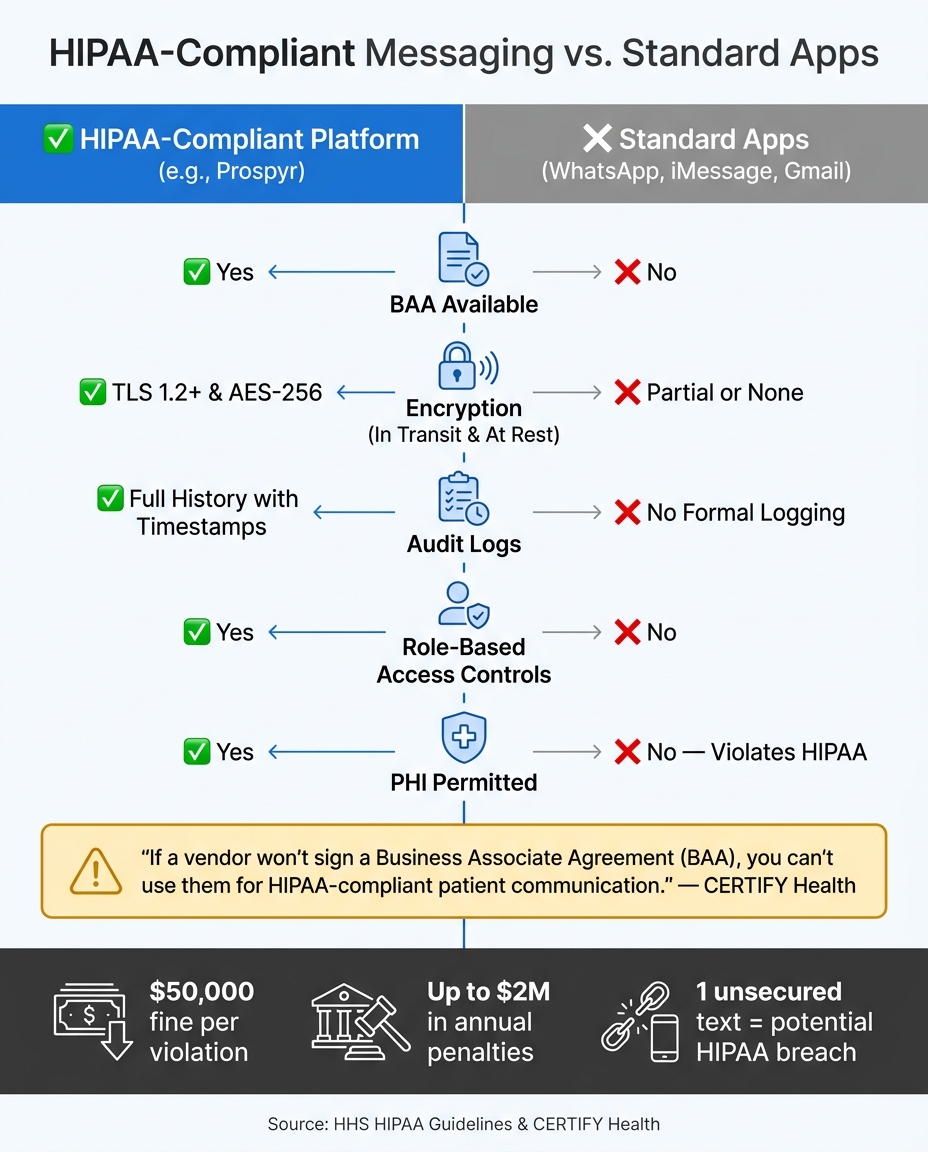
HIPAA-Compliant vs. Standard Messaging: Feature Comparison for Aesthetic Practices
Even the most organized aesthetic practices can run into issues with patient communication. These problems often fly under the radar, creeping in through habits like texting patients from personal phones or shooting off quick emails from unsecured accounts. While these shortcuts may seem harmless, they can lead to serious risks - most notably, HIPAA violations. Tackling these vulnerabilities is essential for maintaining compliance and building patient confidence.
Using Unsecured Channels for Patient Health Information
Everyday tools like standard SMS or personal email accounts might seem convenient, but they come with major security risks in healthcare settings. These platforms lack encryption and proper audit logs, leaving sensitive messages exposed. For instance, a text that includes a patient’s name and treatment details could be intercepted at multiple points. Similarly, emails with subject lines like "Your Botox appointment" can inadvertently reveal protected health information (PHI) by linking a patient’s identity to a procedure. Josh Troop from CERTIFY Health sums it up well:
"If the message would tell a stranger something private about the patient's health, it should not be in plain text."
Missing Business Associate Agreements (BAAs)
A Business Associate Agreement (BAA) is a must-have for any healthcare provider using third-party vendors to handle PHI. Without this legal contract, working with such vendors is a direct HIPAA violation. Unfortunately, popular communication tools like WhatsApp, iMessage, and personal Gmail accounts don’t offer BAAs, which means they cannot be used for any patient communication involving PHI. As CERTIFY Health emphasizes:
"If a vendor won't sign a Business Associate Agreement (BAA), you can't use them for HIPAA-compliant patient communication."
Gaps in Patient Consent and Identity Verification
Ensuring that messages reach the right person starts with verifying contact details and obtaining written consent. Consent forms should clearly explain the risks of using unencrypted communication methods. Even phone calls come with challenges, as the American Med Spa Association points out:
"As it can be challenging to confirm the patient's identity via phone, patients must sign a consent form before you can discuss medical information with them over the phone."
Missing Technical Safeguards in Common Tools
HIPAA compliance goes beyond encryption. It requires specific technical safeguards like auto logoff, role-based access, and encryption at all stages of communication. Unfortunately, many consumer apps fall short in these areas, leaving practices vulnerable to accidental PHI exposure.
The table below outlines how standard consumer apps measure up against HIPAA-compliant platforms:
| Feature | HIPAA-Compliant Platform | Standard App (WhatsApp, iMessage, Gmail) |
|---|---|---|
| BAA Available | Yes | No |
| Encryption (in transit & at rest) | Yes | Partial or none |
| Audit Logs | Full history with timestamps | No formal logging |
| Role-Based Access Controls | Yes | No |
| PHI Permitted | Yes | No - violates HIPAA |
Even with the right technology in place, practices need clear policies and staff training to ensure compliance.
Staff Training and Policy Gaps
Technology alone isn’t enough to guarantee HIPAA compliance. Many violations occur because staff members don’t fully understand the rules or because the practice lacks clear, written policies. For instance, a front desk employee might text a patient from their personal phone for convenience, unaware that this could result in a breach. Establishing robust policies and providing ongoing training are critical - especially as communication tools evolve and staff turnover introduces new team members. Continuous education ensures everyone stays on the same page.
sbb-itb-02f5876
Reading about the problem? See how Prospyr solves it in one platform.
Book a DemoHIPAA Requirements for Secure Patient Messaging
Unsecured channels, missing BAAs, and consent gaps often arise from failing to adhere to core HIPAA rules. Understanding these requirements can help address compliance issues more effectively.
Privacy Rule and Security Rule Basics
The HIPAA Privacy Rule enforces the minimum necessary standard, meaning only the essential amount of PHI (Protected Health Information) should be shared to complete a task. For instance, an appointment reminder should exclude procedure details, and follow-up messages should avoid unnecessary clinical information.
The Security Rule builds on this by requiring three layers of protection:
- Administrative safeguards: Policies, procedures, and signed BAAs (Business Associate Agreements).
- Physical safeguards: Securing devices and facilities.
- Technical safeguards: Encryption, access controls, and other digital protections.
To comply with HIPAA, all three layers must be applied to any messaging workflow.
Patient Consent and Communication Preferences
Before sharing PHI through text or email, written patient consent is mandatory. This consent must be documented and should explain the risks of unencrypted communication while recording the patient’s preferred contact methods. However, consent does not replace the need for a signed BAA. Starting in 2025, encryption for emails containing PHI will become a requirement, not just a recommendation.
Digital intake forms are an excellent way to collect this information. These forms can allow patients to opt into specific communication channels and acknowledge the associated risks. Once consent is secured, practices must implement strong technical and administrative measures to safeguard PHI.
Technical and Administrative Safeguards
From a technical standpoint, HIPAA requires encryption and controlled access. Essential measures include:
- Encryption in transit using TLS 1.2+ and at rest with AES-256.
- Unique user IDs and role-based access controls.
- Multi-factor authentication and automatic logoff.
- Full audit logs tracking who accessed PHI and when.
"HIPAA doesn't expect perfection. It expects intentionality, documentation, and reasonable safeguards." - CERTIFY Health
On the administrative side, practices must conduct an annual enterprise-wide risk analysis to identify vulnerabilities in how electronic PHI is handled through messaging tools. This annual review is not optional - it's a critical compliance requirement.
Here’s a quick look at how common messaging methods measure up against HIPAA standards:
| Messaging Type | HIPAA Compliance Status | Key Requirement |
|---|---|---|
| Standard SMS | Non-Compliant | Avoid for PHI; lacks encryption and audit logs |
| Standard Email | Compliant with safeguards | Requires encryption (TLS 1.2+) and signed BAA |
| Secure Portal Messaging | Compliant | Offers end-to-end encryption, audit logs, and access controls |
| Personal Messaging Apps | Non-Compliant | No BAA, encryption, or audit trail |
How to Implement HIPAA-Compliant Messaging in Your Practice
Understanding HIPAA is one thing; putting secure messaging into action is another. Look for platforms with built-in features that simplify compliance.
Core Features to Look for in a Secure Messaging Platform
When choosing a messaging tool, prioritize these must-have features:
| Feature | Details |
|---|---|
| End-to-end encryption | TLS 1.2+ for data in transit, AES-256 for data at rest - ensures messages can only be read by the sender and recipient. |
| Signed Business Associate Agreement (BAA) | A legal requirement for handling PHI. Vendors must sign a BAA before their platform can process PHI. |
| Role-based access controls | Restricts PHI access to staff members who need it for their roles. |
| Full audit logs with timestamps | Tracks who accessed what and when, aiding in compliance reviews. |
| Automatic session logoff | Prevents unauthorized access from unattended devices. |
| Encrypted photo and file sharing | Essential for practices sharing clinical images, like before-and-after photos. |
"HIPAA compliant patient communication requires encryption, BAAs, access controls, audit logs, and automatic logoff, not just a checkbox." - Josh Troop, CERTIFY Health
One platform that checks all these boxes is Prospyr, designed specifically for aesthetic practices.
Using Prospyr for Secure Patient Communication
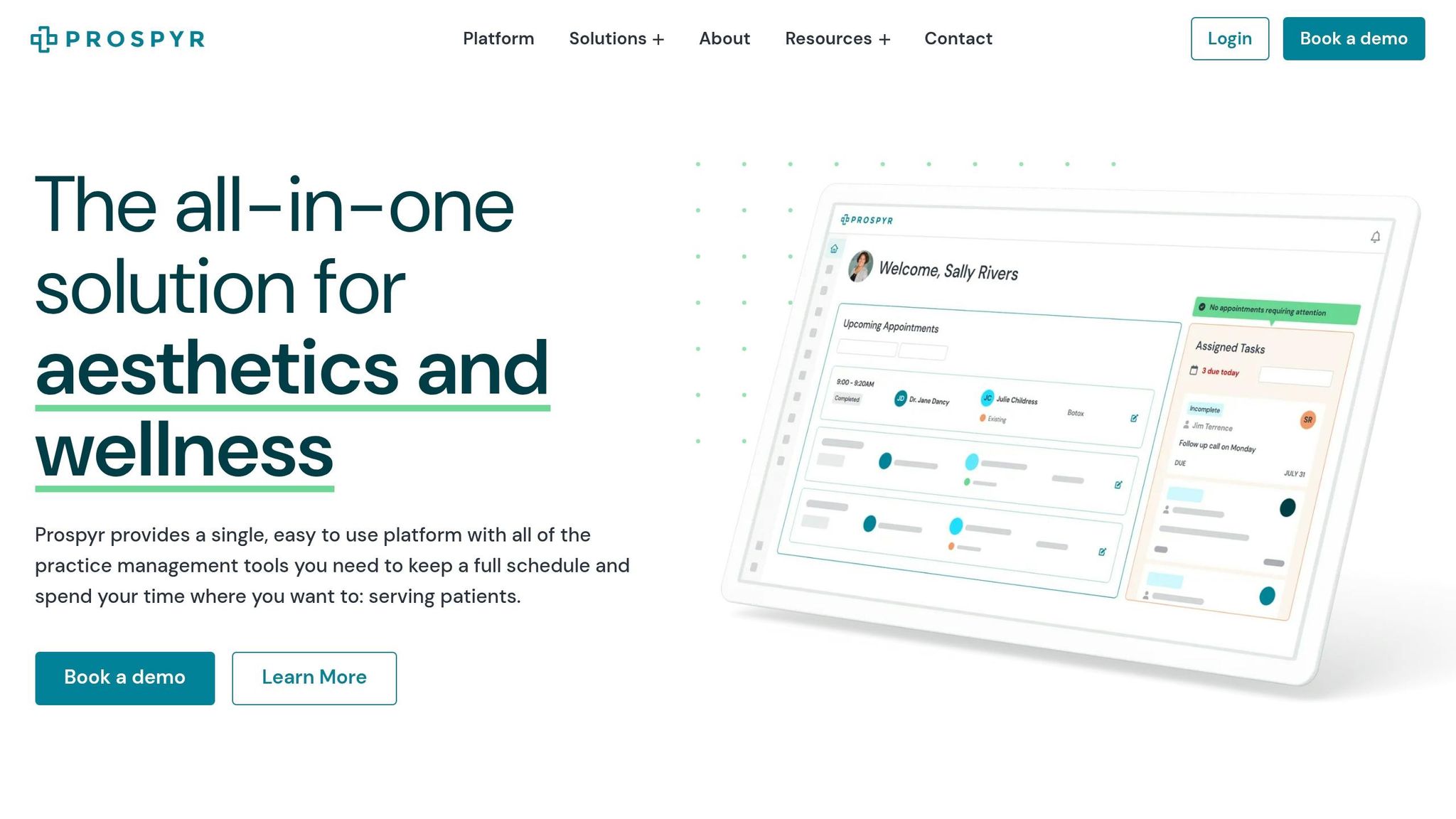
Prospyr caters to aesthetic and wellness clinics with a HIPAA-compliant design that addresses common compliance risks. Its two-way SMS messaging module allows staff to communicate directly with patients and leads, all within a secure, centralized system.
Prospyr also integrates with other essential practice management tools. For instance, digital intake forms collect patient consent and communication preferences securely before any PHI is shared. Features like integrated scheduling, automated reminders, follow-ups, and clinical documentation eliminate the need for unsecured workarounds, helping your practice stay compliant.
Handling Common Messaging Scenarios the Right Way
The features mentioned - encryption, access controls, audit logs - are essential for managing everyday communication securely. Here’s how they apply to typical scenarios:
- Appointment Reminders: Use neutral language. For example, "Your appointment is confirmed for Thursday at 10:00 AM - reply YES to confirm" works well. Avoid including treatment-specific details like "Botox follow-up" or "filler appointment", as these could unintentionally disclose PHI.
- Pre- and Post-Care Instructions: Don’t send sensitive clinical details via standard email or SMS. Instead, send a secure message such as, "Your care instructions are ready", with a password-protected link to a patient portal where the information can be accessed safely.
- Before-and-After Photos: Be extra cautious with clinical images. Use a HIPAA-compliant app that keeps these photos separate from personal storage. Disable automatic cloud backups (like iCloud or Google Photos) unless the service provides a signed BAA. For marketing use, ensure you obtain a separate HIPAA authorization form, distinct from the general treatment consent.
Keeping Compliance Going: Policies, Training, and Audits
Maintaining HIPAA compliance is about more than just having the right tools - it's about creating strong internal practices that safeguard patient interactions every single day. This means having clear policies, thorough staff training, and regular audits to spot and address potential issues.
Building a Messaging Policy for Your Practice
A well-written messaging policy acts as a guidebook for your team. It should clearly outline:
- Approved platforms for patient communication.
- The requirement for a signed Business Associate Agreement (BAA) before using any tool.
- Device security measures, like automatic logoff and remote wipe capabilities.
- Breach notification protocols.
- The Minimum Necessary Standard, advising against including specific procedure names - like "Botox" or "filler" - in appointment reminders or subject lines, as these can be considered Protected Health Information (PHI).
Once this policy is established, the next step is making sure your team understands and follows it.
Training Staff on HIPAA-Compliant Messaging
HIPAA training isn't just for clinicians - it’s essential for everyone on your team. Receptionists, medical assistants, billing staff, and even temporary workers all handle patient data and could unintentionally cause a breach.
Start by auditing your current tools to identify unapproved communication channels. It’s common for practices to find multiple unauthorized platforms during this process. Once identified, staff should be directed to use only approved tools and sign the messaging policy.
"Not knowing the rules is not a valid defense." - HHS Office for Civil Rights
Training should be ongoing. Annual refresher sessions and updates when new tools are introduced are key. These sessions should emphasize recognizing PHI in all its forms - whether it’s names, photos, treatment plans, or payment details - and stress the importance of avoiding patient discussions in public areas like the front desk or waiting room.
With effective training in place, your team will be better equipped to implement policies, setting the stage for regular risk assessments.
Conducting Risk Assessments and Audits
Regular audits are crucial for catching issues before they escalate. Start by reviewing audit logs from your HIPAA-compliant messaging platform. These logs typically track every message action, including timestamps and user IDs. Look for unusual activity, like bulk data exports, access during odd hours, or logins from unfamiliar locations.
Beyond log reviews, perform periodic access checks to ensure role-based permissions align with current job responsibilities. Running tabletop drills - quick exercises where staff practice responding to scenarios like a misdirected message or a stolen device - can also be incredibly valuable.
Finally, it’s important to remember that HIPAA requires you to retain messaging policies and related documentation for at least six years from the date they were created or last updated. Keeping these records well-organized can make all the difference during an audit.
"HIPAA doesn't expect perfection. It expects intentionality, documentation, and reasonable safeguards." - CERTIFY Health
Conclusion: Secure Messaging as a Foundation for Patient Trust and Practice Efficiency
Aesthetic practices handle some of the most personal patient data - like before-and-after photos, treatment records, and other sensitive health details. When this information is protected with a secure messaging system, patients not only notice but also feel valued and respected. This sense of security fosters loyalty and strengthens the relationship between patients and providers. At the same time, it addresses the critical need to safeguard patient data in an era where risks are ever-present.
Recent years have shown how vulnerable practices can be. Many data breaches started with something as simple as a text sent from a personal phone, an email from a non-secure account, or photos shared through unencrypted apps.
"Patient communication is not a side job. It's how your practice shows up in a patient's life between visits." - CERTIFY Health
Understanding these risks opens the door to better solutions. Compliance and a great patient experience don’t have to be at odds. Tools like Prospyr combine HIPAA-compliant messaging with features like digital intake forms, scheduling, and EMR integration in one streamlined system. This reduces the need for multiple tools and minimizes the risks tied to unsecured communication. Incorporating secure messaging into everyday operations not only meets compliance requirements but also enhances patient trust and boosts practice efficiency.
To take the next step, evaluate your current tools, ensure every vendor provides signed BAAs, and make HIPAA-compliant training a routine part of your team’s workflow. Choosing a platform tailored to the needs of aesthetic medicine ensures that every tool - whether for secure messaging or digital forms - works together as part of a unified compliance strategy. This approach not only protects sensitive information but also strengthens the bond of trust between your practice and your patients.
FAQs
What counts as PHI in an aesthetic practice?
Protected Health Information (PHI) refers to any data that can identify a patient and is tied to their health, treatment, or payment details. In aesthetic practices, this includes a range of sensitive information, such as:
- Patient names
- Medical records
- Social Security numbers
- Treatment plans
- Intake forms
- Before-and-after photos
- Clinical notes
- Financial information
Even something as simple as an email or text that mentions a patient's name alongside their procedure type is considered PHI. Because of this, it must be handled in compliance with HIPAA regulations to ensure patient privacy and security.
Can we text patients if they sign a consent form?
Yes, signing a consent form by itself doesn’t make standard texting compliant with HIPAA regulations. Regular SMS doesn’t have the necessary security measures in place. To meet compliance standards, you need to use a platform specifically designed for HIPAA compliance. This means it must have end-to-end encryption and include a signed Business Associate Agreement (BAA).
Consent forms should clearly outline the approved communication methods and inform patients about the risks associated with unencrypted messaging. It’s also important to limit the amount of shared information and avoid texting sensitive Protected Health Information (PHI) whenever possible.
What should we do first if staff are using personal phones to message patients?
If your staff is using personal phones to communicate with patients, it’s time to make a change. Personal devices and consumer messaging apps don’t have the encryption or audit logs required for HIPAA compliance, which puts patient privacy at risk.
The first step? Establish clear policies that prohibit the use of personal devices for patient communication. Then, implement a secure, HIPAA-compliant messaging platform like Prospyr to centralize all communications. Finally, ensure your team is trained on secure communication practices and how to use the new system effectively.
Related articles
Article
The Importance of Follow-Up: Techniques for Reaching Out to Inactive Patients
By Prospyr Team
Article
How to Create Patient Communication Protocols
By Prospyr Team
Article
How HIPAA Impacts Aesthetic Practice Expansion
By Prospyr Team
Article
California Privacy Laws for Med Spas: Key Rules
By Prospyr Team