HIPAA Rules for Storing Patient Photos
Store and share patient photos under HIPAA: identification, encryption, BAAs, consent, retention, and secure disposal.


If your clinic uses patient photos, they may qualify as Protected Health Information (PHI) under HIPAA rules. This means strict guidelines apply to how these images are stored, shared, and used. Failure to comply can result in hefty penalties, starting at $73,011 per violation in 2026. Here's what you need to know:
- What makes a photo PHI? Any image that can identify a patient (e.g., visible face, tattoos, scars, metadata like GPS) and links to their healthcare.
- Key rules to follow: Encrypt photos, restrict access with role-based permissions, use audit logs, and ensure vendors sign a Business Associate Agreement (BAA).
- Consent matters: Written authorization is required for marketing or public use, even if the photo was originally taken for clinical purposes.
- Storage options: Use HIPAA-compliant platforms like EMR systems, secure cloud services (with a BAA), or on-premise servers with encryption.
- Disposal: Deleting files isn’t enough. Use certified methods to ensure data is permanently unrecoverable.
Non-compliance risks include data breaches, reputational damage, and legal penalties. Clinics should implement strong administrative, technical, and physical safeguards to manage patient photos responsibly.
HIPAA Compliance for Storing Patient Photos
What Makes a Patient Photo PHI?
A patient photo is classified as Protected Health Information (PHI) under HIPAA as soon as it can both identify an individual and link to their healthcare.
"Under HIPAA, a patient photograph is Protected Health Information (PHI) when it identifies an individual in connection with their healthcare." - Kevin Henry, HIPAA Consultant
This identification doesn’t just rely on facial features. Tattoos, scars, birthmarks, or even details in the photo's background can be enough to connect an image to a specific patient. According to HIPAA's Safe Harbor de-identification standard, "full face photographic images and any comparable images" are among the 18 identifiers that must be removed before a photo can be considered de-identified.
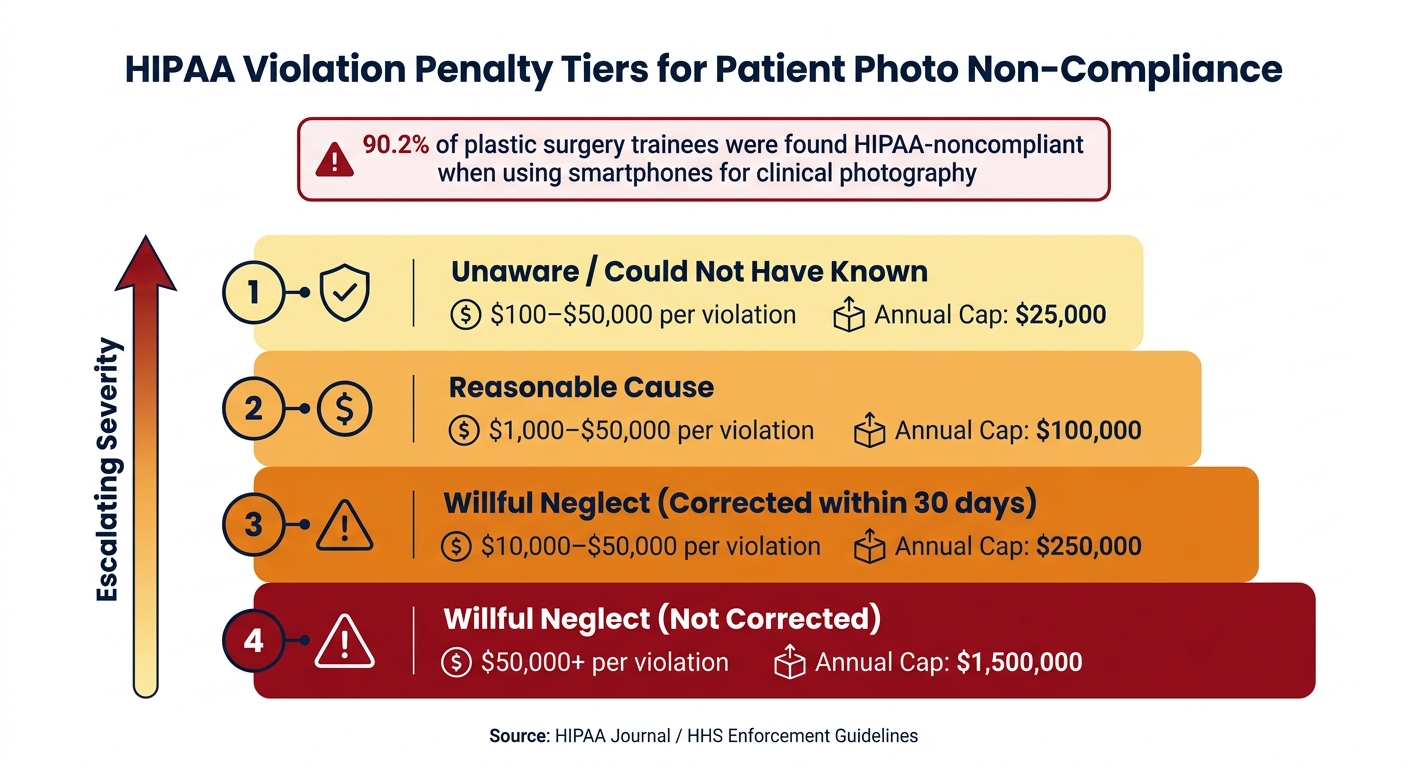
But there’s more to consider than just visible details. Digital photos often carry embedded EXIF metadata, such as GPS coordinates or device serial numbers, which can also reveal patient information. Alarmingly, a survey of U.S. plastic surgery trainees found that 90.2% were HIPAA-noncompliant when using smartphones for clinical photography. This highlights how easily these technical aspects can be overlooked.
Understanding these risks is critical to following the strict storage protocols discussed below.
Key HIPAA Rules for Photo Storage
Once a patient photo is classified as PHI, HIPAA sets clear rules for its storage and protection.
Two primary rules guide the handling of these images: the Privacy Rule and the Security Rule.
The Privacy Rule governs when patient photos can be used. Clinics are permitted to use these images for treatment, payment, or general healthcare operations without requiring written consent. However, if a photo is intended for marketing, social media, or external publication, a valid written authorization from the patient is mandatory. For example, in September 2025, Cadia Healthcare Facilities faced federal penalties for using patient "success stories" in marketing without meeting HIPAA’s consent standards.
The Security Rule focuses on how patient photos should be stored. To comply, clinics must implement several protective measures:
- Access controls: Use unique user IDs, role-based permissions, and multi-factor authentication (MFA) to restrict access.
- Data encryption: Ensure photos are encrypted both at rest (using AES-based storage) and during transmission (via TLS).
- Audit logs: Maintain detailed records of who accessed, viewed, or exported any image.
Additionally, the Minimum Necessary Standard applies, meaning only staff members who absolutely need access to patient photos for their job duties should have it. Granting unrestricted access violates HIPAA regulations.
If third-party platforms, such as cloud storage or integrated tools, are used to store patient photos, they must sign a Business Associate Agreement (BAA) to confirm their compliance with HIPAA requirements. Even the most secure platform becomes noncompliant without this agreement.
sbb-itb-02f5876
Reading about the problem? See how Prospyr solves it in one platform.
Book a DemoCompliant Storage Options for Patient Photos
HIPAA Violation Penalty Tiers for Patient Photo Non-Compliance
Approved Storage Locations
When it comes to storing patient photos, only systems that meet HIPAA's rigorous security requirements are acceptable. Here are three options that comply with these standards:
- EHR/EMR systems: These are considered the safest choice. They come equipped with critical safeguards like encryption, audit trails, and role-based access, making them purpose-built for secure data handling.
- HIPAA-compliant cloud platforms: These are a viable option if the provider signs a Business Associate Agreement (BAA) with your clinic and ensures encryption of data both during transmission and while stored.
- Secure on-premise servers: These can meet compliance requirements if they incorporate AES-256 encryption, two-factor authentication, and robust physical and network security measures.
It's important to note that the BAA requirement applies regardless of whether the vendor can access the stored data. As stated by HHS:
"An entity that maintains ePHI on behalf of a covered entity is a business associate, even if the entity cannot actually view the ePHI." - HHS.gov
Choosing storage solutions outside of these approved options can lead to serious risks for your clinic.
Risks of Non-Compliant Storage
Using consumer-grade tools like smartphones, standard iCloud accounts, free Google Drive, or personal Dropbox accounts to store patient photos is not compliant with HIPAA. These platforms often lack essential administrative controls and do not provide BAAs in their free versions, leaving sensitive data vulnerable to breaches.
The risks of non-compliance are not theoretical. In December 2020, a private plastic surgery chain suffered a breach where hackers stole 900 GB of patient "before and after" photos, threatening to release them unless a ransom was paid.
Beyond reputational damage, the financial penalties for HIPAA violations can be steep. Here's a breakdown of the penalty structure:
| Violation Tier | Culpability | Penalty Per Violation | Annual Cap |
|---|---|---|---|
| Tier 1 | Unaware / Could not have known | $100 – $50,000 | $25,000 |
| Tier 2 | Reasonable Cause | $1,000 – $50,000 | $100,000 |
| Tier 3 | Willful Neglect (Corrected within 30 days) | $10,000 – $50,000 | $250,000 |
| Tier 4 | Willful Neglect (Not Corrected) | $50,000+ | $1,500,000 |
Source: HIPAA Journal / HHS Enforcement Guidelines
How Prospyr Supports HIPAA-Compliant Photo Storage
To navigate these challenges, a secure and integrated solution is essential. Prospyr offers a streamlined approach by embedding photo storage directly into its HIPAA-compliant EMR/CRM platform, ensuring patient images aren’t scattered across unsecured devices or folders.
Prospyr enforces role-based access controls, allowing only authorized personnel to view patient photos, aligning with HIPAA’s "minimum necessary" standard. Additionally, its audit trails log every instance of image access, viewing, or exporting, providing a clear record for compliance and accountability. With a secure infrastructure that meets HIPAA’s technical requirements, Prospyr eliminates the need to juggle separate BAAs or worry about compliance gaps.
Safeguards for Storing and Managing Patient Photos
Administrative Safeguards
Strong administrative policies are the backbone of HIPAA-compliant photo management. Clinics should start with a formal risk assessment to pinpoint and address potential risks of unauthorized photo disclosures.
A detailed photography policy is essential. It should outline who can take photos, which devices are allowed, the purposes for the photos, and the labeling and storage protocols. Avoid using identifiable details in filenames - opt for non-descriptive identifiers or study codes instead.
Regular training tailored to specific roles ensures staff understand safe practices for handling images and devices. Violations of these policies should carry documented consequences, and clinics must have a clear incident response plan in place for suspected breaches involving patient photos.
Beyond administrative safeguards, technical and physical measures play a critical role in protecting patient photos.
Technical and Physical Safeguards
To secure patient photos, use AES-256 encryption, enforce multi-factor authentication, and implement role-based access controls. Audit logs should track all activity involving images, such as access, edits, or exports. Additionally, configure systems to automatically strip EXIF metadata when images are uploaded, as details like GPS coordinates, timestamps, or device IDs can inadvertently reveal patient identities - even if facial features are hidden.
Privacy screens are a must for any workstation displaying patient photos, especially in areas like reception desks or consultation rooms. Physical security is equally important - store cameras, SD cards, and tablets in locked cabinets. Clinic-owned mobile devices should be enrolled in a Mobile Device Management (MDM) system that includes remote wipe capabilities and disables automatic cloud backups (e.g., iCloud or Google Photos).
"A system is only as strong as its weakest component. While we have considered the risks of image capture, transfer, storage, and retrieval separately... any solution must address them together." - Rajiv Chandawarkar, MD
Organizing Clinical vs. Marketing Photos
Once safeguards are in place, organizing clinical and marketing photos properly is another critical step for compliance. Clinical images must remain separate from marketing photos, and explicit written consent is required for any marketing use. Clinical photos are treated as part of the patient’s medical record and fall under treatment consent, while marketing photos need separate, specific authorization detailing their intended use.
For example, in September 2025, Cadia Healthcare Facilities faced penalties from the HHS Office for Civil Rights for using patient "success stories" in marketing without sufficient consent. This case underscores the importance of keeping these categories distinct.
Educational or research use of photos demands thorough de-identification. This means removing all 18 HIPAA identifiers, including facial features and EXIF metadata, before using the images outside of the medical record. If unique features like tattoos or scars are visible but irrelevant to the clinical context, cropping or masking them adds another layer of protection.
Consent, Retention, and Disposal of Patient Photos
When Consent Is Required
When patient photos are used for treatment, payment, or healthcare operations, no additional consent is needed beyond the general treatment agreement.
"Photographs that are used for treatment, payment, or healthcare operations purposes do not require patients' written authorization." - Trish Markus, JD, Partner, Nelson Mullins Riley & Scarborough
However, if the photos are to be used outside of direct patient care - such as for marketing, social media, public websites, fundraising, or external publications - explicit written authorization is mandatory. This applies even if the photos were initially taken for clinical purposes. A new consent form must be completed whenever the intended use changes.
The authorization must clearly outline the specific images, their intended use, expiration date, and the patient’s right to revoke consent. A general "consent to treat" form won’t suffice. Instead, A dedicated digital intake form for photography consent should be used, detailing who will view the images and how they will be stored.
| Use Case | Written Authorization Required? |
|---|---|
| Wound tracking / treatment documentation | No |
| Billing & payment documentation | No |
| Internal quality improvement | No |
| Marketing & advertising | Yes |
| Public website or social media | Yes |
| External research or journal articles | Yes (or IRB waiver) |
| Educational presentations | Yes |
Consent details should be documented in the clinical notes. Once the parameters are set, retention policies determine how long the images are kept.
Retention Policies for Patient Photos
Retention rules for clinical photos align with medical record guidelines, typically requiring storage for 7–10 years for adults and longer for minors. HIPAA regulations mandate that protected health information (PHI), including photos, must remain safeguarded for 50 years after the patient’s death.
For marketing photos, retention timelines differ. Authorization forms for promotional use should include a set expiration date - five years is a common industry practice. Patients can revoke their consent at any time, halting future use of their images. However, materials already distributed may not need to be recalled.
"Once patient consent is withdrawn, you must stop future use of their images, even if materials already in circulation can remain." - RxPhoto Team
For minors, consent generally requires a parent or guardian’s signature. This consent may need to be renewed when the patient reaches the age of 18.
How to Securely Dispose of Patient Photos
Proper disposal of patient photos is essential to ensure compliance. Simply deleting files isn’t enough. Electronic records must be disposed of in a way that makes the data unrecoverable. This can include overwriting data on hard drives, using certified file-shredding software, or physically destroying storage devices like SD cards.
For mobile devices, a factory reset or remote wipe is necessary. Printed photos should be cross-cut shredded. Clinics must also maintain chain-of-custody logs to document the handling and destruction of media, creating an audit trail in case of future inquiries.
Before disposing of digital files, remove all EXIF metadata. This step prevents re-identification through embedded location or device data.
Key Takeaways for HIPAA-Compliant Photo Storage
Patient photos are considered Protected Health Information (PHI) if they include identifiable features - such as a visible face, unique scars, tattoos, or even location metadata embedded in the image. Once classified as PHI, these photos must be handled under strict HIPAA guidelines.
To ensure compliance, clinics should follow these key measures:
- Secure Storage: Use 256-bit AES encryption and establish signed Business Associate Agreements (BAAs) with all vendors managing the data.
- Access Controls: Implement safeguards like role-based access, multi-factor authentication (MFA), automatic session timeouts, and audit logs.
- Consent Management: Clearly differentiate patient consent for clinical purposes versus marketing use.
- Proper Disposal: Ensure permanent, irretrievable deletion when disposing of patient photos.
These steps are especially critical given the widespread non-compliance observed in clinical settings. Research highlights that most clinicians - both experienced physicians and trainees - fail to comply with HIPAA regulations when using personal devices or consumer apps for clinical photography. This isn’t an isolated issue; it’s a systemic problem in clinics that rely on these tools.
The risks of non-compliance are severe. Tier 4 HIPAA violations can lead to substantial financial penalties, making compliance not just a legal responsibility but also a financial necessity.
Platforms like Prospyr offer a practical solution by centralizing patient photo management within a secure and auditable CRM/EMR system. This approach keeps sensitive images off personal devices and consumer cloud services, while also supporting digital consent workflows and ensuring the BAAs required by law are in place.
FAQs
Do patient photos taken on staff phones count as PHI?
Yes, patient photos stored on staff phones are classified as Protected Health Information (PHI) under HIPAA if they can identify an individual. This includes identifiable features like faces, tattoos, or contextual elements such as chart labels. The issue? Personal phones often lack proper encryption and security measures, which can create serious compliance risks.
To address this, Prospyr provides a secure, HIPAA-compliant platform designed for storing patient photos while seamlessly integrating into clinical workflows.
How can we remove GPS/EXIF data from patient photos automatically?
To remove GPS and EXIF data automatically, consider using a metadata scrubber that works locally on your device or browser. These client-side tools help keep sensitive information private, aligning with HIPAA compliance standards. For professional tasks, ExifTool is a trusted choice. You can use the following command to strip all metadata:
exiftool -all= -overwrite_original photo.jpg
For securely managing patient images, Prospyr provides a HIPAA-compliant Media Archive solution.
What should we do if a patient revokes consent for marketing photos?
If a patient decides to withdraw their consent for marketing photos, you are required to stop using those images immediately. Patients usually revoke authorization in writing, and once this happens, you must remove the photos from every platform - this includes your website, social media accounts, and any other marketing materials. Tools like Prospyr can make this process easier by helping you keep track of patient interactions and consent statuses, ensuring you stay compliant.