Ad Compliance Checklist for Aesthetic Clinics
Four-step pre-launch checklist to ensure pricing, financing, images, consent, and records meet HIPAA, FTC, and TCPA requirements.

A single ad can create risk at four points: claims, images, consent, and recordkeeping. If I were reviewing this article for a clinic team, I’d boil it down to one rule: check the ad, the landing page, the opt-ins, and the file trail before anything goes live.
Here’s the short version:
- Prices must match the final charge. If you advertise $399, the patient should pay $399 unless limits are stated near the offer.
- Financing claims need full terms. A line like "$99/month" should sit next to the APR, repayment period, and total paid.
- Patient photos and testimonials need written permission and close review. That includes before-and-after images, staff endorsements, and paid influencer posts.
- SMS marketing needs a separate opt-in. It can’t be mixed into a general contact checkbox.
- Digital intake forms and follow-up tools can trigger HIPAA and TCPA issues. Even a simple message box can turn into PHI if someone types in treatment details.
- Keep ad files for at least 6 years. The article points to 6 years as a sound baseline for approvals, authorizations, screenshots, and opt-in logs.
What I like about the piece is that it stays focused on the parts that cause the most problems first: offers, financing, visuals, consent language, and proof of approval. It also keeps the scope broad enough to cover paid social, search, landing pages, email, and SMS without turning into a legal manual.
If I had to sum up the whole article in one line, it would be this: say exactly what the patient gets, show only what you’re allowed to show, collect consent the right way, and save proof that you did it.
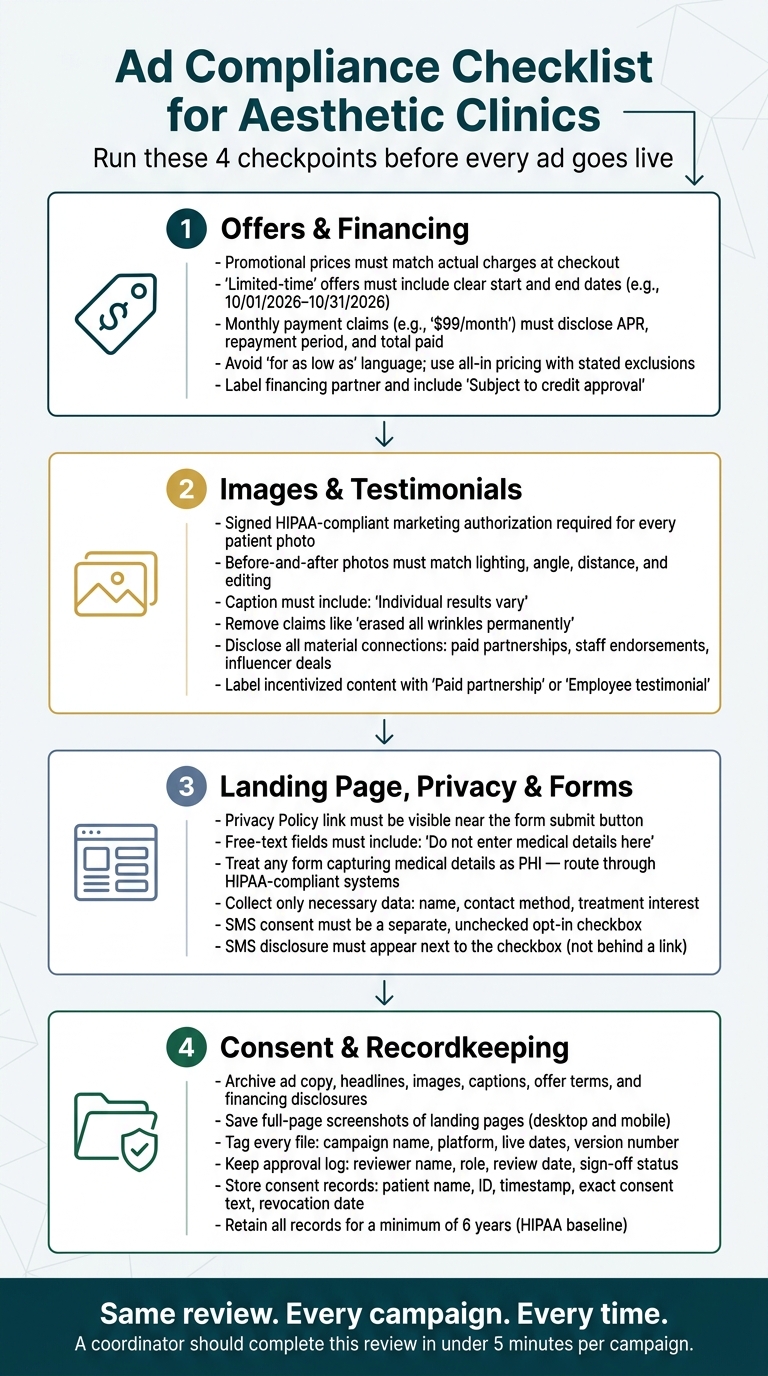
Ad Compliance Checklist for Aesthetic Clinics: 4-Step Pre-Launch Review
1. Review offers, pricing, and financing language before launch
Pricing and offer claims are one of the most common trouble spots in aesthetic ads. The price in your ad needs to match what patients pay, and it needs to be easy to spot.
Validate promotional prices and offer terms
Before an ad goes live, check current pricing against your billing records or checkout totals. Then review every campaign asset: the ad, the landing page, and the confirmation email. If an ad says "$399 Botox special," the total charge must be $399, including any required fees. Some state laws ban bait-and-switch pricing and phrases like "for as low as". A safer route is all-in pricing with clear limits and exclusions.
The fine print matters just as much as the headline price. If a discount is only for new patients or only at one location, say that clearly near the offer, not tucked away in a footer. Use a clear U.S. date format, such as "Offer valid 10/01/2026–10/31/2026," and make sure the campaign ends on time. If you use was/now or strikethrough pricing, the higher price must have been your actual, bona fide selling price for a meaningful period, not a padded reference price.
If the ad mentions monthly payments or deferred interest, treat financing claims as a separate review.
Check financing and monthly payment claims
Monthly payment or rate claims trigger financing disclosures. Under federal Truth in Lending rules, if you state "$99/month," you also need equally prominent disclosure of the total of payments, the repayment period, and the APR. Put those terms right next to the claim.
Offers like "0% financing" and "no interest" need extra care. If your clinic promotes a financing period, the ad should say how long it lasts, what the rate becomes after that, and whether interest builds during the promo window even if it is waived with early payoff.
Don’t suggest that approval is automatic. Use language like "Subject to credit approval" and clearly name the financing partner. It also helps to keep approved financing copy in one central place so staff reuse the same disclosure text.
Next, standardize the approved language so future campaigns use the same disclosures.
sbb-itb-02f5876
2. Verify images, before-and-after content, and testimonials
Visuals and testimonials can create compliance problems fast. That’s why every image, quote, and endorsement needs a careful review before anything goes live.
Confirm consent and accuracy for before-and-after photos
Before you use patient photos, get a HIPAA-compliant authorization that covers marketing use across each channel: social, paid ads, website, email, print, and third-party platforms. Then link the signed authorization to the exact asset in the patient record.
“Identifiable” doesn’t just mean a full face. It can also include tattoos, one-of-a-kind jewelry, visible marks, or photos connected to treatment details or dates.
For before-and-after images, consistency matters. Match the lighting, angle, distance, expression, background, and editing. If the “after” photo is brighter, cropped closer, or shot with a different head tilt, the result can look more dramatic than it was. That’s where trouble starts.
A simple safeguard helps: have someone other than the person who made the content review the final version before approval. Add a short caption such as: "Individual results vary."
Review testimonials, reviews, and endorsements for FTC risk
Testimonials get close scrutiny, so make sure each one is real, current, and tied to the treatment being named. Keep claims limited to outcomes you can support for typical patients. Remove statements that promise permanent, guaranteed, or universal results.
"erased all wrinkles permanently."
That type of claim should be removed.
If a result shown or described is unusual, say that plainly instead of letting readers assume it’s standard. You also need to disclose material connections, including free or discounted treatments, influencer deals, affiliate setups, staff endorsements, and employment or family relationships. Put labels like "Paid partnership" or "Employee testimonial" right next to the quote.
Once the creative is approved, review the landing page forms, privacy links, and SMS consent.
Reading about the problem? See how Prospyr solves it in one platform.
Book a Demo3. Check landing page forms, privacy links, and consent language
Once the ad creative gets approved, the landing page has to meet the same compliance bar. Think of the page as part of the ad itself. A form mistake or weak consent setup can turn a compliant ad into a noncompliant one.
Audit lead forms and privacy notice links
Keep forms short. For an ad-driven landing page, ask only for what you need to reply or book: name, contact method, and a treatment-interest field.
Pay close attention to free-text fields. If a patient types medical details into a general message box, that submission can become PHI under HIPAA. Add: "Do not enter medical details here." If the form does allow medical details, treat the submission as PHI and send it through HIPAA-compliant systems.
Your Privacy Policy link should be easy to spot before someone submits the form. Put it near the submit button and in a standard visible location, like the footer. The policy should explain what data you collect, how you use it, and how you protect it.
Separate SMS marketing consent from general contact consent
Don’t bundle everything into one catch-all consent for appointment texts, promotional SMS, and email. That setup can create TCPA risk.
Promotional SMS needs its own separate, unchecked opt-in. Include the clinic name, consent-not-required language, notice that message and data rates may apply, that message frequency varies, and opt-out/help instructions. Put the SMS disclosure right next to the checkbox, not behind a separate link.
Also, save the final consent language with the live form version for later review.
Use Prospyr to standardize compliant forms and consent capture
If your clinic uses Prospyr, create one vetted intake template with separate email and SMS consent fields, then use it across campaigns. Prospyr can store the consent record with the form version and timestamp. That makes audit logging easier later.
Save the approved form version with the campaign file for audit review.
4. Keep records for audits, complaints, and internal approval
The last step before launch is documentation. Once an ad gets approved, lock down the paper trail before it goes live. Think of documentation as part of the campaign itself.
Keep one complete advertising file for board reviews, complaints, and internal sign-off. That file should include ad creatives, landing pages, and related consent forms. It should also show what was approved, what actually ran, and who signed off.
Archive ad versions, landing pages, and approval logs
For each campaign, save:
- Ad copy
- Headlines
- Images
- Captions
- Offer terms
- Financing disclosures
- Full-page screenshots of the landing page in desktop and mobile views, so truncated disclosures are visible
Tag every file with the campaign name, platform, live dates, and version number. That way, you can show exactly what ran and when.
Keep an approval log too. Include the reviewer's name and role, the review date, a short summary of changes, and the final sign-off status. Verbal approvals and text-message sign-offs can get messy later, so add them to the log while they're still easy to track. Compliance experts recommend keeping these records for at least 6 years.
Store consent records and marketing authorizations
Archive the final signed version of every consent form with the campaign file.
For patient images, before-and-after content, testimonials, reviews, SMS opt-ins, email subscriptions, and HIPAA marketing authorizations tied to PHI, keep a record of the patient name, ID, timestamp, source, exact consent text, scope, and revocation date.
For SMS and email, keep a log of each opt-in event, the disclosure language shown, and which campaigns that contact received.
If an authorization record is missing, you're exposed. Store every signed authorization with the matching ad file.
Build a repeatable approval workflow in Prospyr
Use one repeatable workflow so unapproved assets don't slip through.
If your clinic uses Prospyr, set up an "Ad Launch" task template with subtasks for:
- Verifying offer pricing
- Checking financing language
- Confirming patient image consents
- Validating SMS consent language
- Checking privacy policy links on the live landing page
Assign each subtask to the right role, like the marketing coordinator, clinical lead, or compliance officer. Then record completion in the task trail with timestamps.
Because Prospyr centralizes patient data through its CRM/EMR integration, marketing consents stored in patient records can be cross-referenced before any patient image or testimonial is used in an ad. If there isn't an active consent linked to that asset, it doesn't run.
Conclusion: A one-page pre-launch ad compliance checklist
Before any ad goes live, run through these four checkpoints:
| Checkpoint | What to Confirm |
|---|---|
| Offers & Financing | Promotional prices match current fee schedules; "limited-time" offers include clear start/end dates; financing claims disclose APR, term length, and eligibility |
| Images & Testimonials | Signed marketing authorization is on file for every patient image; before-and-after photos are unedited and represent typical results; incentivized testimonials include a clear disclosure |
| Landing Page Privacy & Form Setup | Privacy notice is visible near the form; privacy policy link is current and working; form fields collect only necessary contact and interest data |
| Consent & Recordkeeping | SMS marketing consent is captured separately from general contact consent; ad versions, landing pages, and approval logs are archived; consent records include date, source, and the exact disclosure language shown |
A coordinator should be able to finish this review in under five minutes per campaign. That’s the point: the same review, every campaign, every time.
The next step is simple. Turn this checklist into a written SOP that spells out who reviews each checkpoint, what counts as sign-off, and where finished checklists are stored. Clinics using Prospyr can fold this into a digital "Ad Pre-Launch" workflow, assign each checkpoint to the right role, and log completion with timestamps, so nothing goes live without a written trail.
Keep records of every ad version, landing page, approval, and consent capture. If a complaint comes in or an audit request lands on your desk, you’ll want that file ready to go. HIPAA requires covered entities to retain required documentation for at least six years, which makes that a practical baseline for ad records too.
FAQs
What counts as misleading ad pricing?
Under FTC standards, ad pricing is misleading if it gives people the wrong overall impression, even if each line is technically correct. In plain English: pricing has to be clear. You can't leave out key details that change how someone reads the offer.
The FTC reviews the ad as a whole. That includes the copy, headline, and visuals. And fine print doesn't save a misleading headline. Health claims and price claims need support, and any material financial relationships or conditions have to be disclosed in a clear way.
Do I need separate consent for promotional texts?
Yes. For promotional texts - messages with offers or marketing content, not just treatment-related reminders - you need separate, signed patient authorization. A general consent form, or permission for treatment-related texting by itself, isn’t enough.
It helps to keep operational reminders and marketing messages in different lanes. Use separate consent choices or system flags so promotional texts don’t go out if the patient hasn’t opted in.
For SMS, document the patient’s preferred contact methods and use a HIPAA-compliant messaging setup.
What records should I save for each ad?
Keep a clear audit trail for every ad and campaign. Save HIPAA-related records - patient authorizations, policies, training logs, and risk assessments - for at least six years from the date they were created or last in use.
For each consent event, record:
- The patient
- The exact timestamp
- The document version
- The capture method
- The consent scope
- The staff member involved
For before-and-after photos, keep the exact approved uses on file, with separate, explicit marketing authorizations.