Employment Record Requirements for Med Spas
Separate, store, and retain HR, payroll, I-9, OSHA, and HIPAA records with role-based access and legal-hold rules.


If you run a med spa, employee records need their own system. Digital intake and patient charts are only part of compliance. Your hiring files, payroll records, I-9s, leave paperwork, HIPAA workforce documents, and OSHA medical files all follow different federal retention rules.
Here’s the short version:
- Keep employee records separate from patient records
- Do not use one retention period for every file
- Store medical, ADA, OSHA, payroll, and I-9 records in separate file groups
- Pause destruction right away if there’s an EEOC charge, wage claim, OSHA issue, or other legal matter
- Make records easy to pull fast during an audit
That matters because agencies can ask for records on short notice, and poor filing can create legal risk. The article points out that the EEOC received 81,055 discrimination charges in FY 2023. It also notes that DOL payroll records may need to be produced within 72 hours.
The main timelines to know are simple:
- EEOC personnel records: at least 1 year
- Payroll records under FLSA: 3 years
- Timecards and wage-support records: 2 years
- FMLA records: 3 years
- Form I-9: 3 years after hire or 1 year after termination, whichever is later
- HIPAA workforce compliance records: 6 years
- OSHA employee medical records: length of employment + 30 years
The main takeaway: I’d treat employment recordkeeping as a separate compliance job, not a side task. The article shows that a clean file structure, role-based access, fixed retention rules, and routine internal checks can help a med spa stay ready for EEOC, DOL, OSHA, and I-9 reviews without last-minute scrambling.
Common recordkeeping problems in med spa HR operations
The rules are easy to list. Managing them day to day is where things get messy.
Most med spas handle records by habit, not by written policy. Files get saved wherever it’s easiest. Old records get deleted when storage starts to feel tight. And people usually go looking for documents only when an audit, complaint, or inspection forces the issue.
Mixed retention clocks lead to early deletion or over-retention
Not every record follows the same timeline. Payroll, tax, HIPAA, and OSHA records all run on different clocks, and they rarely line up neatly.
That’s where trouble starts. If a clinic uses one blanket retention rule for everything, it can end up deleting HIPAA compliance documents or OSHA medical records before the law allows. On the other side, keeping I-9s too long creates its own audit problem. Every extra I-9 on file is one more document that can be reviewed and cited for mistakes.
So the blanket approach doesn’t solve the problem. It just swaps one compliance issue for another.
The next problem is just as common: sensitive records get stored in the wrong place.
Sensitive employment records are often stored in the wrong file
Accommodation requests, employee health information, and other medical or disability-related records should be kept in separate confidential files, not in general personnel folders. Access needs to stay limited to staff who have a legitimate need to see them.
In a med spa, that line can blur fast. Someone who has access to patient-facing systems may assume they also have broad access to internal employee records. Then a coworker’s accommodation request ends up sitting in the wrong folder, visible to people who should never have seen it.
That kind of exposure can come back during an EEOC investigation.
Fragmented systems slow down audit responses
Even when records are sorted the right way, scattered storage creates a second headache.
Growing clinics often add systems faster than they build process. Onboarding documents live in one tool, timekeeping records in another, and licensing or training files somewhere else. When a DOL review, OSHA inspection, or Form I-9 audit happens, staff have to piece the file back together under pressure.
That slows everything down. It also signals disorganization to investigators and makes missing pages, duplicate files, or conflicting versions more likely. The fix is a single retention structure tied directly to daily HR workflows.
Reading about the problem? See how Prospyr solves it in one platform.
Book a DemoA practical retention schedule and file structure for med spas
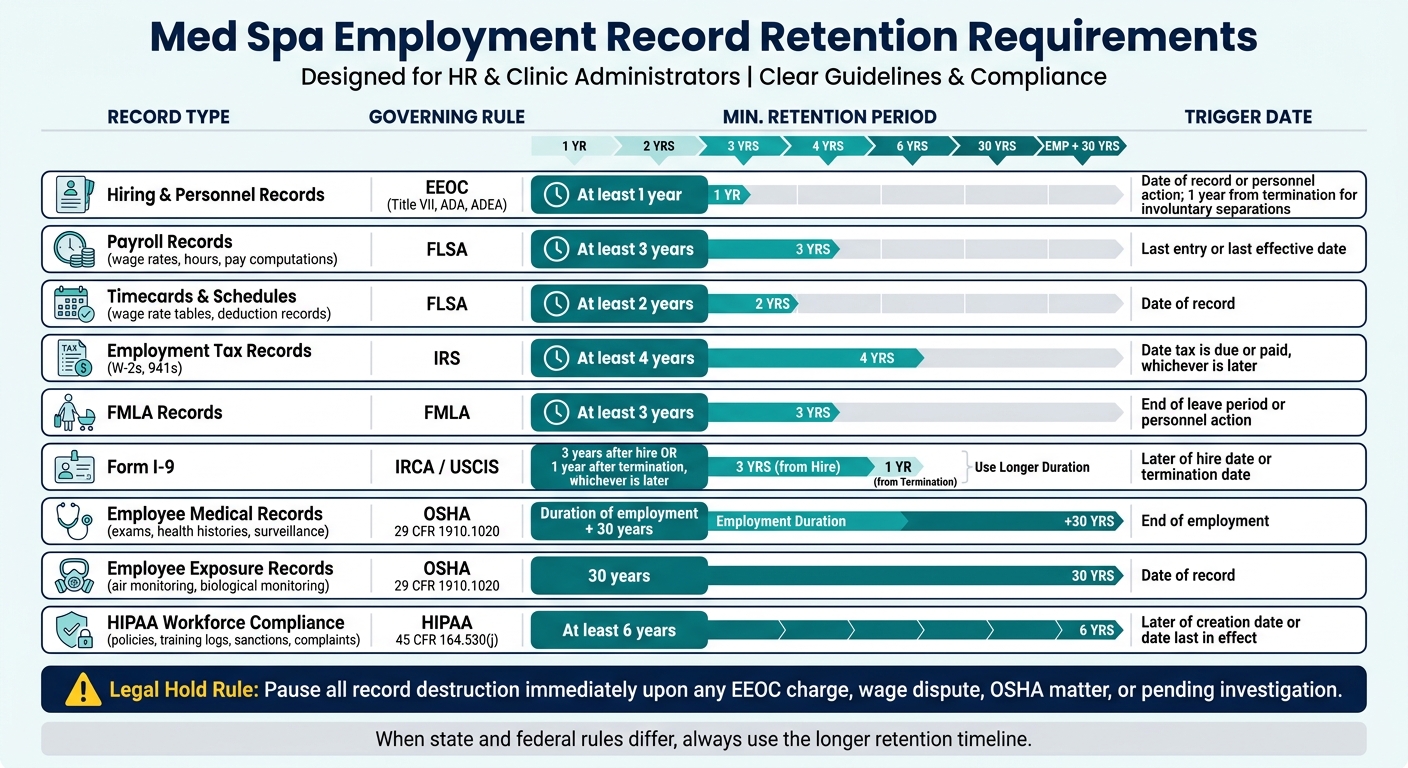
Med Spa Employment Record Retention Requirements by Record Type
Use one written retention schedule and one file structure across your med spa practice. For each record, follow the longest federal or state timeline that applies.
Start with the retention schedule. Then tie each record type to its trigger date so your team knows when the clock starts.
Retention periods by record type and trigger date
| Document Type | Governing Rule | Minimum Retention | Trigger Date |
|---|---|---|---|
| Hiring and personnel records | EEOC (Title VII, ADA, ADEA) | At least 1 year | Date of record or personnel action; 1 year from termination for involuntary separations |
| Payroll records (wage rates, hours, pay computations) | FLSA | At least 3 years | Last entry or last effective date |
| Timecards, schedules, wage rate tables, deduction records | FLSA | At least 2 years | Date of record |
| Employment tax records (W-2s, 941s) | IRS | At least 4 years | Date the tax is due or paid, whichever is later |
| FMLA records | FMLA | At least 3 years | End of leave period or personnel action |
| Form I-9 | IRCA / USCIS | 3 years after hire or 1 year after termination, whichever is later | Later of hire date or termination date |
| Employee medical records (exams, health histories, surveillance) | OSHA 29 CFR 1910.1020 | Duration of employment plus 30 years | End of employment |
| Employee exposure records (air monitoring, biological monitoring) | OSHA 29 CFR 1910.1020 | 30 years | Date of record |
| HIPAA workforce compliance (policies, training logs, sanctions, complaints) | HIPAA 45 CFR 164.530(j) | At least 6 years | Later of creation date or date last in effect |
State rules can stretch these periods. When state and federal rules differ, use the longer timeline.
How to separate personnel, payroll, medical, and compliance files
A retention plan falls apart fast if records end up in the wrong place. The fix is simple: split files by record type and limit access by role.
Six categories usually keep things clean and audit-ready:
- General personnel file: Offer letters, job descriptions, performance reviews, disciplinary notices, promotion records, and termination documents. Access should stay with HR, the practice administrator, and the employee's direct supervisor.
- Payroll file: Timecards, schedules, wage rate changes, bonus records, garnishments, and all FLSA-required wage data. Limit access to payroll, finance, HR, and supervisors who approve pay-related items.
- Form I-9 file: Keep one file for active employees and a separate file for terminated employees. Access should stay with HR or named compliance staff.
- Confidential medical / ADA file: Accommodation requests, ADA documentation, fitness-for-duty notes, FMLA certifications, and workers' compensation medical correspondence. These records stay confidential. Managers should receive only work restrictions and approved accommodations.
- OSHA medical / exposure file: Medical surveillance exams, respirator clearance records, and hazardous exposure monitoring results. Limit access to safety officers, occupational health providers, and HR/compliance staff.
- HIPAA workforce compliance file: Policies, training logs, discipline logs, and complaints. Access should stay with the privacy officer, security officer, and senior leadership.
Storage, destruction, and legal hold rules
Storage rules matter, but so does day-to-day execution. Paper records should stay in locked cabinets with restricted key access. Electronic records need encrypted storage, role-based permissions, and a file naming rule your staff can follow without guessing.
A simple naming format works well: date + record type + employee ID.
Destruction needs the same level of care. Use secure destruction methods for both paper and electronic records, and tie each deletion to the correct trigger date. That helps prevent two common problems: deleting a file too early or hanging onto it far past its required period.
A legal hold stops the normal deletion schedule right away. If there is an EEOC charge, wage dispute, OSHA matter, or another pending investigation, destruction must pause immediately. The hold stays in place until the matter reaches final disposition.
Once this structure is set, connect it to onboarding, scheduling, payroll, and credentialing. That way, records move into the right file as part of normal work instead of getting sorted later.
How to connect HR workflows with practice management operations
Once retention rules are in place, the next move is to bake them into day-to-day clinic work.
Recordkeeping usually falls apart when HR tries to clean it up later. A better approach is simple: make record creation part of the workflow from the start.
Map recordkeeping to onboarding, scheduling, payroll, and credentialing
Hiring should pull applications, interview notes, and selection criteria into one candidate record. Onboarding should collect Form I-9, W-4, direct deposit details, and policy acknowledgments on time, with timestamped storage and the correct retention rule tied to each file.
Scheduling and timekeeping tools should log hours, overtime, breaks, and pay rates automatically. Payroll should then pull from approved time records to create pay stubs, registers, withholdings, and deductions.
Licenses, certifications, and malpractice documents should live in the same system with issue dates and expiration dates attached. Set renewal alerts before those dates hit so nothing slips through the cracks.
Once those records exist, access controls help keep each file where it belongs.
Use role-based access, audit trails, and task tracking
Limit access based on role, and keep confidential files separate from general personnel records. Audit logs should also be protected from editing or deletion.
Every meaningful action should be logged: who created, viewed, edited, or deleted a record; what changed; and when. Add automated task tracking on top of that. Assign training completions, license renewals, and onboarding steps as scheduled tasks with documented outcomes. That gives your team a running compliance record instead of a last-minute scramble before an audit.
Where Prospyr fits
Using one system can cut down on manual handoffs and missed deadlines.
Prospyr can support this workflow with digital intake forms, e-signatures, task tracking, reminders, and role-based access. That helps keep employment records organized, easy to retrieve, and separate from patient files.
Audit preparation: what med spas should do now
Once your retention rules and file structure are set, the next question is simple: how fast can you pull records when an agency asks for them?
That’s where many clinics get stuck. Under audit pressure, speed matters. DOL payroll records must be produced within 72 hours of a request. If records live in email chains, shared drives, and paper folders, that deadline can slip fast.
Records to check before an EEOC, DOL, OSHA, or Form I-9 review
When a federal agency asks for records, the countdown starts right away. Before any review, make sure you can pull records across these four areas without digging around. Use the retention schedule above to confirm that each agency-specific record set is easy to find. Keep files searchable by category and date.
| Review Type | Key Records to Have Ready | Minimum Retention |
|---|---|---|
| EEOC | Personnel, applicant, and termination files, plus legal-hold records | At least 1 year; if a charge is filed, keep related records until the charge or lawsuit is fully resolved |
| DOL / FLSA | Payroll registers, wage rates, overtime, and time cards | Payroll records: 3 years; time cards and similar records: 2 years |
| OSHA | Forms 300, 300A, 301, privacy case list, and annual certification records | 5 years from the end of the calendar year covered |
| Form I-9 | Completed Form I-9 for every current employee and recently terminated staff | Later of 3 years from hire or 1 year after termination |
Each record set runs on its own timeline. If you treat them all the same, you can end up deleting a file you still need by law.
A simple internal audit process for clinic administrators
A simple internal audit can help you spot trouble before an agency does. Keep it to four steps, and write down what you find.
- Confirm records exist. For every current employee and every former employee still inside the retention window, check that each required file set is there and complete: personnel, payroll, I-9, and credentialing files.
- Verify retention periods. Match each file type to its legal minimum. Flag anything kept past its destruction date and anything that may have been deleted too soon.
- Check file separation and access. Confirm I-9, medical, and OSHA files are stored apart from general personnel files and limited to approved roles.
- Document gaps and legal holds. Log missing or misplaced records as action items. Stop destruction for any file tied to an open complaint, wage dispute, or investigation.
For Form I-9s, review active employee forms and terminated employee forms separately. Document any corrections, and destroy forms that are past their retention date.
Run this audit every quarter, ideally right after payroll close. Higher-risk areas like I-9s, payroll records, and access permissions often need more frequent spot checks.
Key takeaways for compliant, audit-ready employment recordkeeping
Audit readiness comes down to three things: fast retrieval, clear file separation, and on-time destruction.
Med spas deal with several overlapping federal rules - EEOC, FLSA, OSHA, and immigration law. Each one has its own retention timeline and trigger. One blanket policy won’t cover all of them. Sensitive records need to stay separate from general personnel files. Access should be limited and logged. And the moment a legal hold applies, destruction has to stop.
The clinics that move fastest during audits usually aren’t doing heroics at the last minute. They already built clean onboarding and offboarding checklists, assigned record ownership, and connected HR, payroll, credentialing, and practice operations through one working system.
FAQs
Which employee records should med spas keep separate?
Med spas should keep FMLA medical certifications and health histories separate from general personnel files. Those records must stay confidential and should be available only to authorized personnel.
The same goes for patient-related clinical records an employee may handle under HIPAA. Access should be limited. At the same time, required verification, background, and license records should stay in the employee file with role-based access.
How do I know when each retention period starts?
Retention periods usually begin on one of three dates: when the document is created, when the event happens, or when the employment relationship ends.
Here’s what that looks like in practice:
- OSHA sharps injury logs start their five-year retention period after the calendar year in which the incident took place.
- Employee medical and exposure records must be kept for the length of employment plus 30 years.
- Training logs are usually kept for three years after training is completed.
The key point is simple: the clock doesn’t always start on the same day. It depends on the type of record and the rule tied to it.
What should a med spa do first during an audit or legal hold?
Secure and preserve all relevant employment records right away in one centralized, searchable system. Keep access limited to authorized personnel only. That includes payroll and tax records, which should be kept for at least 4 years, along with verification, licensing, and credentialing records.
Then review those files for completeness. Make sure medical leave records are stored separately but can still be retrieved without hassle. It also helps to keep a clear record of communications and disputes, so if an audit comes up, the paper trail is easy to follow.