Out-of-Tolerance Handling: Guide for Clinics
Clinic playbook for OOT devices: quarantine, document, assess patient impact, coordinate vendor service, finish CAPA, verify before reuse.
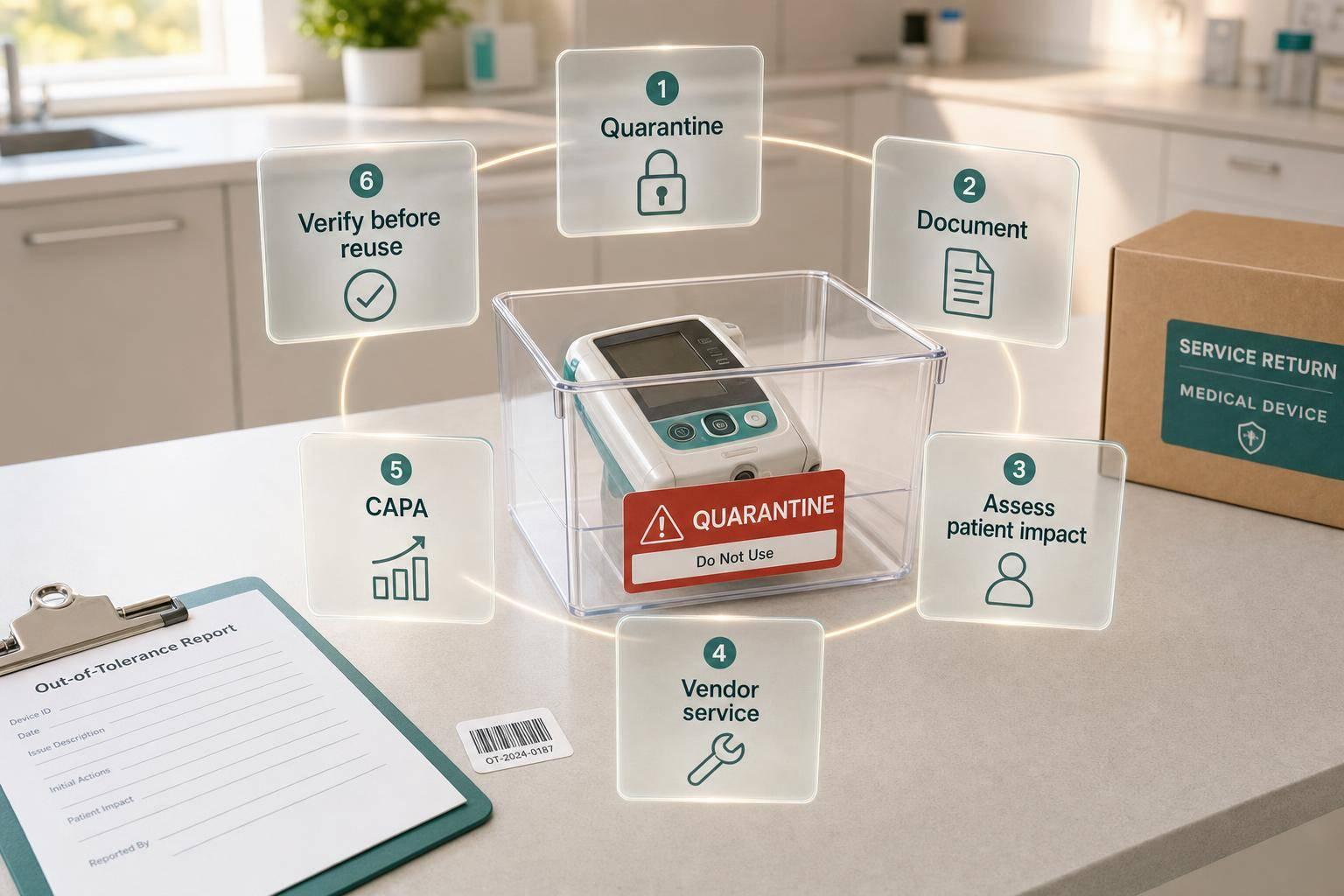

If a device is out of tolerance, I should stop using it at once, tag it, review who and what may have been affected, fix the cause, and put it back in service only after proof that it is back within limits.
This is the whole system in plain terms:
- Pull the device from use right away
- Label it clearly as Out of Tolerance – Do Not Use
- Find the last in-tolerance check and review all use since then
- Document every step in the log, EMR, and device record
- Involve the right people fast based on patient risk
- Get written service proof before reuse
- Close CAPA before return to service
A few examples show why this matters. A refrigerator outside 36–46 °F can put injectables at risk. A laser drifting past ±10% of its set output can change treatment results. And if the bad tool is a reference meter or calibration weight, every device checked with it may also be in doubt.
Here’s the short version of what I’d want any clinic to have in place:
- One device register with ID, serial number, location, due date, and status
- A written OOT policy with triggers, limits, owners, and timelines
- Clear status controls such as Active, Out of Service – OOT, and Ready for Return
- A lookback process for patient, treatment, storage, or sterilization impact
- Written vendor records, service reports, and post-service verification
- Final approval before the device goes back into patient care
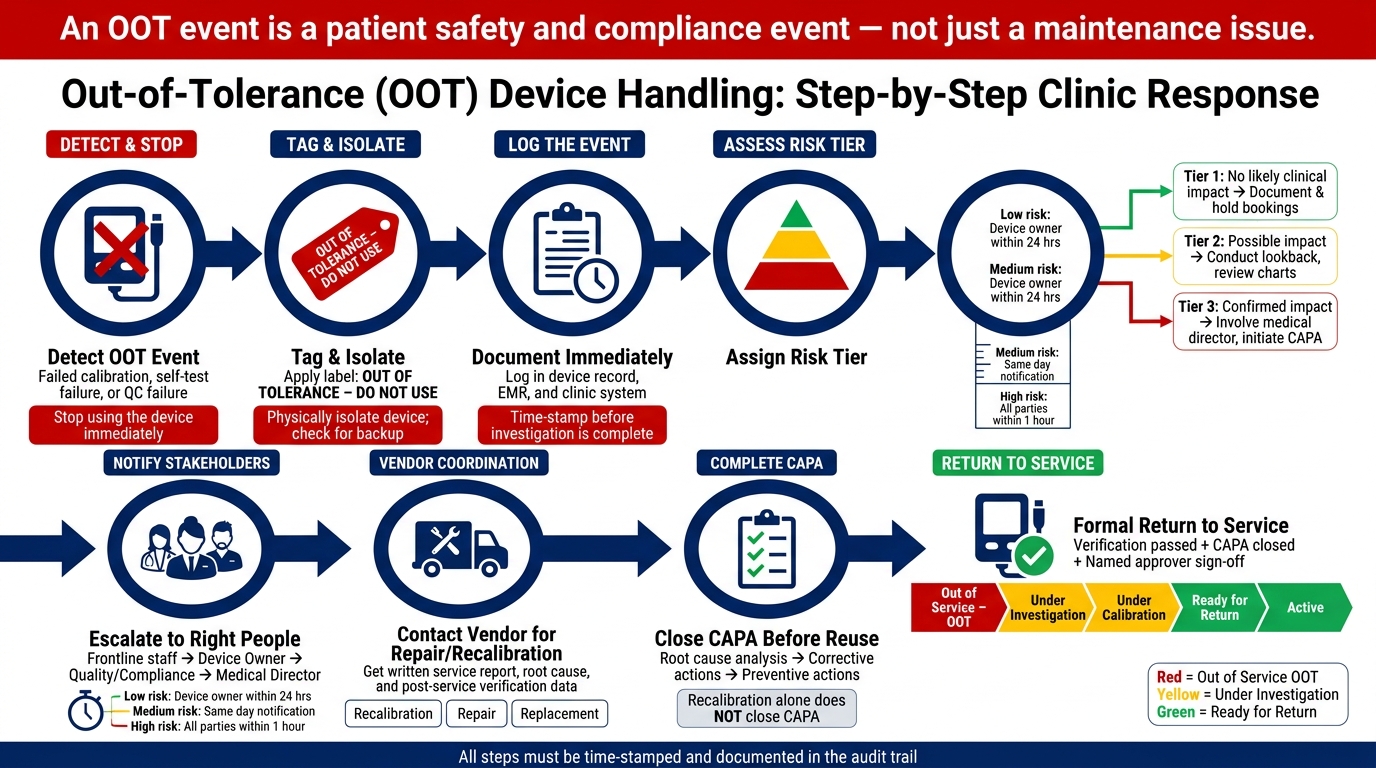
Out-of-Tolerance Device Handling: Step-by-Step Clinic Response
Quick Comparison
| Area | What the clinic needs to do |
|---|---|
| Immediate response | Stop use, tag, isolate, log |
| Risk review | Check the affected period since the last passing check |
| People involved | Frontline staff, device owner, quality/compliance, medical director, admin |
| Records | Time-stamped status changes, measured values, service notes, approvals |
| Vendor work | Repair/recalibration plus written proof the device meets spec |
| Return to service | Verification passed, CAPA closed, named approval recorded |
If I had to boil the article down to one point, it’s this: an OOT event is not just a maintenance issue - it is a patient safety and compliance event that needs a written, time-stamped process from start to finish.
How to Set Up a Written Out-of-Tolerance Policy
A written OOT policy turns your clinic’s response into a repeatable process. The introduction covered the four-step response. Here, that gets turned into clear triggers, thresholds, owners, and status rules staff can follow on the spot.
Define Triggers, Tolerances, and Immediate Containment Steps
Your policy should spell out the exact conditions that trigger an OOT event. That usually includes:
- A failed calibration or verification check against a traceable standard
- A device self-test failure
- A QC failure that continues after routine troubleshooting
Tolerances should come straight from the manufacturer IFU, with clinic-level decision rules added on top. For example, if a laser’s energy output must stay within ±10% of the set value, that threshold should be listed in the device register. Any reading outside that range is automatically OOT. The same approach applies to environmental controls. A medication refrigerator running outside 36–46 °F is also an OOT event.
When a trigger is hit, containment steps need to happen right away and without debate. Stop using the device. Apply a standard label that reads "OUT OF TOLERANCE – DO NOT USE," and physically isolate it if you can. Log the event in the clinic’s system immediately, before the investigation is finished, so you have a time-stamped record from the start. Staff should also check for a backup device and alert scheduling to hold any appointments that depend on the affected equipment.
Create Risk Tiers That Drive Next Actions
Not every OOT event carries the same level of risk. Your policy should reflect that. A simple three-tier setup keeps decisions steady without turning the process into a maze.
| Tier | Situation | Key Actions |
|---|---|---|
| Tier 1 – No likely clinical impact | Device failed before any patient use that day | Document, hold related bookings if no backup, coordinate service; no patient review needed |
| Tier 2 – Possible impact requiring review | Device used while OOT; extent of impact unclear | Conduct a documented lookback period based on risk and use history, review affected charts, assess whether measurements drove treatment decisions, and consider repeat visits |
| Tier 3 – Confirmed impact requiring leadership | Device error likely altered diagnosis or treatment | Involve the medical director immediately, block future bookings on that device, initiate CAPA, and assess patient notification |
These tiers only help if people know who does what. Your policy should define who counts as leadership and what each person must do at Tier 3. Pre-approved patient communication templates, reviewed by legal or risk management, should be ready before anyone needs them.
Those tiers also depend on clear ownership. If no one has the authority to block a device, review charts, or pause bookings, the policy will stall when speed matters most.
Connect OOT Handling to the Device Lifecycle
An OOT policy that only covers the moment a problem is found is incomplete. It should track the device from purchase through retirement.
Before first use, tie each new device to an owner, a calibration schedule, and its tolerance limits. If maintenance is missed, the device should stay blocked until it returns to in-tolerance status. Storage and handling conditions matter too. If a device or product goes outside listed temperature or humidity limits, that should count as an OOT trigger.
The policy should also explain what repeated OOT findings mean over time. If a laser hits OOT status after nearly every high-volume month, that’s a clear signal. You may need more frequent preventive maintenance, or it may be time to retire the device. Retirement should require documented leadership approval and should be recorded in the device’s history. Repeated OOT findings should feed back into maintenance planning or retirement decisions.
Once the policy is on paper, the next step is making it usable in day-to-day work: assign roles, set escalation timing, and control device status so staff can act the same way every time.
Reading about the problem? See how Prospyr solves it in one platform.
Book a DemoStaff Roles, Escalation Paths, and Device Status Controls
Roles and Approval Responsibilities by Job Function
OOT handling only works when every step has a clear owner. Once the policy is in place, assign named owners for detection, containment, review, and approval.
Frontline clinicians and technicians are usually the first to spot an OOT event. Their job is simple and immediate: stop using the device, tag it, log the event, and notify the device owner and operations lead. If patient care was involved, any patient impact should go into the EMR. They should not try to recalibrate or repair the device on their own. A one-page checklist in each treatment room or procedure area helps keep this steady across shifts and experience levels.
The device owner is responsible for the device through its full lifecycle: inventory record, calibration schedule, vendor contacts, and service history. During an OOT event, that person verifies the issue, confirms OOT status, updates the device record, and works with the vendor on repair, recalibration, or functional checks. They also suggest a risk tier to quality or compliance and make sure manufacturer instructions and warranty terms are followed.
Quality/compliance leads handle the formal OOT investigation and CAPA process. They assign the risk tier, lead or document root cause analysis, define the affected period and any patients who may have been impacted, and record corrective and preventive actions in a CAPA log. Every detail matters here: who found the issue, when it happened, what was done, and why. That record needs to hold up under regulatory or legal review.
The medical director should step in whenever there is a credible patient safety concern. That includes high-risk devices, events where miscalibration may have changed treatment settings, or repeat OOT findings on the same device. The medical director reviews the risk assessment, decides whether patient follow-up is needed, and gives final approval before the device returns to service. For lower-risk cases, a summary review is enough.
Operations and administrative leaders deal with the ripple effects. They adjust schedules, alert front-desk teams and schedulers that a device is unavailable, move staff to services that do not depend on that device, and make sure OOT procedures are part of onboarding and annual training. In high-volume clinics, it also helps to track OOT downtime. That data can support vendor service-level talks and backup equipment decisions.
Escalation Timelines for Low-, Medium-, and High-Risk Events
Response time should match the risk tier already set in the policy. Use the same low-, medium-, and high-risk logic defined there.
| Risk Level | Trigger Example | Escalation Timeline |
|---|---|---|
| Low | Minor deviation on non-critical office equipment | Device owner notified within 24 hours; OOT log updated within 24–48 hours; quality review within 3–5 business days |
| Medium | Calibration drift on non-life-critical treatment device | Device owner and operations lead notified same day; device removed from use immediately; quality review within 24 hours; vendor contacted within 24–48 hours; medical director review as needed within 72 hours |
| High | Treatment-critical device with possible patient impact | Device owner, operations lead, quality/compliance, and medical director notified within 1 hour; device removed from service and tagged at once; preliminary risk assessment completed same day; vendor/manufacturer contacted same day; external reporting evaluated within 24 hours |
Contact the manufacturer when a device fails a self-test or calibration check under the user manual, or when repeat OOT events point to a component or design problem. Contact your calibration provider when results do not line up or when site conditions may have affected the calibration process. FDA Medical Device Reporting obligations under 21 CFR 803 may apply when an OOT-related device failure has caused or could cause serious injury. Quality should assess MDR reporting within 24 hours for high-risk events.
Send vendor and manufacturer messages by email or portal so the record is time-stamped.
Use Clear Device Statuses to Prevent Accidental Use
| Status | What It Means | Staff May Do | Approval Required To Change |
|---|---|---|---|
| Active | Device is fully functional and within calibration | Use for patient treatments | None beyond normal clinical authorization |
| Due for Calibration | Device is approaching its calibration due date, usually within 30 days | Continue use until due date | Device owner schedules calibration |
| Under Calibration | Device is currently being calibrated or under vendor service | Vendor or designated staff only; no clinical use. | Device owner |
| Out of Service – OOT | Device is confirmed or suspected out-of-tolerance or unsafe | No use under any circumstances | Frontline staff can initiate; device owner confirms |
| Under Investigation | Device is removed from service while quality/compliance conducts root cause analysis and risk assessment | Investigation activities only | Quality/compliance sign-off |
| Ready for Return | Device has passed repair or recalibration and internal checks; awaiting final approval. | Limited test use per protocol only | Medical director and/or quality |
| Decommissioned | Device is permanently removed from service | No clinical use | Administrative and medical director approval |
Clear device statuses help stop accidental use. Digital status fields are part of that, but physical controls matter too.
Use standardized color tags:
- Red for Out of Service – OOT
- Yellow for Under Investigation
- Green for Ready for Return
Place OOT devices in a designated storage area away from treatment rooms. For high-risk devices such as lasers, a lock-out cover over the control panel adds one more barrier. Barcode or RFID labels tied to the asset management system let staff scan the device and confirm status before use, which cuts out guesswork about whether it is cleared.
Every status change should be time-stamped before the device moves back toward service. Log each change in the audit trail before the device returns to use.
Documentation, Audit Logs, Vendor Coordination, and Software Workflows
Capture the Right Records and Maintain a Defensible Audit Trail
Once the device is quarantined, the record becomes the main control point for everything that follows. If the documentation is weak, the whole event gets fuzzy later. If it’s solid, anyone reviewing the case can see what happened from start to finish.
Each OOT record should show the full sequence: detection, containment, impact review, correction, and return to service. That means recording the device ID, detection time, finder, measured value, tolerance range, affected patient or case, containment steps, status changes, reviewers, escalation, vendor details, service findings, verification results, final disposition, and closure date. Time-stamp and approve each step so the event can be rebuilt end to end.
The table below shows the minimum evidence by risk level:
| Documentation Element | Minor OOT Event | Major OOT Event |
|---|---|---|
| Device ID and detection details | Required | Required |
| Measured value vs. tolerance | Required | Required |
| Containment and status change log | Required | Required |
| Repair or recalibration record | Required | Required |
| Return-to-service approval | Required | Required |
| Affected patient appointments | If applicable | Required |
| Root-cause analysis | Not required | Required |
| Escalation to leadership | Not required | Required |
| Vendor service report | If vendor involved | Required |
| CAPA record | Not required | Required |
| Patient follow-up decision | Not required | Required when patient exposure is possible |
When an OOT event is found, take the device out of use right away. That status should appear on both the physical label and the electronic log. Move it to Out of Service – OOT, then move it through Under Investigation, Under Calibration, Ready for Return, and Active only after approval. Every status change should be time-stamped and approved by the right person, such as the staff member who found the issue, the department manager, the biomedical lead, or the medical director. That gives you a clean chain of custody and cuts down the risk of accidental reuse.
Audit logs for systems containing ePHI should be tamper-evident. They must also be retained for at least six years under HIPAA Security Rule requirements. Those logs should show who accessed records, what actions were taken, when they happened, and how the system was used.
That same record should then drive the vendor request, verification, and closure steps.
Coordinate with Vendors for Repair, Recalibration, and Verification
The vendor work order should match the clinic’s acceptance criteria and tie back to the audit trail. When you contact a vendor after an OOT event, spell out exactly what you need. A strong service request should ask for the measured error, root cause, corrective actions, parts replaced, post-service verification data, and written confirmation that the device meets specification.
Before the device goes back into service, get written confirmation that it passed post-service verification, along with the service documentation and any quality check results that apply. Return the device only after that written verification shows it meets clinic acceptance criteria. The vendor service report should be added to the device history before return to service. If the event affected patient care or a meaningful number of procedures, the right clinical leader should review the affected period and clear the device for reuse.
Service agreements should set these expectations ahead of time. They should spell out:
- Response times for urgent versus routine events
- Turnaround times for repair or recalibration
- Escalation contacts if the first response is delayed
- Whether a loaner device is available
- What documentation must be sent after service
- Whether the vendor must provide a certificate of calibration or similar verification
- Who pays for diagnostics, shipping, parts, and verification testing
When choosing between recalibration, repair, and replacement, match the option to patient risk, downtime, and the strength of the post-service proof:
| Path | Best Used When | Typical Timeline | Relative Cost | Verification Required |
|---|---|---|---|---|
| Recalibration | Device is mechanically sound but drifting out of spec | Relatively quickly | Lower | Documented verification after adjustment |
| Repair | A component or software issue is causing the deviation | Days to weeks, depending on parts availability | Moderate | Post-repair performance verification |
| Replacement | Device is obsolete, repeatedly failing, or unsafe to repair | Fastest if a unit is available | Highest upfront cost | Verification before use |
Keep all vendor and manufacturer communication in writing so each message is time-stamped and easy to retrieve.
Use Prospyr to Support Task Tracking, Documentation, and Visibility
If the clinic handles OOT events in software, the same record should stay visible until the case is closed. Prospyr can log the event, assign an owner, set due dates, track status changes, and store attachments in one workflow. If a deadline slips, the task remains open and visible until someone resolves it.
Prospyr’s CRM/EMR integration can link incident documentation to the affected patient or workflow context, and its task management tools keep notes and attachments in one place. Prospyr can store OOT records tied to patient data securely. Practice analytics can also help spot repeat failures or recurring device issues, which gives the clinic a stronger basis for vendor follow-up or replacement decisions.
Assess Impact, Complete CAPA, and Return the Device to Service
Once the device is quarantined and vendor work has started, the last part is straightforward: review the impact, finish CAPA, and return the device to use only after formal sign-off.
Review the Affected Period and Possible Patient Impact
Define the affected period as the time from the last verified in-tolerance check to the OOT detection timestamp. Then review appointment logs, procedure records, device logs, and EMR/CRM data to identify each affected case.
Next, determine whether the deviation could have changed a clinical decision or outcome. That review should be based on the size of the error, the clinical importance of the device, corroborating data, and patient-specific factors.
If the deviation was minor, remained within acceptable clinical limits, and did not influence treatment decisions, document that reasoning and close the case with designated approval. If there is a credible risk that the device affected dosing, energy delivery, or a safety threshold, perform a chart review and consider patient outreach using standardized templates approved by clinical leadership and, when needed, legal or risk management.
Close Corrective and Preventive Actions Before Reuse
Recalibration by itself does not close CAPA.
Start with root cause analysis to determine why the drift happened. From there, assign corrective actions for the current failure and preventive actions aimed at stopping it from happening again.
Corrective actions deal with the immediate issue, such as:
- Repair
- Adjustment
- Recalibration
- Replacement
Those steps should be followed by as-left verification and backed by a calibration certificate or service report showing that the device is back within tolerance.
Preventive actions focus on recurrence. That can include staff retraining, revised SOPs, tighter calibration schedules, or better storage conditions.
Track repeat OOTs, calibration trends, and audit results for 30 to 90 days before closing CAPA. Keep the device out of service until verification is complete, all safety-related CAPA actions are closed, and a named approver signs off.
The records need to match the status on the floor. Update the asset record, calibration label, and status fields with the new calibration date and next due date. Prospyr can support this process by requiring completed fields and approvals before a device status moves from quarantined to active. That helps stop front-line staff from scheduling treatments on a device that has not been formally cleared.
Conclusion: The Minimum System Every Clinic Should Have
At that point, the device can return to service without reopening the investigation.
Every US clinic needs a written OOT policy, clear ownership, status controls, complete records, vendor coordination, and software-supported workflows. A checklist and Prospyr can log events, link device records, assign tasks, and capture electronic sign-offs.
That kind of disciplined system helps protect patients, makes staff responsibilities clear, supports compliance, and cuts disruption when a device has to be taken out of service.
FAQs
What counts as out of tolerance?
In clinical operations, an out-of-tolerance event is any deviation from set safety, performance, or regulatory standards.
That includes equipment that fails calibration or maintenance checks, protocol deviations from documented procedures or scope-of-practice rules, and near-misses or process issues that fall outside normal limits - even when no patient harm occurs.
How far back should we review affected cases?
Review cases all the way back to the initial point of failure so you can identify every patient who may have been affected.
Keep in mind, record-retention rules require documents to be kept for at least six years. But the incident review period shouldn't default to six years. It should track back to when the issue or protocol deviation likely started.
If that start date isn't clear, use a look-back period beginning with the date of the last successful audit or quality assurance check. That gives you a safer way to define the full scope of the impact.
Who can approve return to service?
The medical director has the final say on clinical matters and is responsible for signing off on corrective action plans.
Since return to service usually happens after those corrective actions are completed and verified, the medical director is also the main person authorized to approve that return.
A designated review team or compliance lead may help review the fixes and confirm that the issues were addressed. But the final sign-off still stays with the medical director.