TPS vs EAD Auto-Extension: Clinic Guide
Mixing TPS and EAD dates causes I-9 errors—track TPS end date, EAD auto-extension end date, and the legal source separately.

If you use the wrong date on Form I-9, you can make the wrong hire or reverification call. I’d treat TPS status dates and EAD auto-extension dates as two separate items: one belongs to Section 1, and the other drives Section 2 and follow-up timing.
Here’s the short version:
- TPS status date = the employee’s TPS end date for Section 1
- EAD auto-extension date = the date that tells me whether an expired EAD still works for Section 2
- The card’s printed expiration date is not always the last valid date
- HR should check the Federal Register notice or Form I-797C receipt, then save that source in the file
- Supplement B should be done by the extension end date, not by the date printed on the card alone
- Section 2 must still be completed within 3 business days of the employee’s first day of work
This matters because some EAD renewals can get an auto-extension of up to 540 days, and TPS country notices can set a different timeline. So if I rely on the card by itself, I may track the wrong deadline.
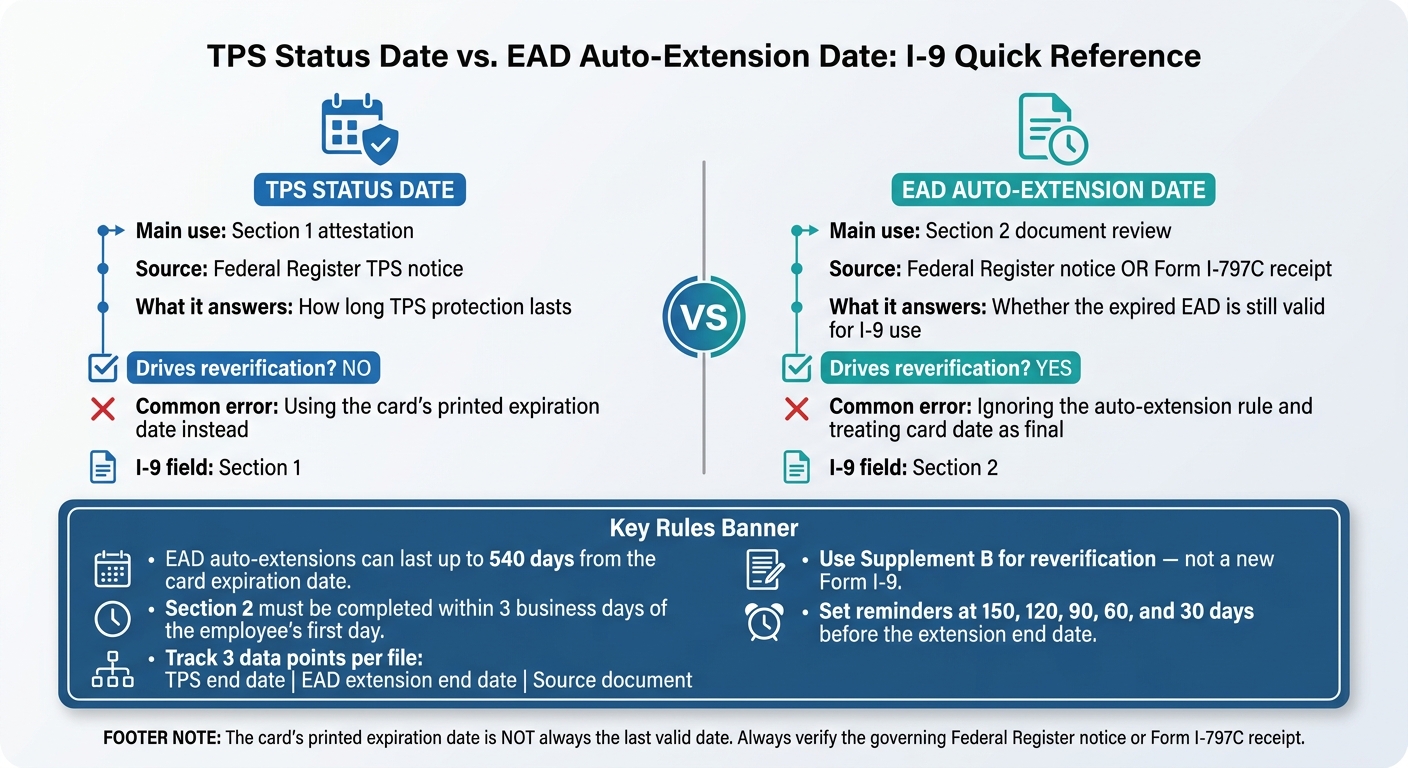
TPS Status Date vs. EAD Auto-Extension Date: I-9 Quick Reference
Quick Comparison
| What to check | TPS status date | EAD auto-extension date |
|---|---|---|
| Main use | Section 1 attestation | Section 2 document review |
| Source | Federal Register TPS notice | Federal Register notice or Form I-797C receipt |
| What it answers | How long TPS lasts | Whether the EAD is still valid for I-9 use |
| Reverification trigger | No | Yes |
| Common error | Using card date instead | Ignoring the extension rule |
My takeaway: keep three separate data points in every file - TPS end date, EAD extension end date, and the source for each one. That keeps hiring, reverification, and audit prep much cleaner.
TPS status date vs. EAD auto-extension date: side-by-side comparison
Use this chart to keep the TPS status date separate from the EAD auto-extension date. That one distinction can prevent a lot of I-9 mistakes.
| Aspect | TPS Status Date | EAD Auto-Extension Date | Impact on Clinic HR / I-9 |
|---|---|---|---|
| Legal basis | DHS country designation and USCIS implementation notices published in the Federal Register | USCIS regulations and notices, or a timely filed Form I-765 renewal with an I-797C receipt | Check the right source - not just the card - before making an I-9 decision |
| Date source | Federal Register TPS notice | FRN extension date or receipt-based extension date | Do not rely on the card date alone |
| What it controls | TPS protection and work authorization eligibility | Whether the physical EAD is acceptable for Form I-9 verification during the extension period | TPS status may continue even when the card looks expired; HR still needs valid I-9 documentation |
| Duration | Varies by TPS notice; receipt-based extensions can run up to 540 days from the card expiration date | Varies by TPS notice; receipt-based extensions can run up to 540 days from the card expiration date | Extension lengths differ by case type - one rule does not fit all TPS employees |
| Drives reverification? | No - TPS status alone does not set the I-9 reverification deadline | Yes - the EAD auto-extension end date is the operational deadline for reverification planning | Set reminders based on the EAD auto-extension date, not the TPS designation date |
Once those dates are split out, HR can apply the right rule at each I-9 step.
What a TPS status date controls
A TPS status date shows how long a person is protected under a country designation issued by DHS. For Section 1, enter the TPS designation end date, not the card expiration date.
What an EAD auto-extension date controls
The EAD auto-extension date decides whether an expired card is still valid for Form I-9. There are two paths.
- A Federal Register notice can blanket-extend certain TPS EADs. The FRN gives the exact auto-extension end date, and that date goes in Section 2.
- A receipt-based extension applies when a Form I-765 renewal was filed on time and the employee has an I-797C receipt. In that case, the card can be extended for up to 540 days from the Card Expires date.
For Section 2, use the FRN auto-extension date or the calculated receipt-based date - not the TPS designation date.
That is why HR needs to confirm the extension basis before entering or updating I-9 dates.
Date mix-ups that cause I-9 problems
The most common mistake is plain and easy to spot: HR sees the printed expiration date on the EAD card and treats it as final. It is not. A card that looks expired may still be valid under an FRN or a receipt-based extension.
Another common slip is assuming every TPS employee is on the same timeline. They are not. TPS EADs can qualify for automatic extension when the renewal is filed on time under the applicable Federal Register notice.
The cleanest way to handle this is to track three things on their own:
- the TPS status date
- the EAD auto-extension date
- the document basis for accepting the card
That way, the file shows why the document was accepted, not just when it appeared to expire. Track TPS status dates and EAD auto-extension dates in separate fields.
Reading about the problem? See how Prospyr solves it in one platform.
Book a DemoHow clinic HR should handle hiring and reverification
Section 1 and Section 2 date entry rules
Once the TPS date and extension date are split apart, enter each one in the right I-9 section. In Section 1, the employee makes the self-attestation. In Section 2, HR records the document details and the expiration date that applies under the rule.
If an employee presents an EAD that looks expired but qualifies for a DHS auto-extension notice, record the document date and the notice-based extension end date. Section 2 must be completed within three business days of the employee's first day of work. That one detail matters more than it may seem. If HR uses the wrong date at the start, the same mistake can carry into reverification later.
Do not ask for extra documents just because a worker has TPS or temporary work authorization. Verify only what the document and the governing rule call for - nothing more.
Supplement B reverification timing
Use Supplement B for reverification - not a new Form I-9. For timing, use the earliest date that applies: either the extension end date or the work authorization end date on the employee's record.
The work authorization end date in Section 1, if there is one, and the document expiration date in Section 2 do not have to match. So HR needs to check both. If an EAD auto-extension runs through a stated date in the extension notice, that date controls when Supplement B is due, not the expiration printed on the card. For TPS-based EADs, use the TPS-related automatic extension date in Section 2 and reverify at the end of that extension period. That same date sets the Supplement B deadline. At reverification, accept any valid document the employee chooses.
A simple tracking process for small and mid-size clinics
For small and mid-size clinics, one central list can go a long way in stopping TPS and EAD date mix-ups. Keep a single record of each employee whose work authorization needs follow-up. Include:
- document type
- original expiration date
- extension basis, such as "EAD auto-extension notice" or "TPS-related employment authorization guidance"
- extension end date
- next action date
- source for each date
Set reminders for 150, 120, 90, 60, and 30 days before the extension end date. That gives HR time to ask for updated documents, complete Supplement B before the deadline, and avoid a last-minute scramble. Keep the supporting notice or receipt with the list for audit review.
Audit-ready documentation for TPS and auto-extended EADs
Once HR has the right date, the next step is simple: the file needs to show where that date came from.
Which documents belong in the file
A solid file makes it easy to see why HR accepted the document. If an employee is using TPS or an auto-extended EAD, keep the file small and focused.
At a minimum, include:
- A copy of the EAD card showing the employee's name, A-number, category code, and Card Expires date. For TPS-related EADs, that category code is usually A12 or C19.
- A copy of the Federal Register notice (FRN) that supports the extension, or at least the pages that list the covered category codes and the new automatic expiration date.
- If HR is relying on the receipt-based auto-extension rule instead, a copy of the Form I-797C that shows the EAD category and filing date.
- A PDF or printout from the USCIS TPS country guidance page.
Add a dated note that lists the original card expiration date, the rule HR used for the extension, and the new valid-through date.
That way, the file shows both pieces that matter: the rule and the exact date HR relied on.
How to note the rule used for the extension
The Form I-9 Section 2 Additional Information field is the right place to record the rule HR used. Keep the wording plain and consistent. The note should point to a clear source.
For a TPS FRN-based extension, use wording like this: EAD EXT – TPS FRN El Salvador, 89 FR 12345; auto-extended A12 card exp. 03/09/2025 to 03/09/2026.
For a receipt-based auto-extension, write something like: 540-day auto-extension under USCIS EAD rule; EAD category (c)(9) – renewal filed timely, I-797C dated 06/01/2025; new valid-until date: 11/23/2026.
Each note should include the source, the category, and the dates.
That may sound a little picky, but audits often turn on small details. If one file says one thing and another file says it a different way, that can draw extra attention even when HR made the right call.
Using Prospyr to organize reminders and compliance tasks
Keep the reminder in the same employee record used for the I-9 file.
In Prospyr, create a task for each affected employee and tie the extension end date to that reminder. This keeps the audit trail and the follow-up date in one place.
Conclusion: The date HR must check before acting
After comparing the two dates, HR needs to check the source that controls the issue before taking action. Before hiring, reverifying, or running an audit, the rule is simple: the governing rule controls the date. TPS dates come from the Federal Register. EAD auto-extension dates come from the USCIS rule that applies to that document.
Once HR confirms the source, it should record that source in the file. A date on its own is weak in an audit. Keep the rule with the date.
Use one standard across every employee file. If one file uses one method and another file uses something else, audit consistency starts to fall apart. Check the source, record the basis, and track the law-controlled date.
FAQs
Which date goes in Section 1 vs. Section 2?
On Form I-9, the employee fills out Section 1 no later than their first day of work.
The employer then completes Section 2 within three business days of the start date by reviewing the employee’s original documents to confirm identity and work authorization.
How do I verify an auto-extended EAD?
Check the employee’s original EAD and Form I-797C, Notice of Action, to confirm they filed a timely renewal application under a qualifying category.
Make sure the category code on the EAD matches an eligible category and that the documents show the extension is still active. Store these records in a centralized, secure system so they’re easy to pull for an audit.
When should Supplement B be completed?
Supplement B of Form I-9, the Reverification and Rehire section, comes into play in two cases: when an employee’s work authorization has expired, or when that employee is rehired within three years of the original Form I-9 completion date.
For reverification, the employer must complete Supplement B no later than the date the employee’s current work authorization expires.